English−15
Installing a safety wire
WARNING: Please refer to “WARNING 9”.
CAUTION: Please refer to “CAUTION 7”.
NOTE: When installing, do not apply pressure to the LCD panel or excessive force to any part of the monitor by pushing or
leaning on it. This may cause the monitor to become distorted or damaged.
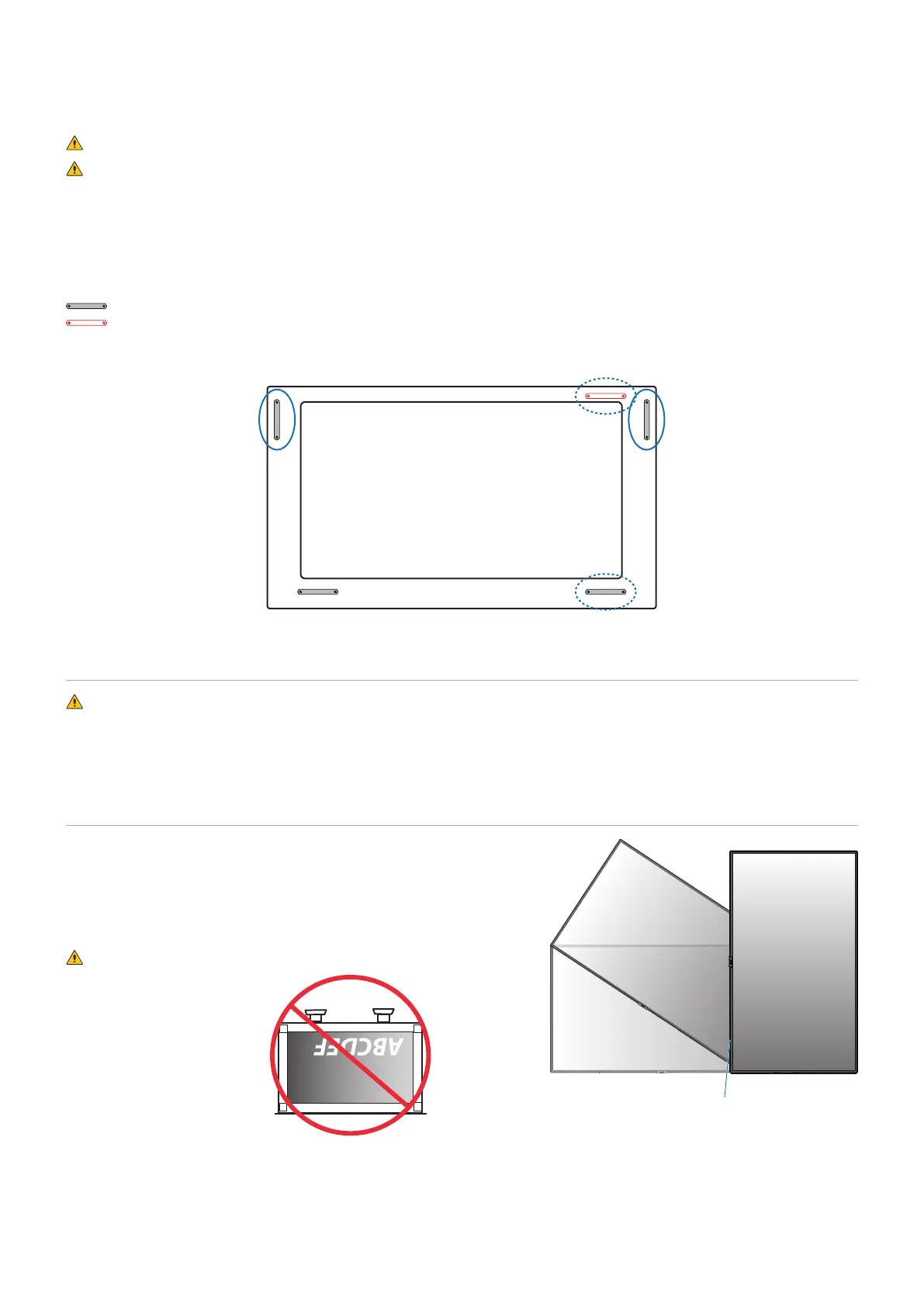
Handles for safety wire
(Fasten Force: 139 - 189 N•cm).
: Factory set position.
: Alternate position.
Solid line: Handle placement for safety wire in landscape position.
Dotted line: Handle placement for safety wire in portrait position.
Mounting Location
WARNING: Please refer to “WARNING 8”.
NOTE: Allow for adequate ventilation or provide air conditioning around the monitor, so that heat can properly dissipate away
from the monitor and from the mounting equipment.
Orientation
• When using the monitor in the portrait position, it should be rotated
clockwise so that the left side is moved to the top, right side is moved
to the bottom. This will allow for proper ventilation and will extend the
lifetime of the monitor. Improper ventilation may shorten the lifetime
of the monitor.
WARNING: Please refer to “WARNING 8”.
LED Indicator








 To Next Page