English−37
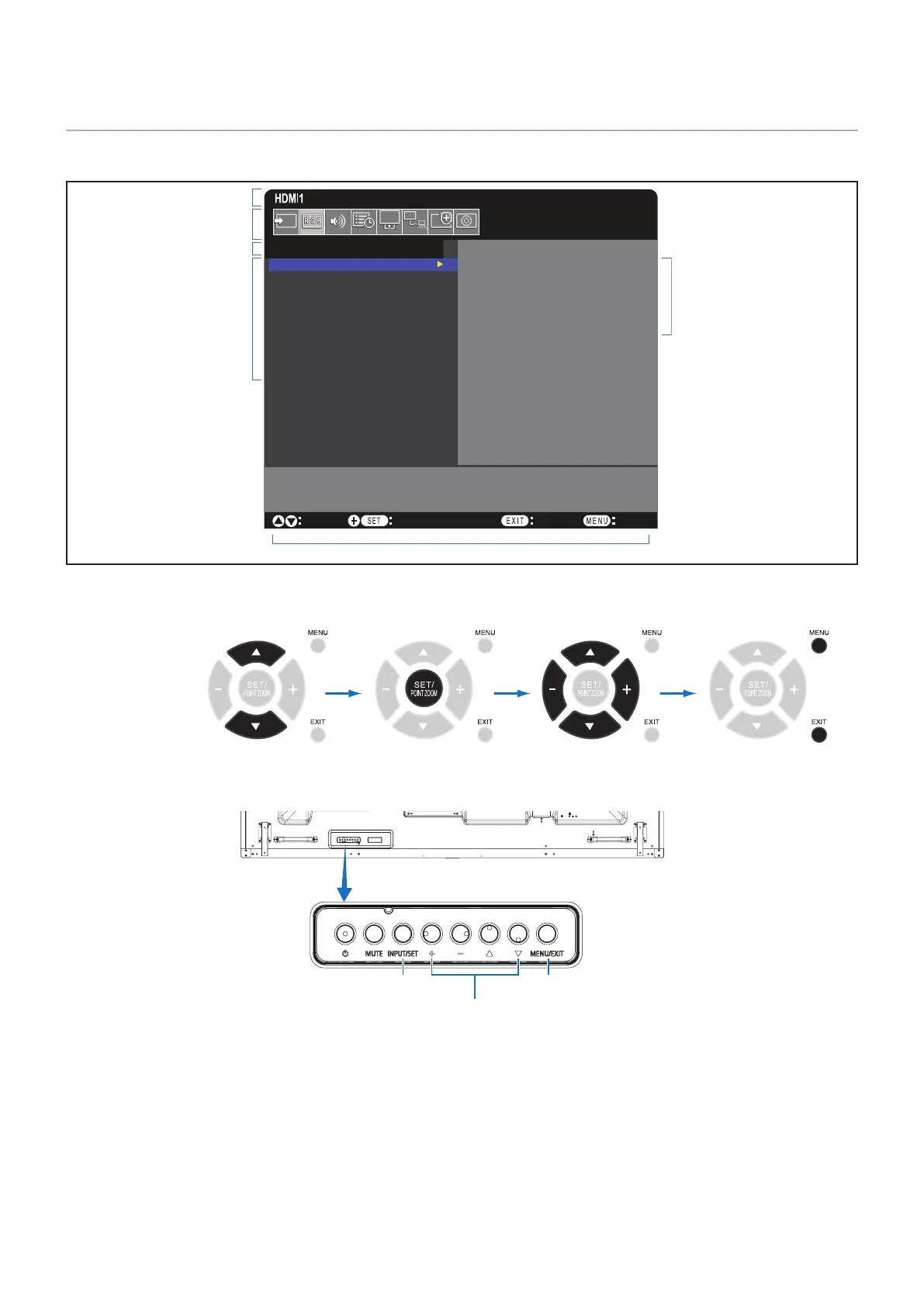
OSD (On-Screen Display) Controls
NOTE: Some functions may not be available depending on the model or optional equipment.
Goto Adjustment
Select
Return Close
PICTURE:
PICTURE MODE
BACKLIGHT
BACKLIGHT DIMMING
VIDEO BLACK LEVEL
GAMMA
COLOR
CONTRAST
ADVANCED
NATIVE
RETAIL
CONFERENCING
TRANSPORTATION
CUSTOM
Input source
Main Menu Icons
Main Menu Item
Sub Menu
Key Guide
Adjustment Settings
Remote Control
Press or to
navigate to a sub-menu.
Press SET/POINT
ZOOM to select an
option.
Press or , + or –
to select the function or
setting to be adjusted.
Press MENU or EXIT.
Control Panel
Press INPUT/SET to select. Press MENU/EXIT to open or exit the OSD menu.
Press UP or DOWN, PLUS or MINUS to
select the function or setting to be adjusted.









 To Next Page