EasyManua.ls Logo

NEC PC-8201A - Page 107

NEC PC-8201A
219 pages
Print Icon
To Next Page IconTo Next Page
To Previous Page IconTo Previous Page
Loading...
Chapter
6
Now
press
the
^
Cursor
Movement
Key
7
times
and
press
the
6
Key
to
change
the
"0"
to
"6".
Then
press
the
5
Key
and
a
lower
sound
than
the
one
previously
generated
will
be
heard
and
the
cursor
will
move
down
another
line
on
the
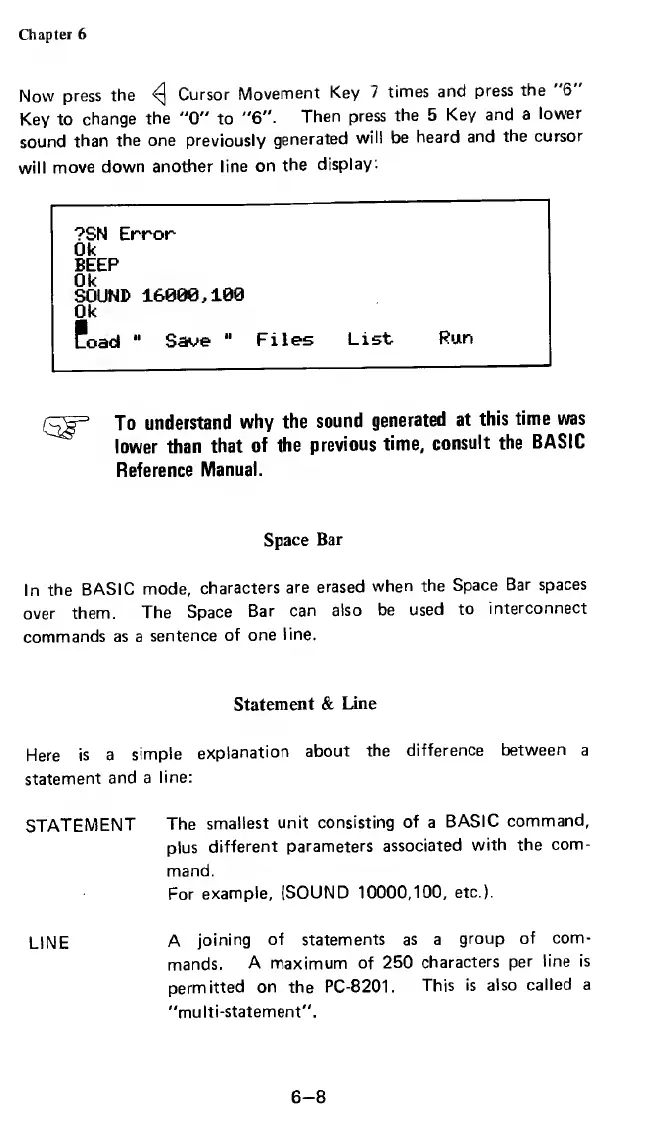
display:
?SN
Error
0k
BEEP
Ok
SOUND
16800,100
0k
Load
"
Save
"
Files
List
Run
To
understand
why
the
sound
generated
at
this
time
was
lower
than
that
of
the
previous
time,
consult
the
BASIC
Reference
Manual.
Space
Bar
In
the
BASIC
mode,
characters
are
erased
when
the
Space
Bar
spaces
over
them.
The
Space
Bar
can
also
be
used
to
interconnect
commands
as
a
sentence
of
one
line.
Statement
&
Line
Here
is
a
simple
explanation
about
the
difference
between
a
statement
and
a
line:
STATEMENT
The
smallest
unit
consisting
of
a
BASIC
command,
plus
different
parameters
associated
with
the
com¬
mand.
For
example,
[SOUND
10000,100,
etc.).
LIME
A
joining
of
statements
as
a
group
of
com¬
mands.
A
maximum
of
250
characters
per
line
is
permitted
on
the
PC-8201.
This
is
also
called
a
"multi-statement".
6-8

Related product manuals