7
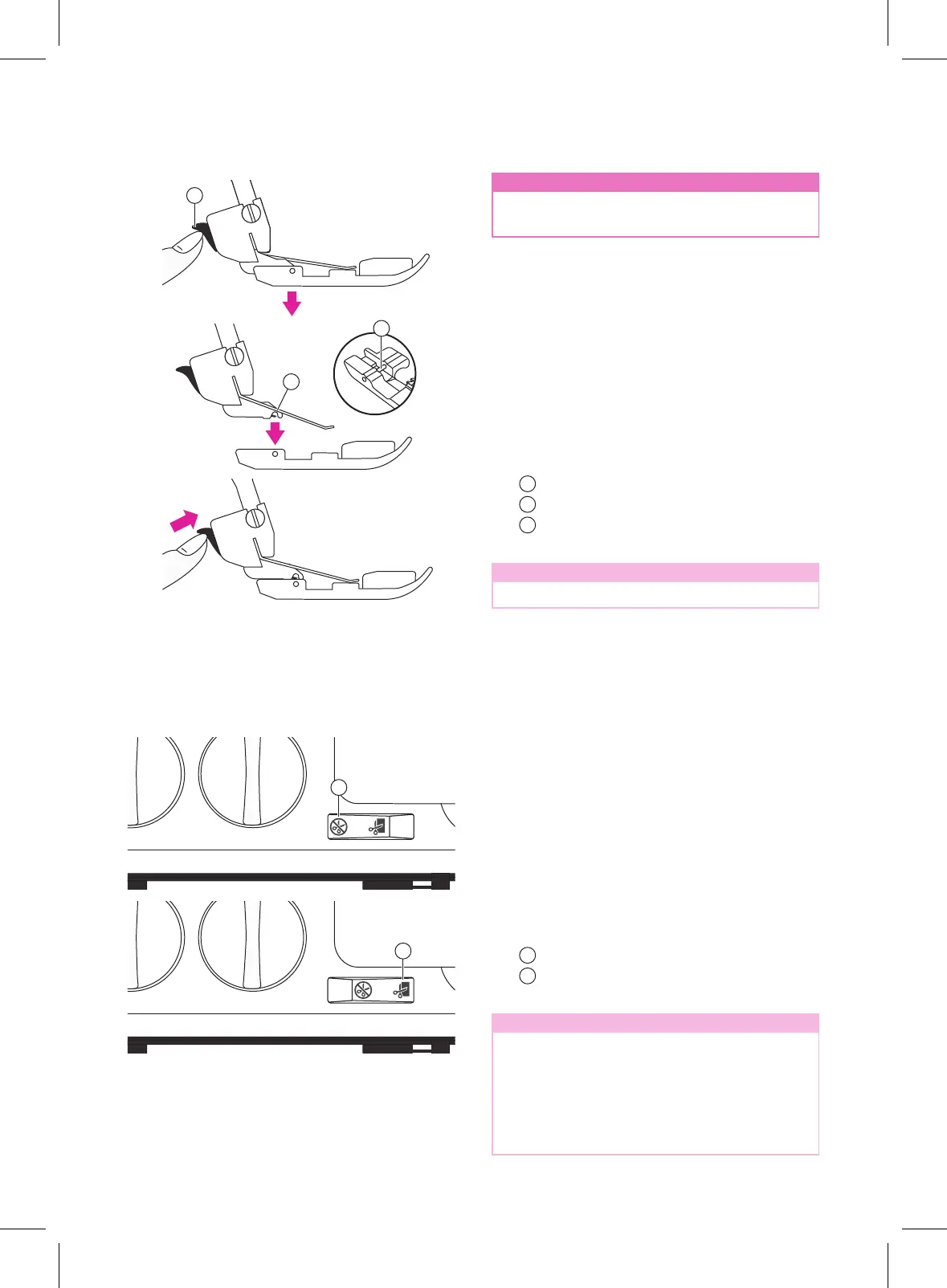
Changing the presser foot
How to use the upper cutter
n
Attention
Turnothemainpowerswitchandunplug
the machine.
1. Raise the presser foot.
2. Turn the hand wheel toward you until the
needles are in the highest position.
3. Push the black button on the back of the
presser foot holder, and the foot will come
o.
4. Place the new foot with the pin right
underneath the groove of the ankle and
lower the presser foot. Push the black
button on the back of the presser foot
holder and the foot will snap into place.
Presser foot holder
Pin
The groove of the ankle
Note
Optional feet are not included.
v
Deactivate the upper cutter
- Turn the hand wheel toward you until the
upper cutter is in its lowest position.
- Turnotheuppercutterbyswitching
the upper cutter switch to non-cutting
position.
v
Reactivate the upper cutter
- Turn on the upper cutter by switching the
upper cutter switch to cutting position.
Non-cutting position
Cutting position
Note
Always have the upper cutter in the cutting
position when sewing, because this
machinemusttrimoanyexcessfabric
to form the stitch over the fabric edge. An
exception to this is when sewing decorative
atlockseams.Thentheuppercutter
needstobeturnedo.
1
3
2
1
2



 To Next Page