EasyManua.ls Logo

Necta Astro - TECHNICIAN MENU - SUMMARY: MACHINE PARAMETERS; BUTTON-SELECTION AND TEMPERATURE SETTINGS; WASH BUTTON AND MIXER HEATING CONFIGURATION

Necta Astro
84 pages
Print Icon
To Next Page IconTo Next Page
To Previous Page IconTo Previous Page
Loading...
© by NECTA VENDING SOLUTIONS SpA
46
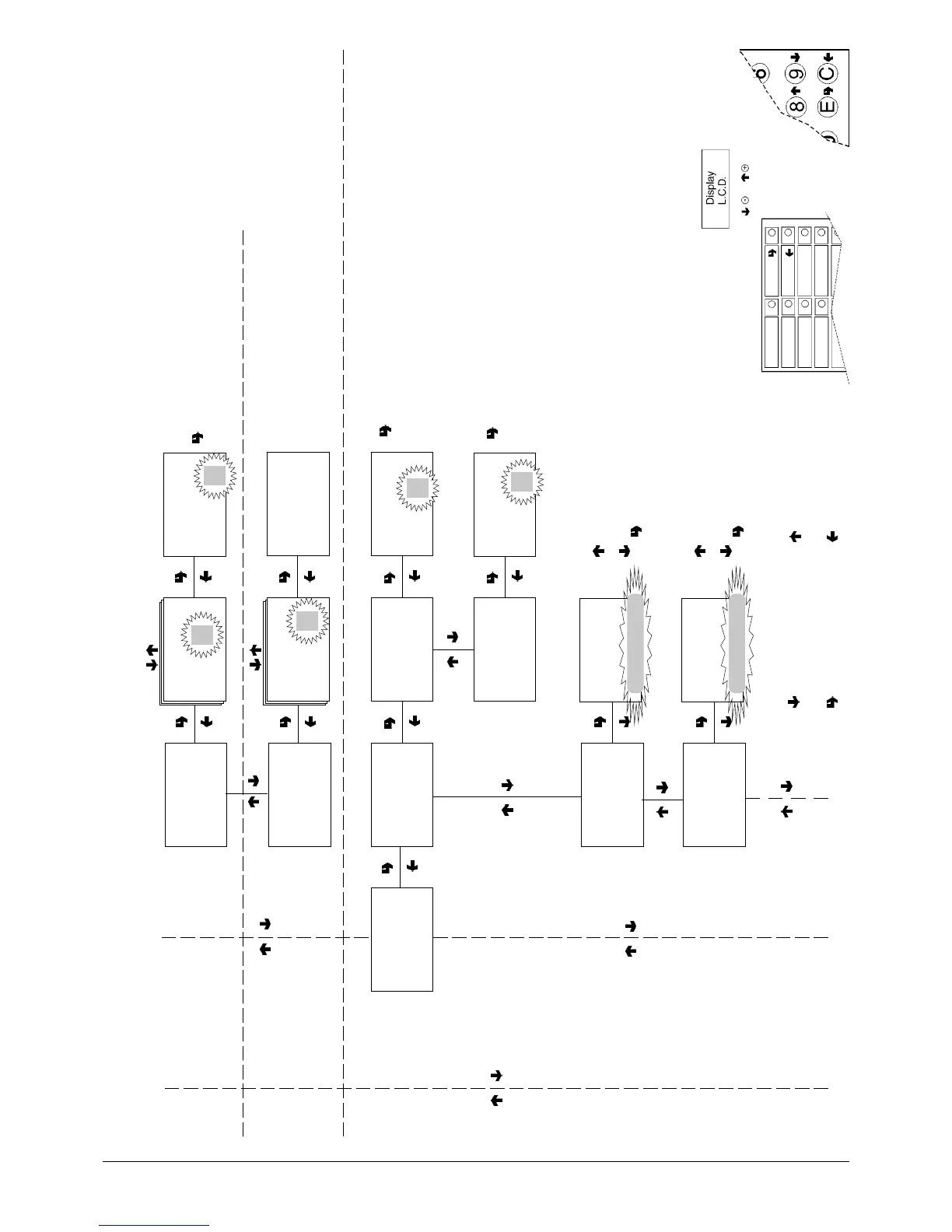
Technician menu - Summary
0210 206-00
As alternative
CONFIRM DATA/
CONFIRM FUNCTION
DELETE DATA/
EXIT FUNCTION
PREVIOUS FUNCTION/
DECREASE DATA UNIT (-1)
NEXT FUNCTION/
INCREASE DATA UNIT (+1)
TECN>2.2.5
Button<- ->Selection
TECN>2.2.5
Button<- ->Selection
Selection n.
##
TECN>2.2.5
Button<- ->Selection
Selection n. ##
Select button/n.
##
When pressing a button and
confirming it is assigned to
the selection number
TECN>2.2.6
Check selection N.
TECN>2.2.6
Check selection N.
Select button/n
TECN>2.2.6
Check selection N.
Select button n. ##
Selection Number ##
##
The selection number
assigned to the button is
displayed for 5 tenths of a
second
TECN>2.3
Vend. mach.parameters
TECN>2.3.1
Vend. mach.parameters
Temperature
TECN>2.3.1.1
Espresso boiler
T. threshold = ###
TECN>2.3.1.2
Instant boiler
T. threshold= ###
TECN>2.3.1.2
Instant boiler
T. threshold =
####
TECN>2.3.1.1
Espresso boiler
T. threshold=
####
ONLY FOR MODELS
WITH
DIRECT BUTTONS
TECN>2.3.3
Vend. mach.parameters
Enable wash button
TECN>2.3.3
Vend. mach.parameters
Enable wash button
EnableON
DisableOFF
ON/OFF
TECN>2.3.4
Vend. mach.parameters
Mixer heating
TECN>2.3.4
Vend. mach.parameters
Mixer heating
EnableON
DisableOFF
ON/OFF

Table of Contents

Other manuals for Necta Astro

Related product manuals