© by NECTA VENDING SOLUTIONS SpA
52
Technician menu - Summary
0210 206-00
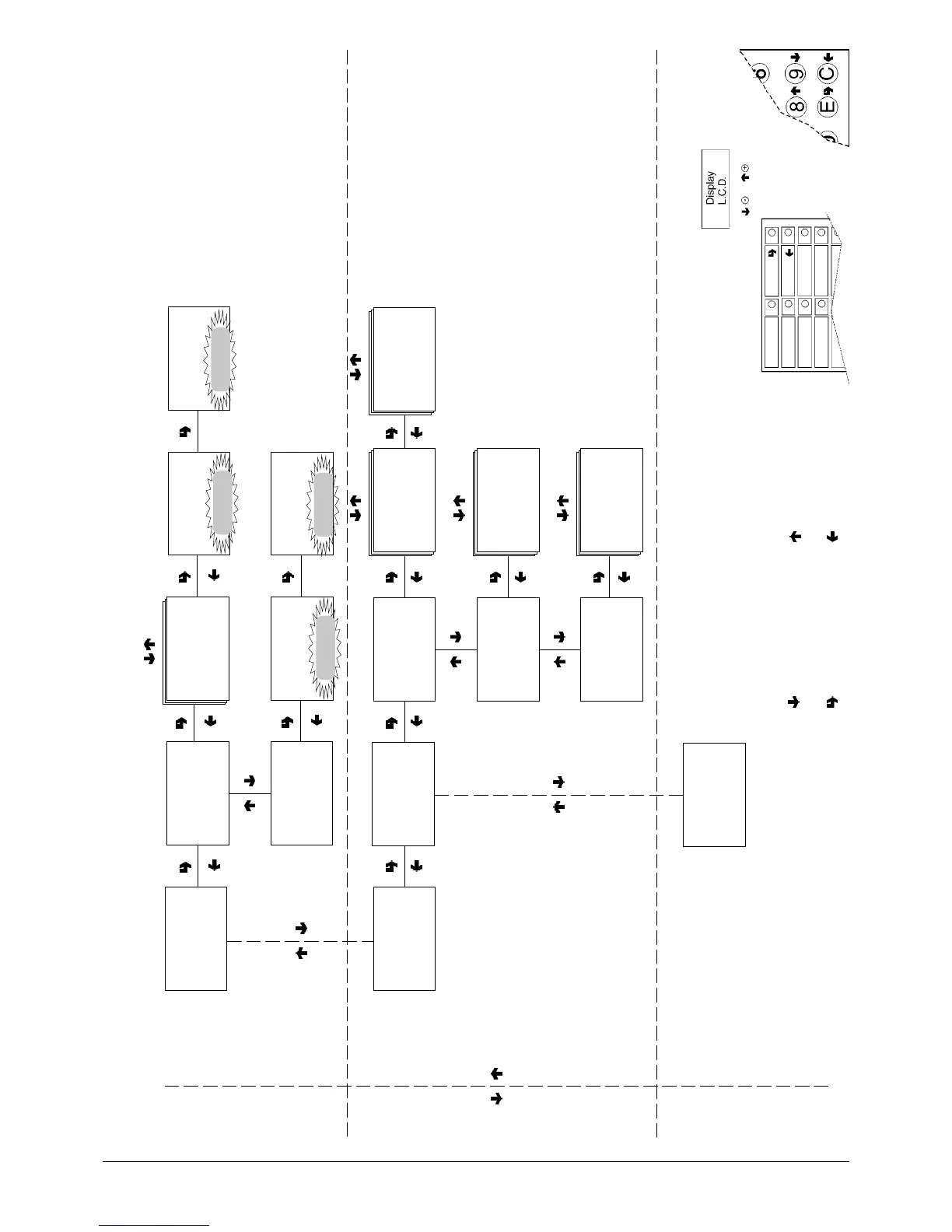
As alternative
CONFIRM DATA/
CONFIRM FUNCTION
DELETE DATA/
EXIT FUNCTION
PREVIOUS FUNCTION/
DECREASE DATA UNIT (-1)
NEXT FUNCTION/
INCREASE DATA UNIT (+1)
TECN>3.3.1
Delete sel. count.
TECN>3.3.2
Total delete
TECN>3.3.1
Partial delete
TECN>3.3
Delete statistics
Delete data by:
Selections
Bands
Discounts=
Failures
Coin mechanism data
Delete all data
STATISTICS
TECN>3.3.1
Partial delete
TECN>3.3.1
Partial delete
Confirm?
Working
TECN>3.3.2
Total delete
TECN>3.3.2
Total delete
Confirm?
Working
Display sales by single
selection for each time band
and total
Display total sales by single
selection
Display total complete sales
in normal operation and filler
menu mode
RELATIVE STATISTICS
TECN>3.4
Display relative statistics
TECN>3.4.1
Display sel. counter
TECN>3.4.1.1
Display single counter
TECN>3.4.1.1
Display single counter
Selection 1-#
TECN>3.3.1.1
Display single counter
Selection 1-#
Band # = ####
TECN>3.4.1.2
Display total counter
TECN>3.4.1.2
Display total counter
Selection 1-#
Tot. = ###
TECN>3.4.1.3
Display sel. counter n.o.
Complete sel. n.o./maint
Tot. = ###
TECN>3.4.1.3
Display sel. counter n.o.
TECN>3.4.2
Count. by time bands



 To Next Page