30 EN Operating instructions
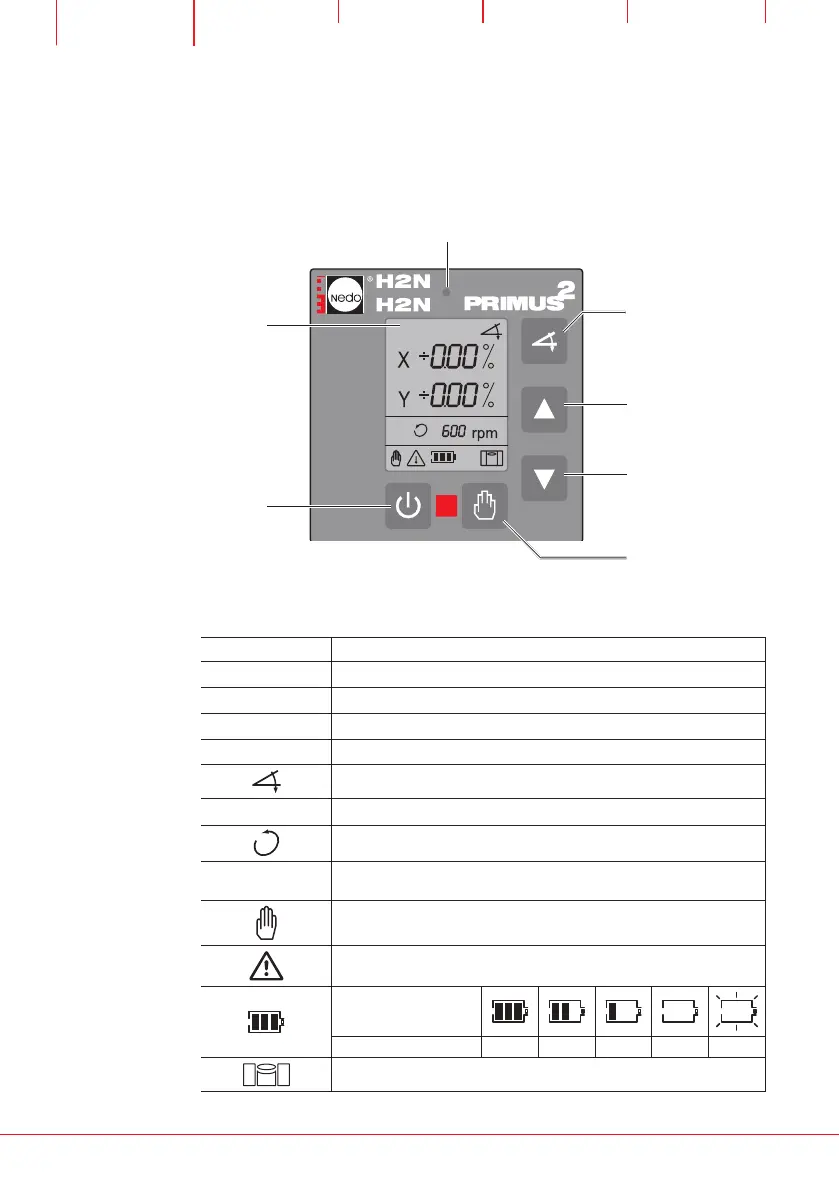
4 Controls PRIMUS 2 H2N/H2N+
4.1 Control panel buttons
The laser is operated using the control panel.
4.2 Displays
Symbol Description
C00 – C03
Warning
ERR1 – 12
Error display
X
X axis selected (symbol flashes, values can be set)
Y
Y axis selected (symbol flashes, values can be set)
TILT function (symbol flashes during input)
± 0.00 %
Enter and display TILT as percentage values
ROTATION mode
600 rpm
Speed of the laser.
At H2N+ from Serial no. P2-10000 optional 900 rpm possible
MANUAL operating mode
Warning symbol (flashes)
Remaining life in hours
Rechargeable battery 100 70 30 5 < 0,5
Levelling
+
Activate TILT axes/
confirm percentage
value input
Increase value,
see Comfort func-
tions, Page 37
Display
Activate/deactivate
MANUAL operating
mode
Laser
ON/OFF
reduce value, see
Comfort functions,
Page 37
Warning LED


 To Next Page