42 EN Operating instructions
12 Laser receiver COMMANDER 2 H2N/H2N+
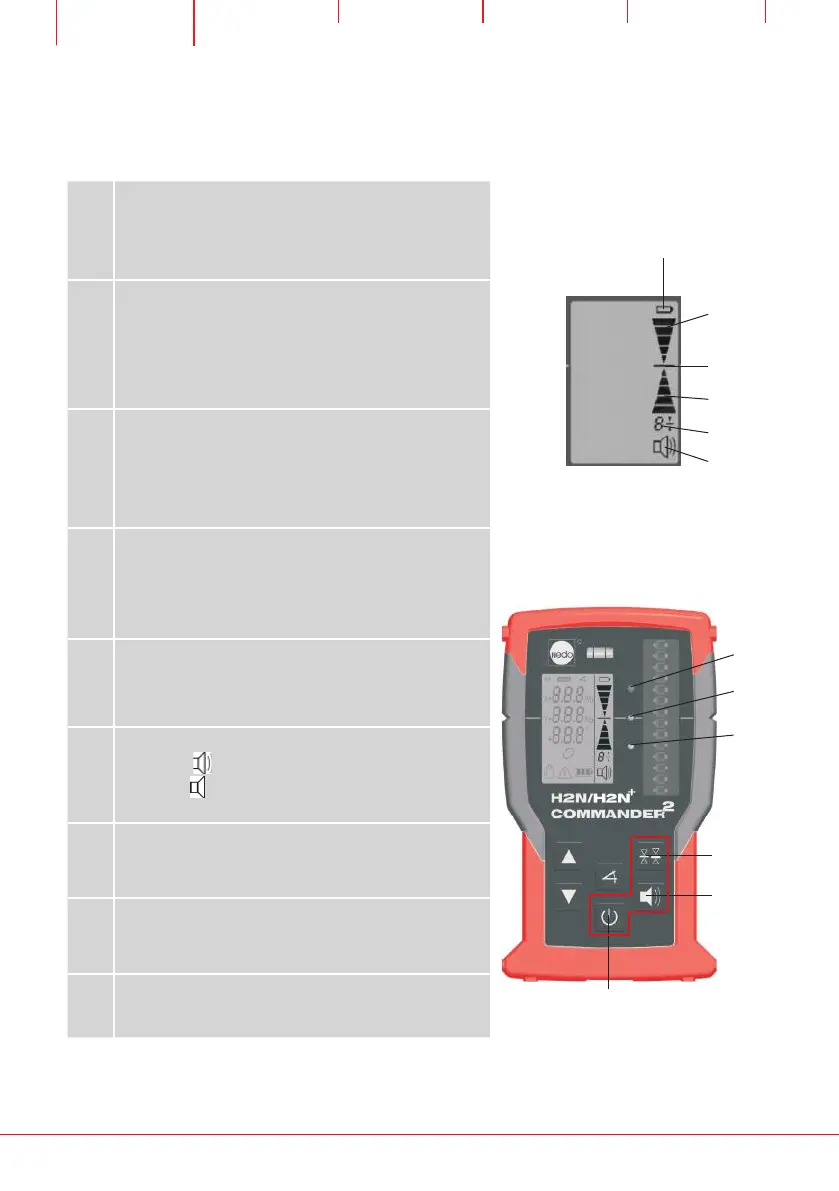
12.1 Displays and controls of the laser receiver
2
3
4
6
5
1
(4)
(3)
(2)
7
8
9
1
LCD display BATTERY
Display lights up: limited remaining life
(battery approx. 5h / rechargeable approx. 0,5h)
2
LCD display LOWER
Lights up if the laser line is within the sensor
window but below the zero line. In addition, the
red LED next to the reception field lights up and
also a slow melody sounds.
3
LCD display TARGET
Lights up if the laser line is located at the level of
the zero line. In addition, the green LED next to
the reception field lights up and a
continuous melody sounds.
4
LCD Display HIGHER
Lights up if the laser line is within the sensor
window but above the zero line. In addition, the
yellow LED next to the reception field lights up
and also a fast melody sounds.
5
LCD display DETECTOR FIELD RESOLUTION
Displays the currently set resolution:
4=±4mm / 2=±2mm / 1=±1mm / 0=±0.5mm
6
LCD display ACOUSTIC SIGNAL
Display = acoustic signal loud/
Display = acoustic signal quiet/
No Display = acoustic signal off
7
Button DETECTOR FIELD RESOLUTION
Switches the resolution between
±4mm / ±2mm / ±1mm / ±0.5mm.
8
Button ACOUSTIC SIGNAL
Switches the acoustic signal between
loud/quiet/off.
9
Button ON/OFF
Switches the receiver on and off.


 To Next Page