Home
Ness
Gateway
AC-1000
Page 12 (2.2. Configuration)
Ness AC-1000 - 2.2. Configuration
48 pages
Manual
Save Page as PDF
To Next Page
To Next Page
To Previous Page
To Previous Page
Loading...
12
Ness AC1000 User Guide
VIRDI
AC
1000
User
Guide
12
UNION C
OM
M
UNITY
CO.,
L
Td.
3
F
l
.
H
y
u
n
d
a
i
T
o
p
i
c
s
B
l
d
g
,
4
4
-
3
B
a
n
g
i
-
d
o
n
g
,
S
o
n
g
p
a
-
g
u
,
S
e
o
u
l
,
K
o
r
e
a
1
38
-
0
5
0
,
T
el:
82-2-648
8-3000, Fax: 82-2-6488-3099, E-Mail:sales@unioncomm.co.kr
,
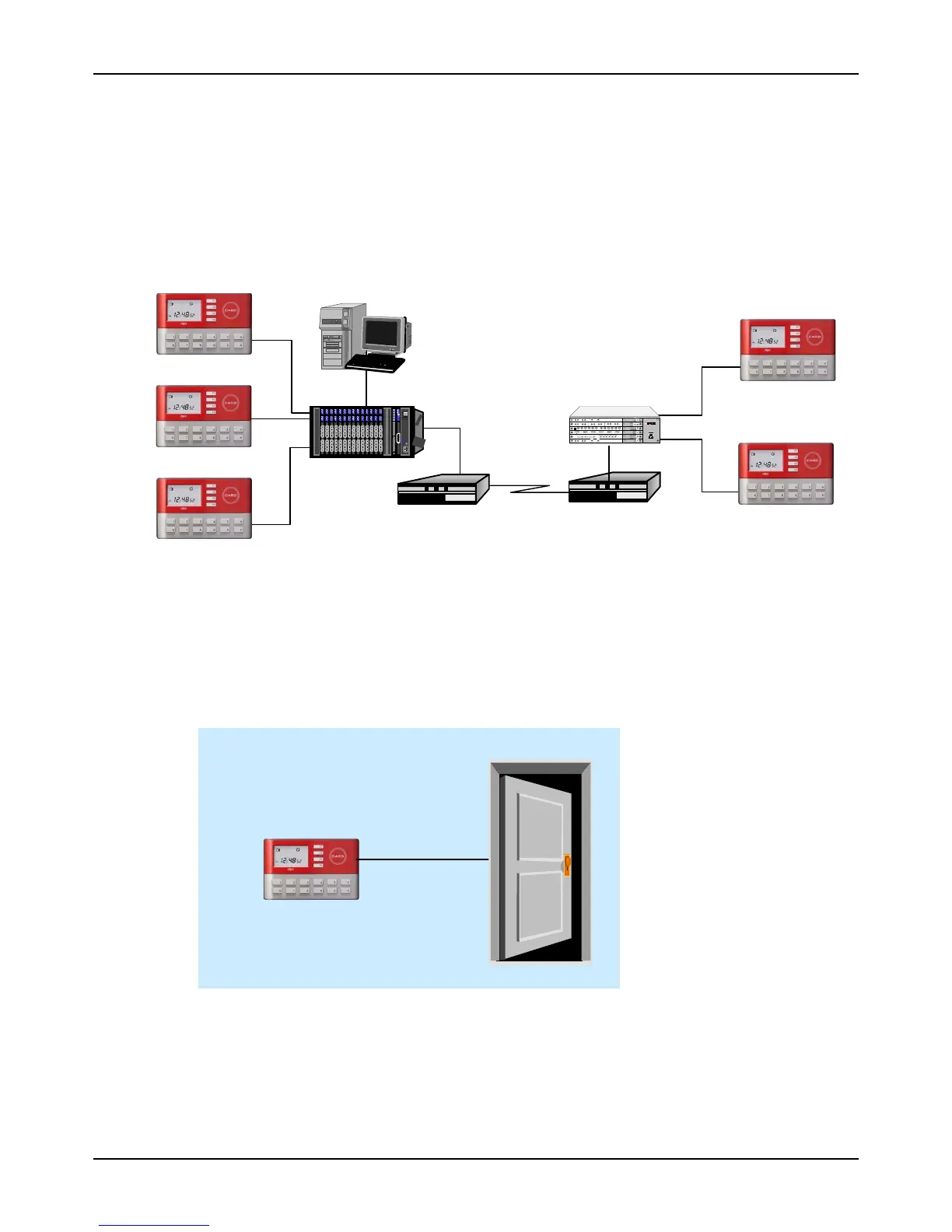
2.2. Configuration
2.2.1. Network configuration
2.2.2. St
andalone configuration
Switch Hub
U
T
P
LET
UTP
UTP
4
35
WA
N
TCP
/
IP
6
2
643
2
2
1
3456
8
7
9
10
1
1
12
2
643
12
2
6423
5
1
23
4
6
78
91
01
11
2
Tx
R
x
1
T
x
Rx
2
Tx
Rx
1
Tx
Rx
2
1
2
3
T
x
Rx
1
Tx
R
x
2
641
6410
3
4
Tx
R
x
1
T
x
R
x
1
2
641
34
T
x
R
x
1
T
x
R
x
2
1
http://
w
ww
.
u
nioncom
m
.
co.kr
UTP
UTP
Network Server
(
Authentication
Server)
Door Lock
UTP
UTP
UTP
AC-1000
11
13
Table of Contents
Main Page
Glossary
2
Table of Contents
3
1 Before Use
6
Safety Precautions
6
Terminal Description
7
Button Description
7
Screen Description (During Operation)
8
LCD Icon During Operation
9
Voice Information During Operation
10
Buzzer Sound During Operation
10
2 Introduction
11
Features
11
Configuration
12
Network Configuration
12
Standalone Configuration
12
Specifications
13
3 Environment Settings
14
Check Items before Setting the Environment
14
Entering Menu
14
Change Settings
14
Save Environment Settings
15
User Registration
18
1. RF" Registration
18
2. ID&PW" Registration
19
3. RF|PW" Registration
19
5. ID&PW|RF&PW" Registration
20
Delete User
20
Modify User
21
1. RF" User
21
2. ID&PW" User
22
3.RF|PW", "4.RF&PW", "5.ID&PW|RF&PW" User
22
Administrator Registration
23
Delete All Users
23
Network Settings
24
Terminal ID Settings
24
Connection [NS / SN / NO] Mode Settings
24
Connection Method Settings
25
IP Address Settings
25
Subnet Mask Settings
26
Gateway Settings
26
Server IP Settings
26
Server Port Settings
27
Option Settings
27
Application Mode Settings
27
0]: Access Control
27
1] Time Attendance Control
28
2] Meal (Cafeteria) Service Control
29
Authentication Method Settings
30
Settings for ID Display When Authentication Is Successful
30
Auto Enter Key Setting
30
Settings for Card Only Authentication
31
Door Settings
31
Door Opening Time Settings
31
Door Status Monitor
32
Door Open Alarm Settings
32
Volume Settings
33
Voice Settings
33
Buzzer Volume Settings
33
Current Time Settings
34
Other Setting
34
LCD Backlight On/Off Settings
34
LCD Brightness Settings
35
Display Time Settings
35
Terminal Information View
36
Extended Functions
37
Erminal Lock Settings
37
Read Card Number
37
Device Settings
38
System Configuration Settings
38
User ID Length Settings
38
Language Settings
39
Function Key Settings
39
Card Reader Settings
40
Wiegand Output Settings
41
Terminal Initialization
41
Settings Initialization
42
Authentication Record Initialization
42
Factory Initialization
42
4 How to Use the Terminal
43
Access Control
43
Authentication Mode
43
Card Authentication
44
Password Authentication
45
Time Attendance Control
46
Authentication Mode
46
Working Mode Expansion Using Multi-Key Authentication
47
Meal Control
48
Related product manuals
Ness 106-096
4 pages
Ness M1
21 pages


 To Next Page