Net.DO Lighting Control Equipment Co.,Ltd http://www.netdo.com.cn
FOX512 Moving Light Controller. PAGE: 9
Attributes --- such as Dimmer, Colour, Gobo etc. Attributes can be selected by Attribute Key,
modified by A/B wheel.
The 10 Attribute Keys correspond to the attribute names above.
Press P2 (indicator bright) to switch to Attribute Page 2, then the Attribute Keys will become
No.11~20 Attribute Keys. One Key controls 2 attributes, so the console can control totally 40 attributes.
FAN -Used to spread the attribute value of selected fixtures to gain the gradual change effect of
attribute value among fixtures.
MODIFY -Relative change function of attributes.
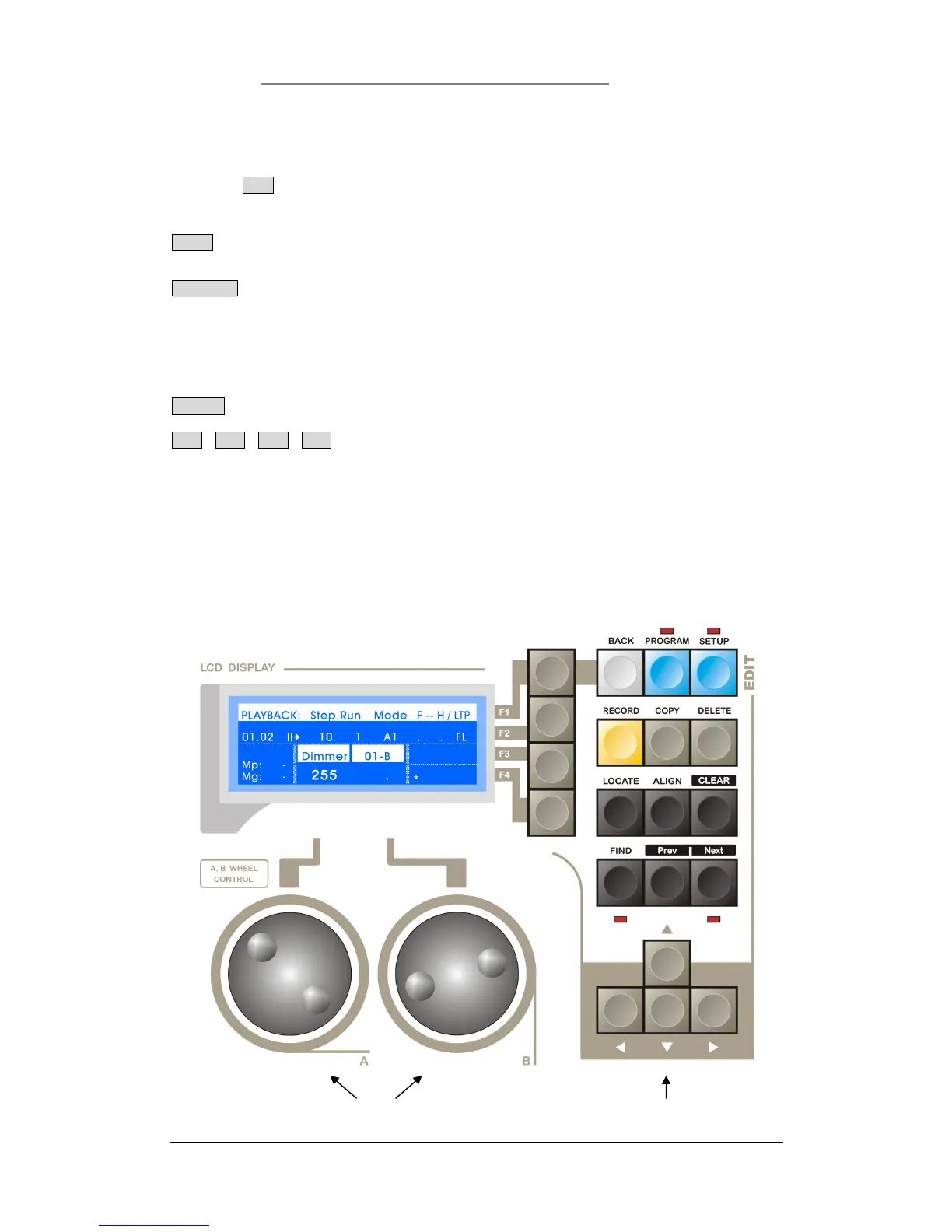
3.7 LCD Display, A/B Wheel, Edit Area
LCD Display Control
BACK : Used to return to previous layer menu.
F1 F2 F3 F4 Soft Keys:
The control contents depend on the current menu page, different functions in different menu pages;
Cursor Key (shown as right)
1. Left/Right Key is used to select the items on left/right;
2. Up/Down Key is used to modify the numerical value of the selected items.
A/B Wheel: There are 2 wheels (A/B), the control contents depend on the items displayed in the menu.
If there is no corresponding display, the Wheel can modify the selected Menu Item.
A /B Wheel Cursor Key


 To Next Page