Net.DO Lighting Control Equipment Co.,Ltd http://www.netdo.com.cn
FOX512 Moving Light Controller. PAGE: 5
2.3.3 DMX512 Signal Interface & Connection of Fixture
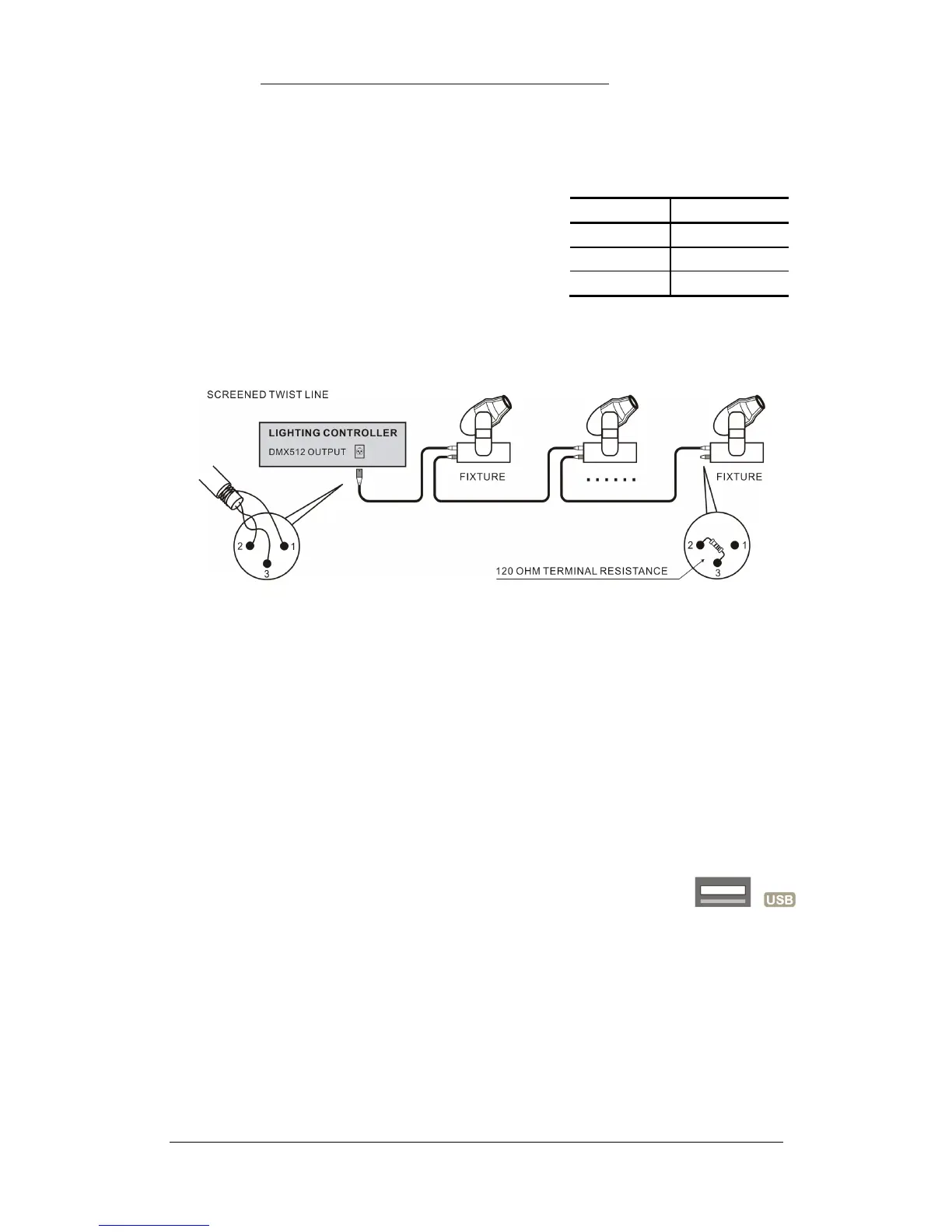
There are 2 DMX512 interfaces which output the same content and use optically isolated circuit,
they’re both 3-pin XLR, pin 1 is for signal ground, pin 2 is for negative, and pin 3 is for positive.
DMX512 cable is screened twist line. Each end of the cable
should be joined to XLR plug by user. Pin 1 of XLR plug is
connected to screen net. Two lines of twist line (distinguished by
different colors) are connected to pin 2 and pin 3 of the plug
respectively. Please do not confuse. The schematic diagram for
connection is shown as follows:
2.3.4 Power Interface
This controller adopts wide range switch power supply (AC100-240V/50-60Hz). Please confirm
voltage is suitable to controller before connection. Power socket must be connected with protective
groundwire to ensure safety.
2.3.5 USB Interface
This controller provides a standard USB interface for data backup, renewal of library files and
software upgrade.
Pin number
Cable conductor
1 Shield
2
Negative ( - )
3
Positive (+ )


 To Next Page