Net.DO Lighting Control Equipment Co.,Ltd http://www.netdo.com.cn
FOX512 Moving Light Controller. PAGE: 8
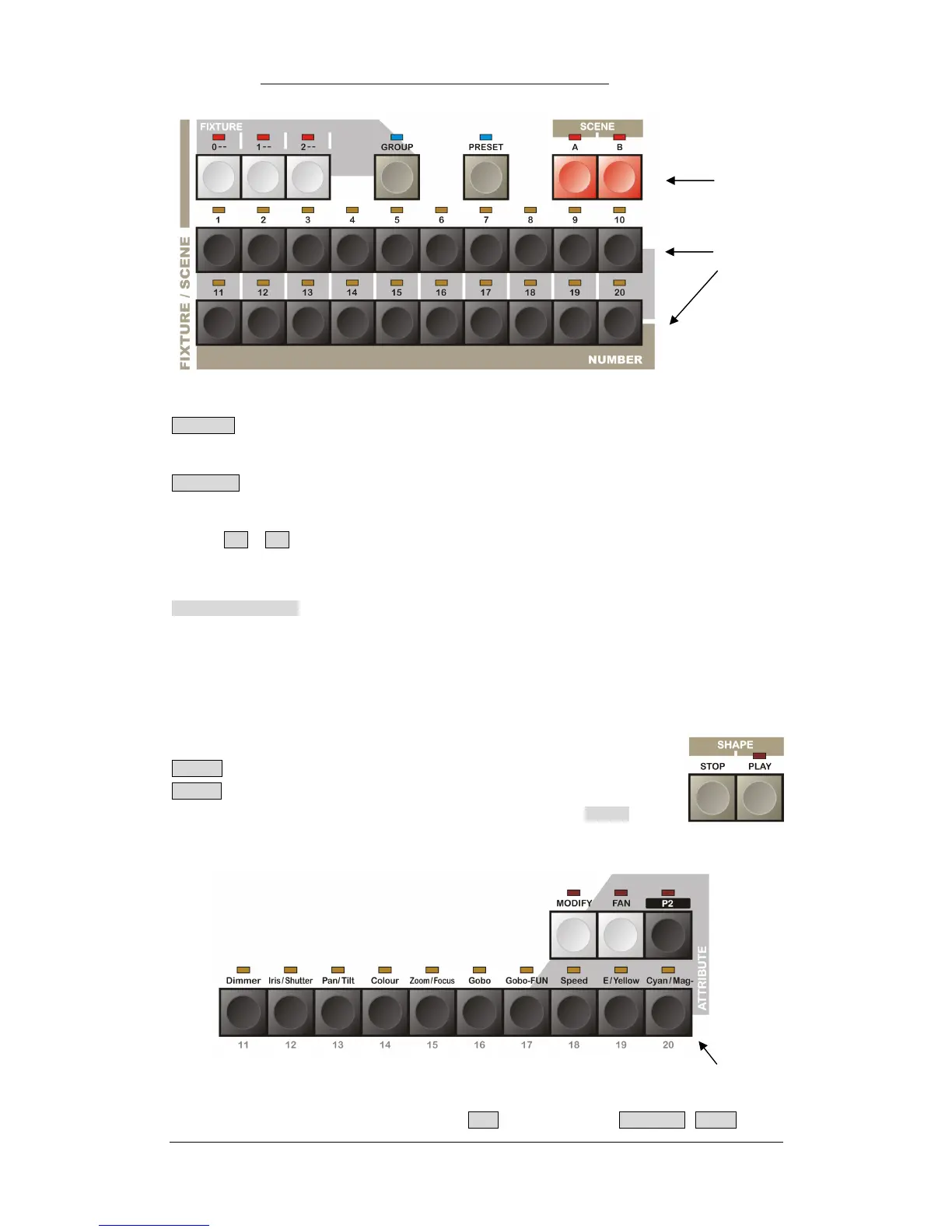
GROUP Function Key
Press GROUP key, then the 1~20 Numeric Key will be used for group selection.
PRESET Function Key
Press PRESET key, then the 1~20 Numeric Key will be used for preset selection.
SCENE A , B Scene-Snapshot Function Key
There are 2 Scene pages (A, B), totally 40 Scenes. 20 Scenes per page, selected by 1~20 Numeric
Key
1~20 Numeric Key Totally 20 Numeric Keys, they will have different functions under different status.
Under Fixture selection status, they are Fixture Numeric Key.
Under GROUP status, they are Group Numeric Key.
Under PRESET status, they are Preset Numeric Key.
Under SCENE status, they are Scene Numeric Key.
3.5 SHAPE Control Area
STOP - Suspend the current called SHAPE.
PLAY - Press once (indicator bright) to run the current called SHAPE.
Press one more time (indicator flashes) to enter SHAPE display.
3.6 Fixture Attribute Key
ATTRIBUTE area contains 10 attribute keys, P2 attribute page key, MODIFY , FAN .
Fixture Attribute Key
Function Key
Number Key


 To Next Page