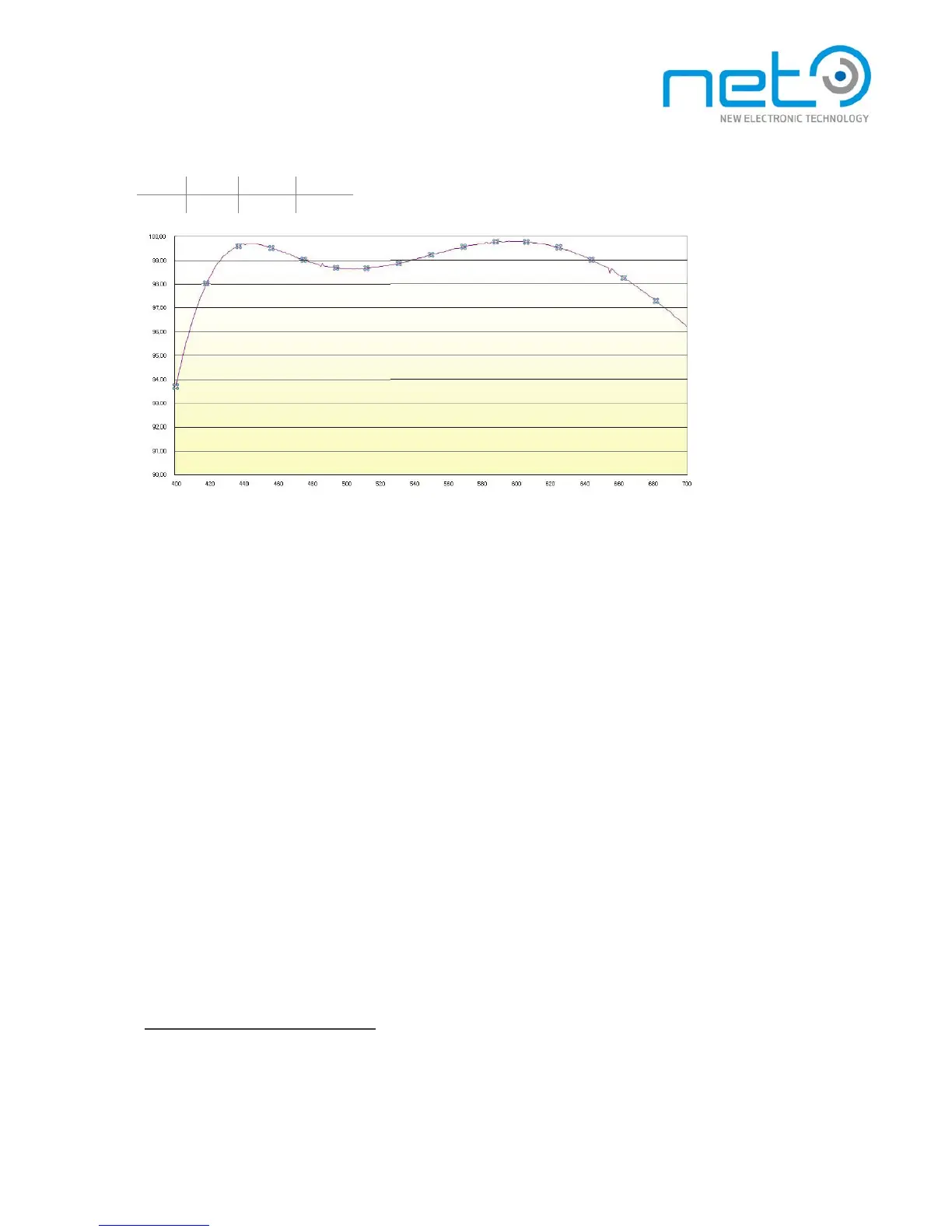
AR filter characteristics for BW cameras
Changing or removing the filter
The filter is accessible from outside the camera and user can change it without loose of warranty.
It is very important to do this operation with maximum care so that the image s e n s o r c a n n o t b e
damaged.
If exchanging the filter for another type, it is highly recommended to choose a filter of the same s i z e , n o t
to change the optical properties of the system. Removing the filter completely will change the length of
the optical path which can lead to focusing problems in some scenarios.
To mount/dismount the filter, you will need a hexagonal screwdriver number 1.5. The f ixi ng screws are
M2×3.
It's important to keep in mind that when changing or removing the filter, not only can be the sensor
damaged, but also dust or other dirt can get inside the camera and especially on top of the sensor itself.
It is necessary to perform such operation in appropriately clean environment and using suitable tools
preventing any sensor dust pollution.
Cover glass
thickness: 3mm
type: float glass
Input and output signals
This section describes all types of input and output signals available on CORSI GHT cameras, including
their characteristics and when necessary including connection examples. Location and pinouts of the



 To Next Page