SCREENGUARD
™
INSTALLATION AND USER MANUAL
17
INSTALLATION
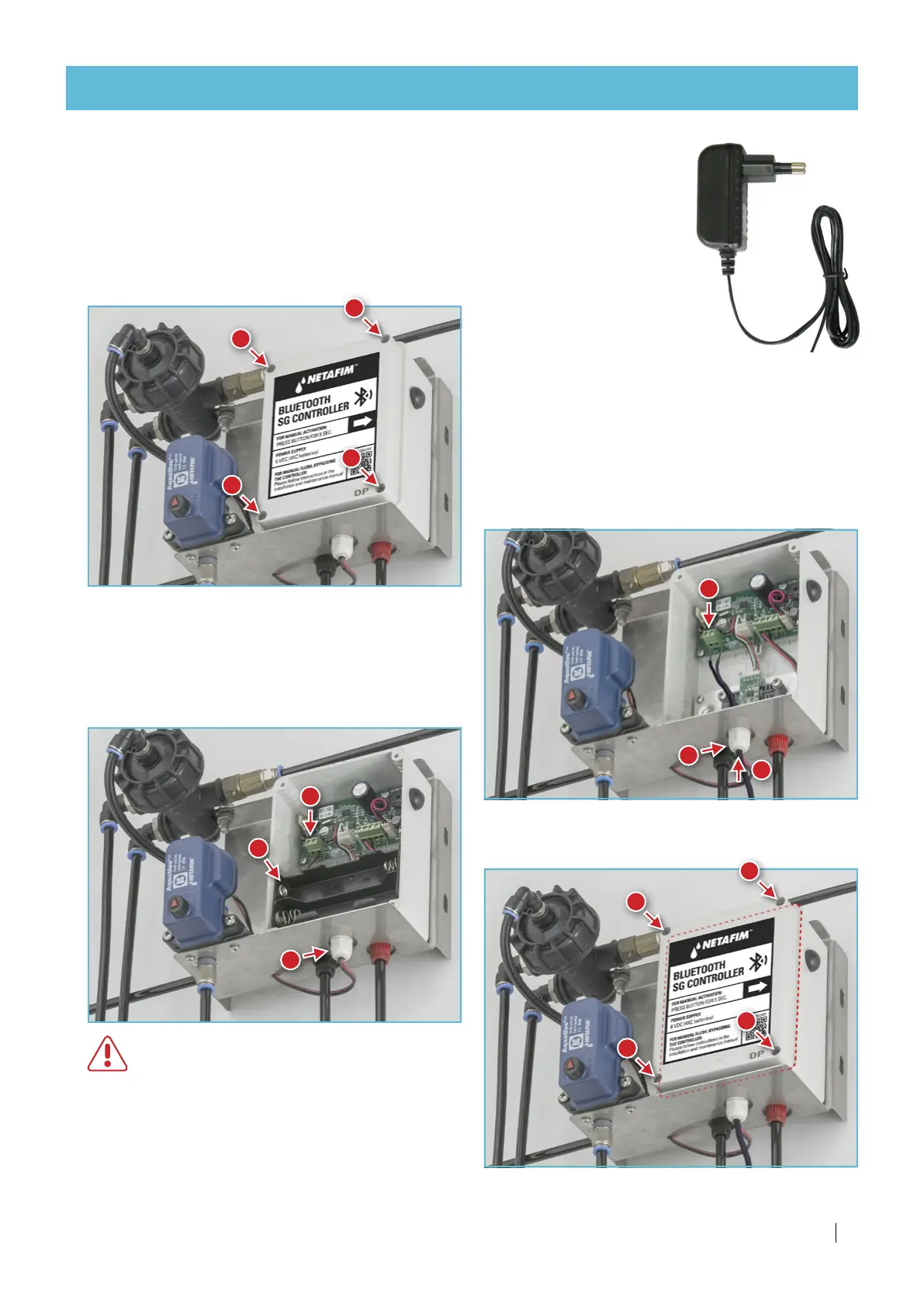
Power the flush controller by an external power supply
If electricity is available at the filter location, the flush controller can be powered
by an external 100-240v AC to 5v DC power supply (not supplied).
5.
Gently thread the
power supply
wires through the cable gland.
1.
Open the flush controller box using a cross-head
screwdriver.
1
1
1
1
2.
Disconnect the battery compartment wires from
the terminal block using a flat-head screwdriver.
3.
Remove the battery compartment and keep it
separately for possible future use.
WARNING
When operating the controller with the
external power supply, make sure that the
battery compartment is not inside the flush
controller (its exposed wire ends could
cause short-circuit).
4.
Loosen the cable gland nut by hand.
9.
Close the flush controller box (mind the
alignment of the cover gasket to ensure sealing).
9
9
9
9
6.
Connect the
power supply
wires to the terminal
block (mind polarity).
7.
Refasten the cable gland nut by hand.
8.
Plug the
power supply to the mains and make
sure the
flush controller turns on.
2
4
3
6
5
7
If your SG filter is equipped with the Filtron 1-10 flush controller, see its User Manual enclosed with it.



 To Next Page