26
SCREENGUARD
™
INSTALLATION AND USER MANUAL
MAINTENANCE
Screen assembly cleaning
Disassembly:
1.
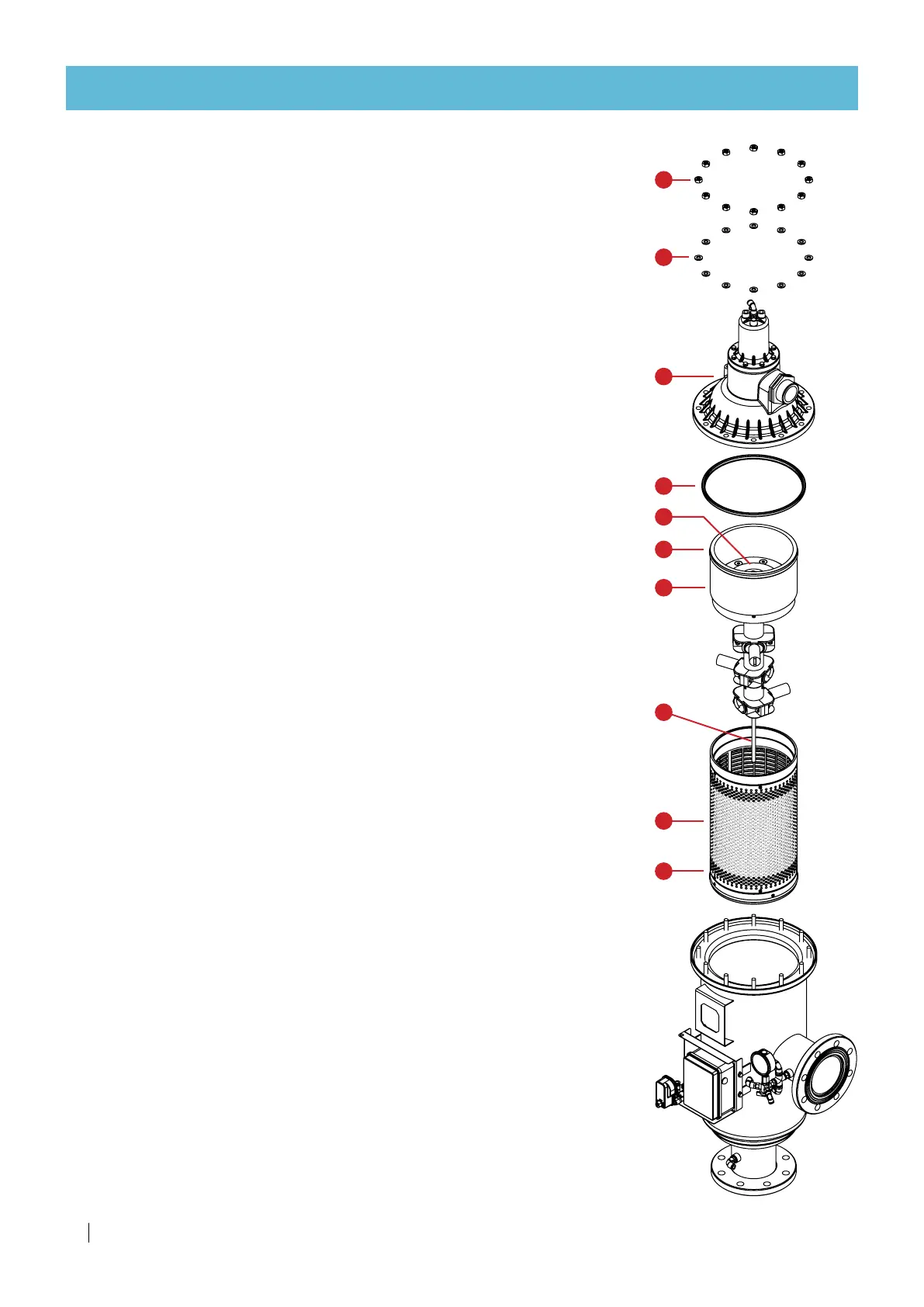
Unscrew nuts (A) with a 17mm wrench
2.
Remove washers (B)
3.
Remove Piston Cover Assembly (C) and gasket (D)
4.
Pull out suction assembly (E)
5.
Pull out screen assembly (F).
6.
Flush screen assembly (F) with pressurized fresh water and remove dirt.
If the screen is still dirty, separate the flushing assembly from the
screen assembly and flush screen assembly (F) from the inside out with
pressurized water and remove remaining dirt.
Assembly:
1.
Lubricate screen assembly O-rings (H).
2.
Insert screen assembly (F) and push all the way.
3.
Insert suction assembly (E) and push all the way.
Make sure suction assembly (E) is aligned and positioned inside the
socket of the screen assembly (F), and that the main shaft (G) is lodged
inside the bottom bearing.
4.
Manually rotate the turbine (I). It should rotate freely.
5.
Make sure gasket (D) is in place.
6.
Put Piston Cover Assembly (C) in place.
7.
Place washers (B) and nuts (A) and tighten the nuts.
G
F
E
D
C
B
A
H
H
I



 To Next Page