20
SCREENGUARD
™
INSTALLATION AND USER MANUAL
OPERATION
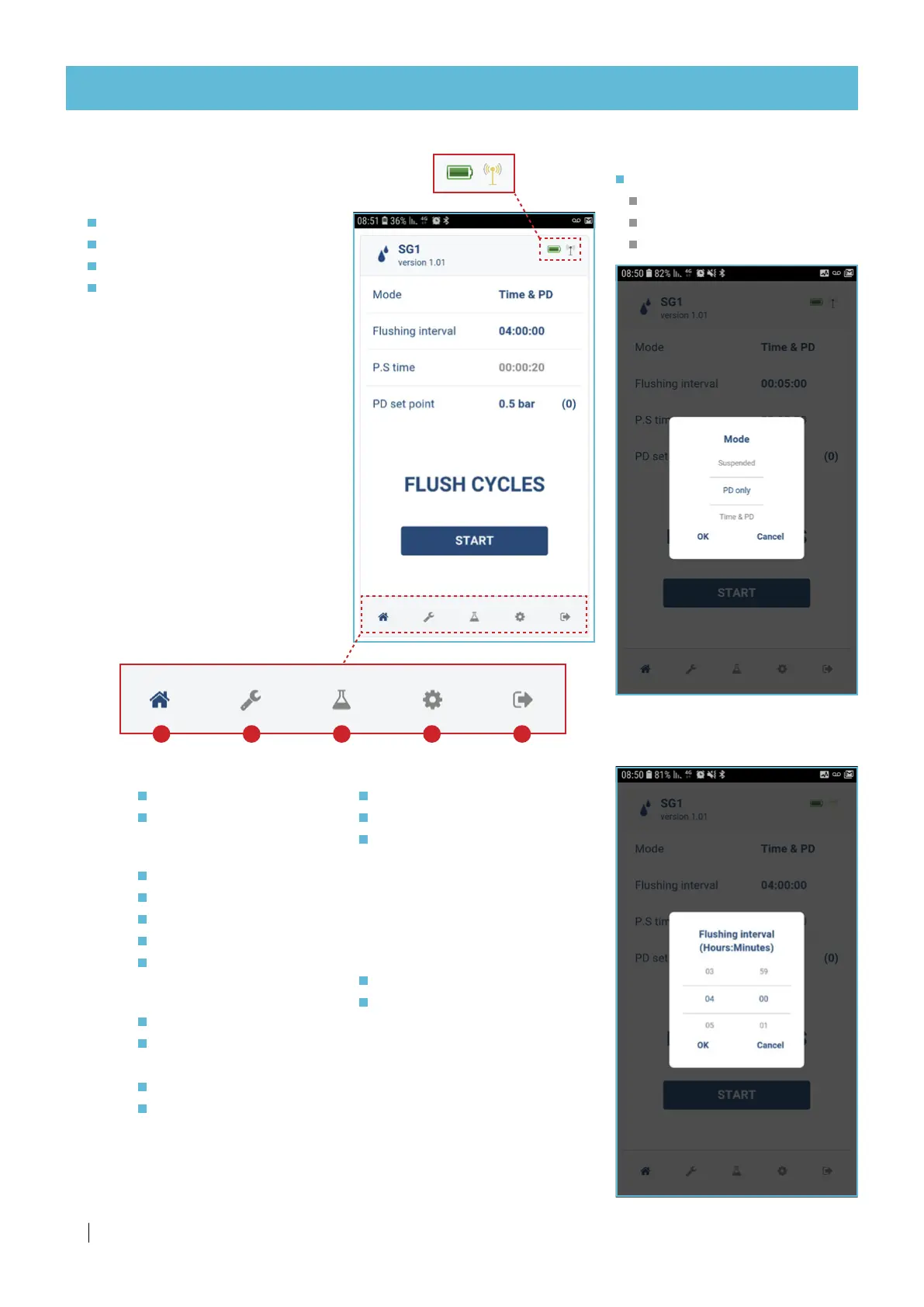
Operation mode selection screen
Select
Suspended
PD only
Time and PD
Flushing interval adjustment
Set time
Your controller home screen
This screen displays the main
parameters of the filter operation:
Operation mode
Flushing interval
P. S . t i me
PD set point
NOTE
The SG controller does not
require any adjustment, it is
entirely factory adjusted for best
operation.
However, you can edit a
parameter by pressing it.
WAIT PD - the application
is acquiring PD data from
the controller (wait before
proceeding).
START - Press to start or stop a
flushing cycle.
Battery
level
BT signal
strength
D. Preferences
Select language
Select font size
Technician mode
(Only Netafim qualified
technicians are authorized
to this section by personal
password).
Netafim™ SG filter
Troubleshooting
Contact Netafim™
E. Exit the SG1 app.
A B C D E
A.
B.
C.
Home
Mode
Flushing interval
Settings
PD delay
Looping limit
Device name
Sound
PD calibration
Flushing history
Based on time
Based on pressure
differential
Manual flushings
Clear counters



 To Next Page