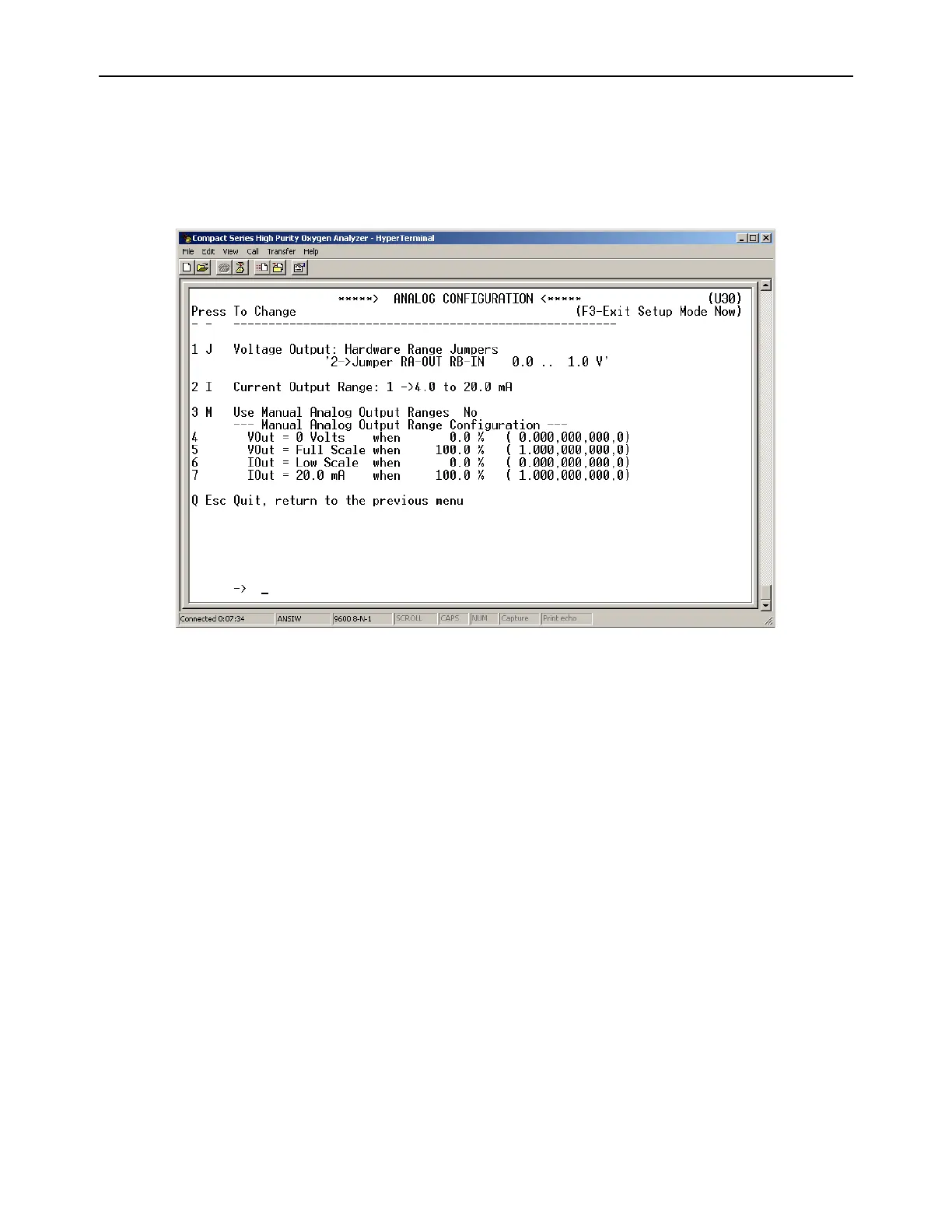
4.1.2.11 (U30) Analog Output Setup Menu
The RS-232 Analog Output Setup menu U30 provides access to all of the settings related to the
Analog Voltage Output (TB3-Pin 5, TB3-Pin 6) and Analog Current Output (TB3-Pin 7, TB3-Pin 8).
It is accessed from the Setup Main Menu by typing “3” or “A” on the RS-232 terminal. To navigate
backwards, use the <Esc> or “Q” key on the RS-232 terminal.
Figure 14 – Analog Output Configuration Menu
4.1.2.11.1 Analog Voltage Output Range
This menu sets the Analog Voltage Output full-scale value. It may be set to 0 (0-5 VDC minimum
to full scale), 1 (0-10 VDC minimum to full scale) or 2 (0-1 VDC minimum to full scale). This setting
must match the RA and RB hardware jumper settings on the bottom of the main CPU PCB (section
4.1.3). This menu is accessed from the Analog Output Setup menu by typing “1” or “J” on the RS-
232 terminal.
4.1.2.11.2 Analog Current Output Range
This menu sets the Analog Current Output range. It may be set to 0 (0-20mA minimum to full
scale), or 1 (4-20mA minimum to full scale). This menu is accessed from the Analog Output Setup
menu by typing “2” or “I” on the RS-232 terminal.
4.1.2.11.3 Use Manual Analog Output Ranges
This menu is used to enable manual override of Analog output mapping to display range, and to
force minimum and maximum Analog outputs to absolute Oxygen measurement values. This
menu is accessed from the Analog Output Setup menu by typing “3” or “M” on the RS-232
terminal.
4.1.2.11.4 Force minimum Voltage Output to O
2
Concentration
This menu sets the Oxygen concentration at which the Analog Voltage output is at zero. This
setting is entered in percent oxygen increments, and can be anywhere from 0.0% to 100.0%. This
menu is accessed from the Analog Output Setup menu by typing “4” on the RS-232 terminal.



 To Next Page