EasyManua.ls Logo

NewAE CHIPSHOUTER CW520 - Page 64

NewAE CHIPSHOUTER CW520
66 pages
Print Icon
To Next Page IconTo Next Page
To Previous Page IconTo Previous Page
Loading...
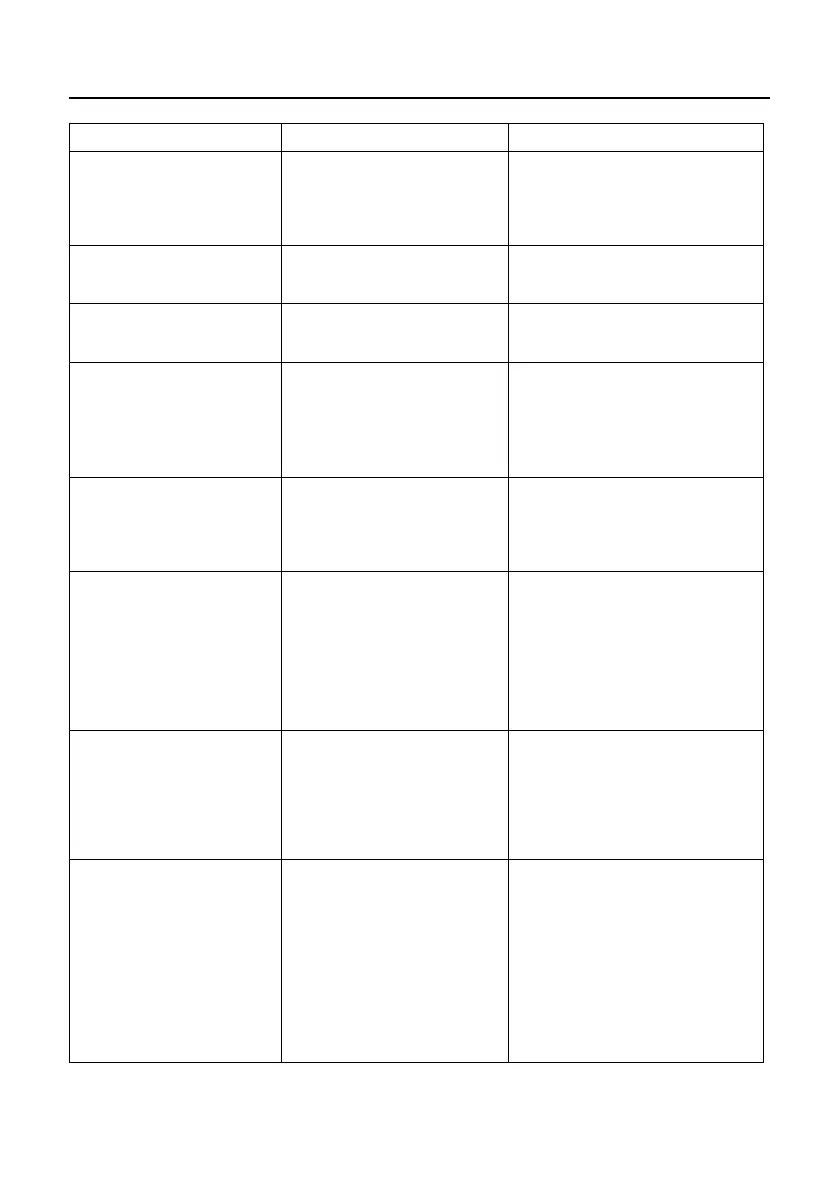
ChipSHOUTER Users Manual: Troubleshooting
64
Symptom
Possible Cause
Solution
Charge fault occurs.
Power supply is in-
sufficient.
Use different outlet.
Replace 19V AC-
DC power
supply.
Device does not boot
(check serial output).
Internal FLASH cor-
ruption.
Perform firmware up-
date/recovery.
Odd smells or sounds
from ChipSHOUTER.
Internal damage
DISCONTINUE USE OF
DEVICE IMMEDIATELY.
Arcing sound from in-
jection tip.
Injection tip not
tight, or injection
tip damaged.
Check injection tip
connections with device
disarmed.
Replace injection tip.
USB interface drivers
do not load.
Drivers are not be-
ing loaded.
Check FTDI website for
latest VCP drivers.
Use different USB port.
Continuous trigger
faults.
External trigger pin
is being pulled to ac-
tive state.
Check if hardware trig-
ger is set to active high
or active low.
Enable 50-ohm termina-
tion with active-high
hardware trigger mode.
ChipSHOUTER goes into
thermal shutdown.
Excessive heat due
to continuous opera-
tion.
Reduce trigger rate.
Disarm ChipSHOUTER in-
between trigger events.
Use external cooling.
Pattern trigger not
working as expected.
Pattern trigger does
not match hardware
trigger polarity.
Probe characteris-
tics mean injected
output does not match
the programmed pat-
tern.
Check hwtrig_mode is
set active-high.
Modify pattern trigger
to achieve desired out-
put.

Table of Contents