EN 12
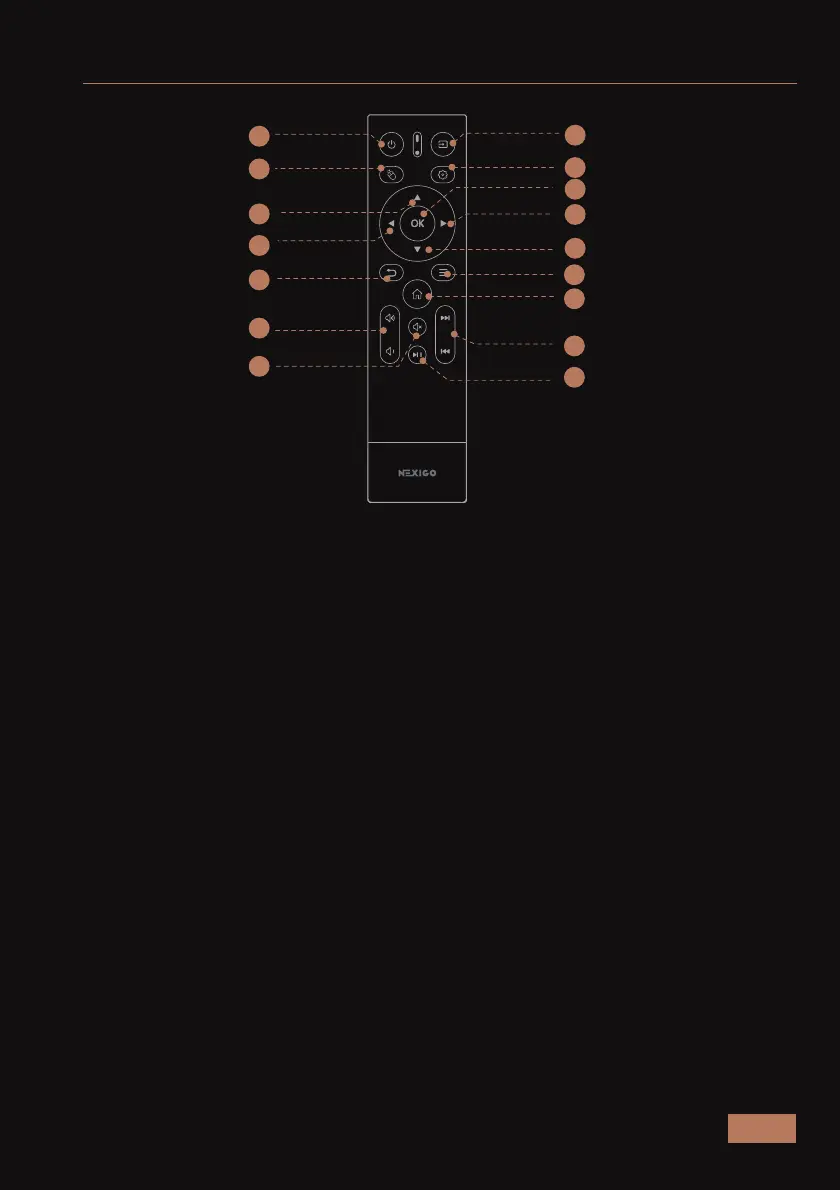
REMOTE INTRODUCTION
1. Power: Toggles power on and off.
2. Source: Adjusts the input source.
3. Air Mouse: Toggles motion control.
4. Settings: Opens the settings menu.
5. Left / Right / Up / Down: Moves the cursor within the on-screen display.
6. OK: Selects the highlighted option.
7. Return: Returns to the previous screen.
8. Menu (Press and hold): Opens the shortcut menu.
9. Home: Returns to the home page.
10. Volume + / -: Increases or decreases the volume.
11. Mute: Toggles audio on and off.
12. Play / Pause: Starts or stops a video.
13. Rewind / Fast Forward: Moves forward or backward within a video.
5
6
5
8
9
12
13
2
4
1
3
5
5
7
10
11



 To Next Page