EN 40
Ensure that you have the Amazon Alexa app set up on your phone or
tablet and that your mobile device is connected to the same Wi-Fi
network as the Aurora Pro.
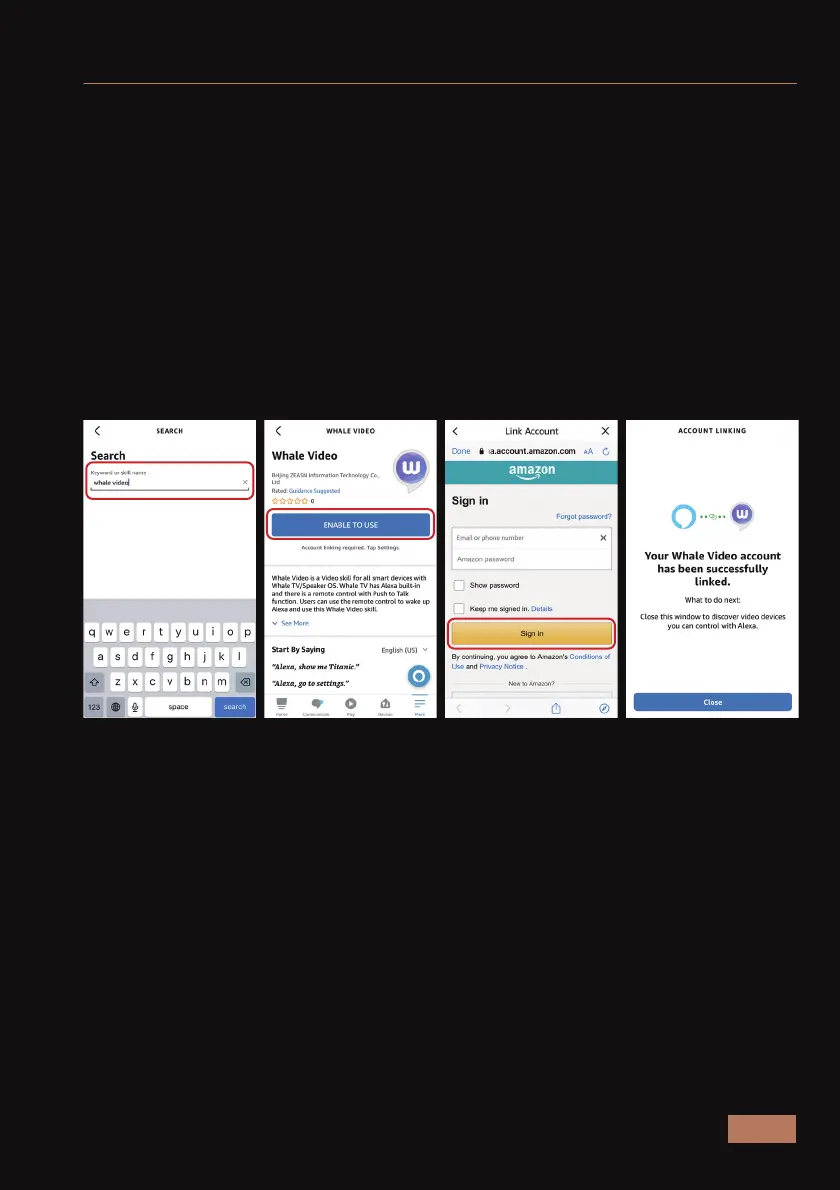
On the Alexa app on your phone, navigate to More > Skills & Games and
then type “Whale Video” into the search bar.
Open the Whale Video Smart Home skill. This skill enables voice control
on devices with access to Alexa. Select Enable to Use to add Whale
Video to your Alexa account.
At this point in the process, you may be prompted to sign in again to
your Amazon account before you can continue. To finish linking your
accounts, you will also need to grant permission for Whale Video to
access your profile.
Step 1: Connect to your home Wi-Fi network.
Step 2: Enable the Whale Video skill on your Alexa app.
AMAZON ALEXA VOICE CONTROL SETUP



 To Next Page