EasyManua.ls Logo

NextBase NBDVR300W - Dash Cam Settings: Accessing Options; Navigate DriveGuard App Settings Menu

NextBase NBDVR300W
46 pages
Print Icon
To Next Page IconTo Next Page
To Previous Page IconTo Previous Page
Loading...
DASH CAM SETTINGS
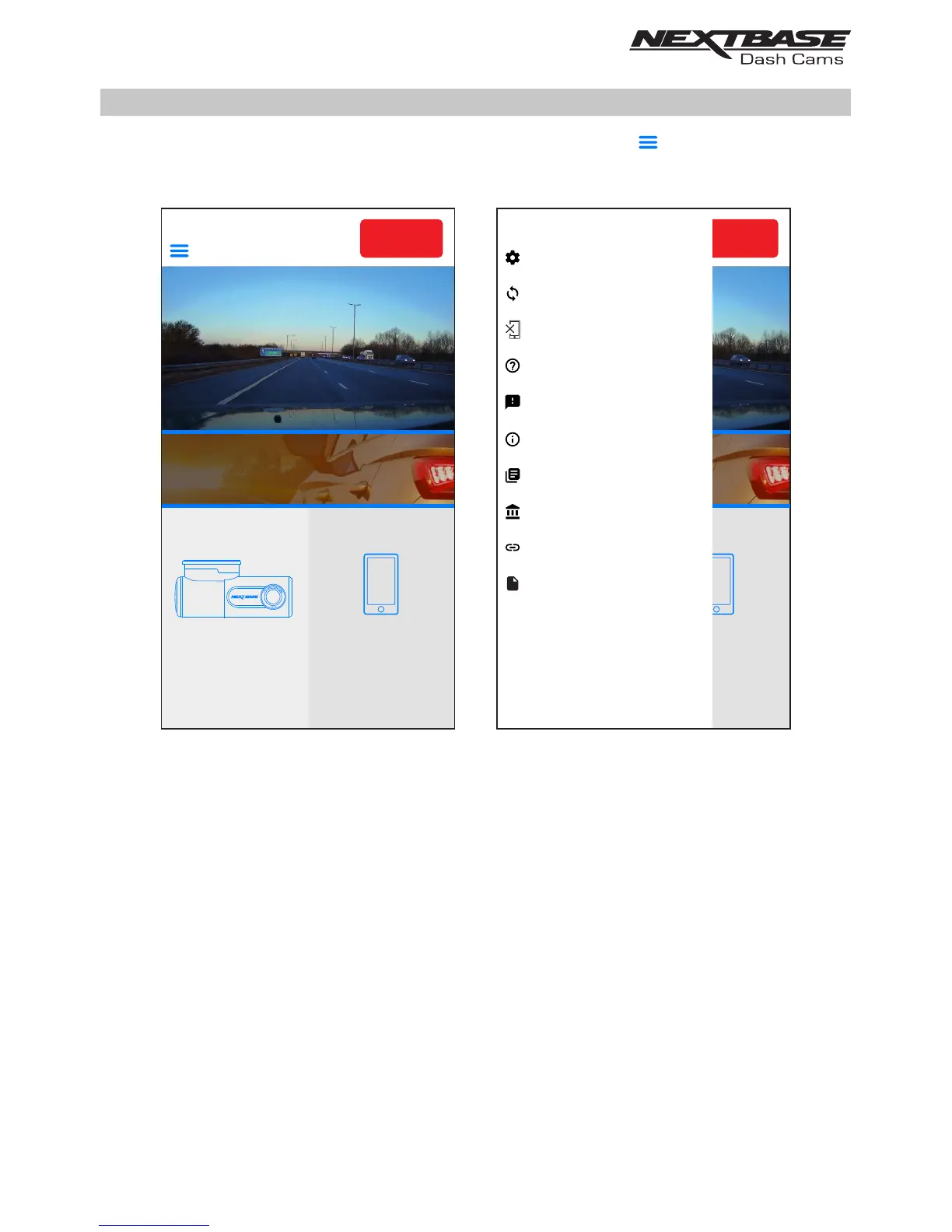
The Dash Cam settings are accessed via the DriveGuard™ App, tap the ‘ ’ button to open the menu.
From the menu select ‘Dash Cam Settings’.
See following pages for full details of the various settings available.
Note:
- Some settings may not be available depending on which iOS / Android version your mobile
device is using.
VIEW
DOWNLOADED
VIDEOS
VIEW
DASH CAM
VIDEOS
REC
HOME
INCIDENT
REPORTING
NEXTBASE News
REC
Dash Cam Settings
Dash Cam Update
Disconnect Dash Cam
REC
Dash Cam Settings
Dash Cam Update
Disconnect Dash Cam
FAQs
Feedback
Acceptable Usage Policy
Acknowledgements
About
Acceptable Usage Policy
Acknowledgements
About
Visit Nextbase.com
Insurance Details
VIEW
DOWNLOADED
VIDEOS
VIEW
DASH CAM
VIDEOS
HOME
INCIDENT
REPORTING
NEXTBASE News
35

Related product manuals