22
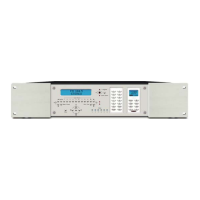
8. Press Program or Menu on the front panel. The Display will return to the default Tuner Window.
9. Test all commands on all buttons for all sources. Replace commands as needed.
NOTE 1: The R-1 Remote that comes with the C-6 has Navigation buttons not found on the
keypads. These buttons are programmed using the same steps as the keypads. (Press a button
on the R-1, followed by a button press on the source remote for the IR command to be associated
with that button.) Once familiar with the process, it may be easier to program all IR commands
using the remote instead of the keypad. This allows programming all of a given sources buttons
at once rather than bouncing back and forth from the keypad to the remote.
NOTE 2: If programming using the R-1 instead of the Programming Keypad, use quick taps on
the R-1 to prompt the Controller in learning mode. Holding the remote buttons down too long will
cause the Controller to recognize R-1 commands, return to a normal operational mode and
attempt to execute to the command. The R-1 remote should be aimed at the IR Window on
the built in keypad on the front of the C-6 not at the IR Learning Window.
NOTE 3: Starting with version 1.91, there are 25 more buttons that can be assigned IR
commands which are not on the keypad, or the remote. These buttons are available as a CCF file
for the Philips Pronto™ series of remote controls. Please contact Nexus if you would like to get
the CCF file.
Power Management of Common Source Components
The C-6 Controller can be programmed to automatically turn the common source components on
when any zone is turned on and turn them off when the last zone is turned off. The programming
is done with a slight variation of IR command programming on the power on/off button.
There are two memory locations associated with the power on/off button for each source
component. One is for an ON command, the other is for an OFF command. All of the source
power on commands will be issued via the IR emitter outputs when any zone in the system is
turned ON. All of the source power off commands will be issued via the IR emitter outputs
approximately 10 seconds after the last zone has been turned off.
If using source components with toggle IR commands (same command turns the device ON and
OFF) program the power command into both locations. If using components with discrete
ON/OFF commands, program ON to the ON location, and OFF to the OFF location. If using
components using RC-5 format codes, the learning processor will recognize the format and
separate the two commands. Simply press the power button on the remote once at step 3 below
and again without pressing any other button on the remote at step 4 below, to teach the ON/OFF
commands to the appropriate locations. To program source power commands:
1. Press PROGRAM on the C-6 front panel. The PROGRAM LED will illuminate RED. The IR
Programming/Zone 1 Keypad on the front panel will turn ON. The Controller Display will change
to the IR Programming Window Menu default: [1] TEACH [2] ERASE.
2. With the Programming Brackets on [1] Teach, press ENTER in the Navigation Array. The IR
Programming Window will change to the Programming prompt for Source 1. (If Source 1 is CD
the prompt will show: Source=CD,? Sel source or func.
3. Press the power button on the Programming Keypad. The LEARN·ERROR LED will slowly
flash RED. The Display will change to: Source=CD,OFF Teach code or re-sel. Point the remote
for the CD player directly at the IR WINDOW on the front panel, next to the Program button and
press the power, or OFF button on the remote. The Learn·Error LED will turn solid red or fast
flash red, quickly turn GREEN and then slowly flash green twice. This indicates a learned
command.
4. Press the power button on the Programming Keypad again. The Display will change to:
Source=CD,ON Teach code or re-sel. Point the remote for the CD player directly at the IR
WINDOW on the front panel, next to the Program button and press the power, or ON button on
the remote. The Learn·Error LED will turn solid red or fast flash red, quickly turn GREEN and
then slowly flash green twice. This indicates a learned command.
5. Repeat steps 3-4 for all sources.
6. Press Program or Menu on the front panel. The Display will return to the default Tuner Window.


 To Next Page
 Loading...