6
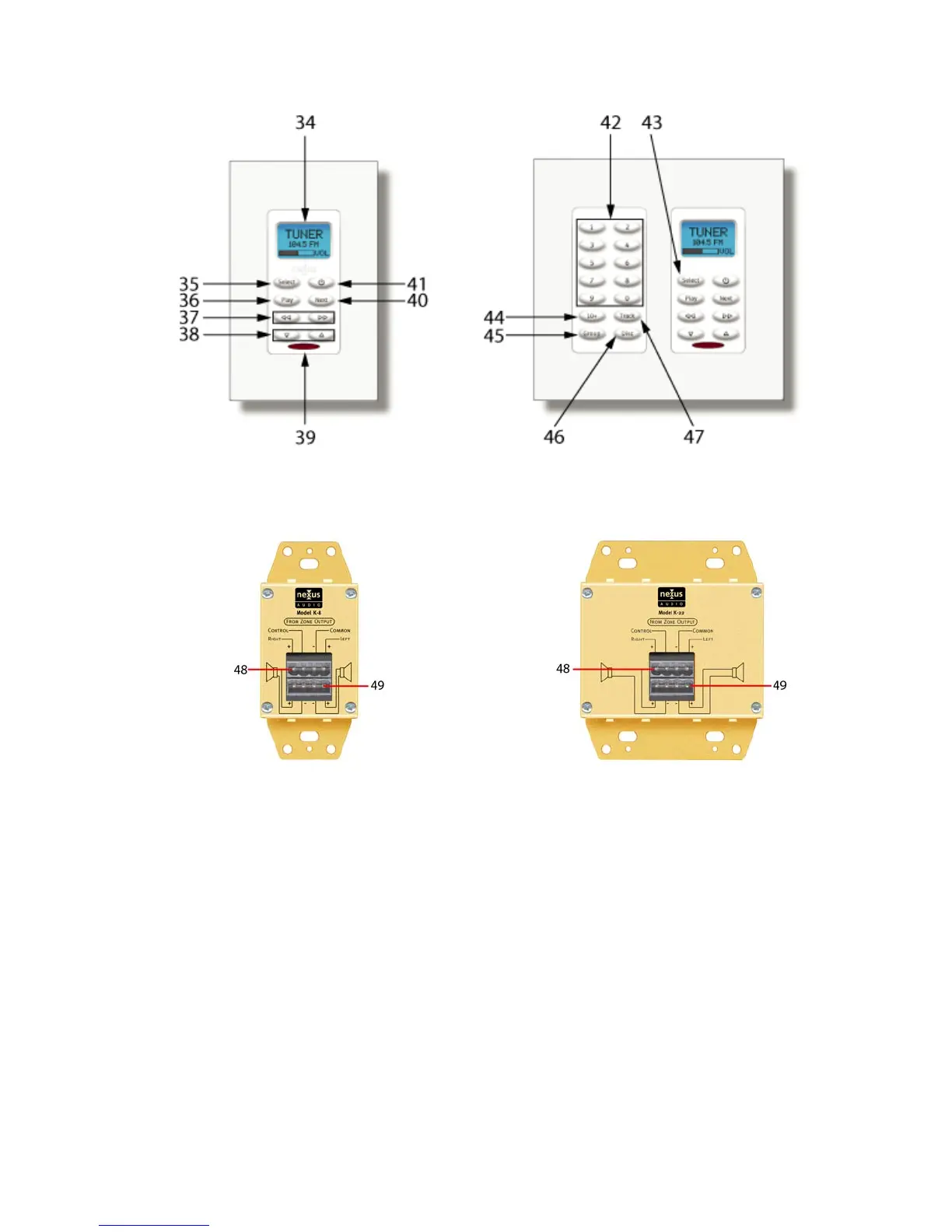
Figure 3. K-8 Keypad Figure 4. K-22 Keypad
Front Panel Front Panel
Figure 5. K-8 Keypad Figure 6. K-22 Keypad
Rear Panel Rear Panel
Keypad
Front (K-8 and K-22 Keypads)
34. Keypad LCD – Displays zone status for the selected source and volume. OFF when zone is
OFF.
35. Select Button – Press to scroll and select sources. No programming required.
36. Play Button – Press to play CD, DVD VCR etc. IR commands must be programmed by
source.
37. Function Buttons – Press to control transport functions such as: scan forward/reverse,
track/chapter skip, previous/next disc etc. IR commands must be programmed by source.
38. Volume UP/DOWN Buttons – Press and hold to adjust volume UP/DOWN by zone. No
programming required.
39. IR Sensor – Receives IR commands from R-1 Handheld Remote or other programmable
remote with R-1 codes to control C-6.
NOTE: C-6 will only respond to R-1 commands. There is no IR pass through to control
source components with their native remotes.


 To Next Page