8
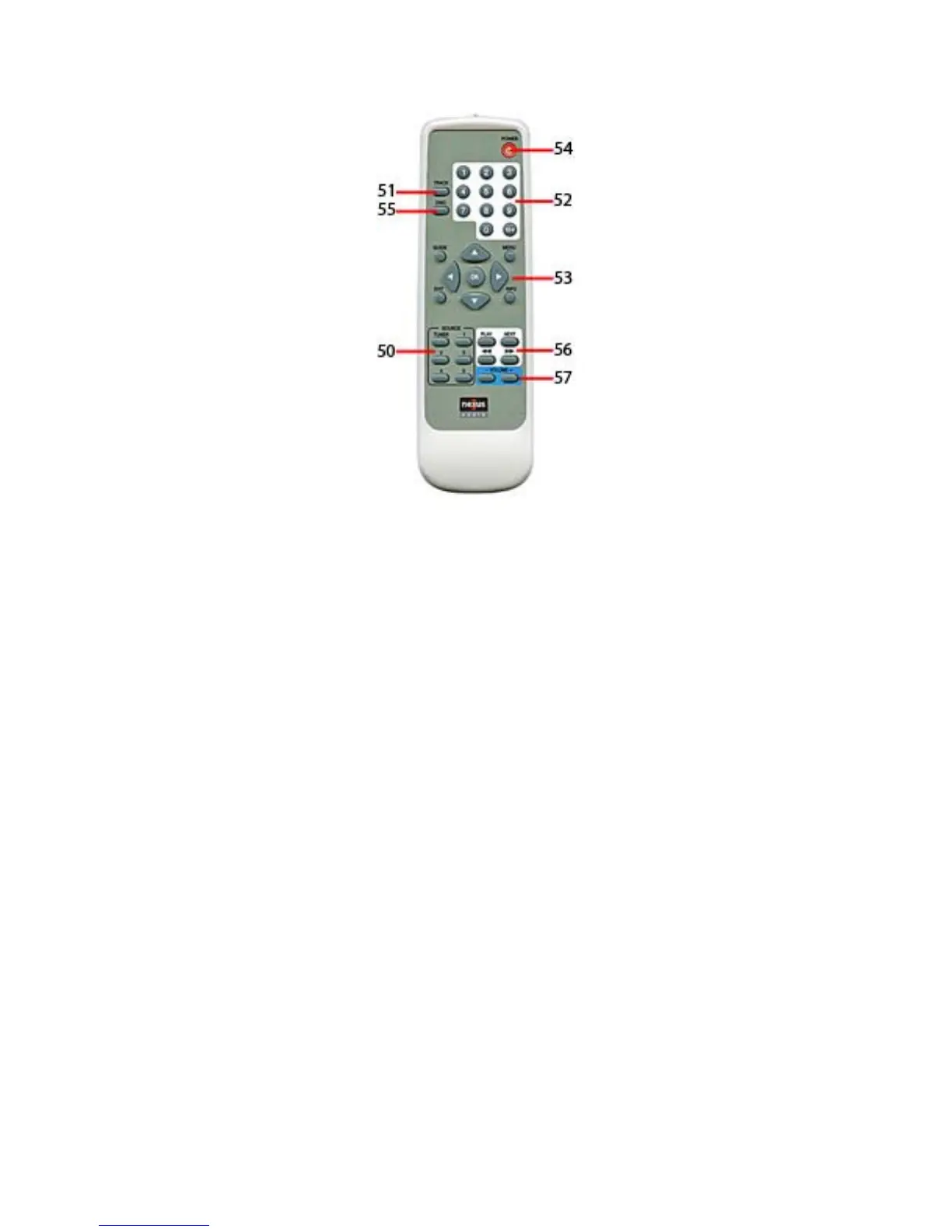
Figure 7. R-1 Handheld Remote
R-1 Handheld Remote
NOTE 1: The C-6 Controller will only respond to R-1 IR codes. ‘System’ functions such as
ON/OFF, Volume, Source select are pre-programmed at the factory. ‘Source’ functions such
as track, disc, play, scan, numeric and navigation function commands must be programmed
into the C-6 Controller. See section: PROGRAMMING - IR. The R-1 commands can be
taught to other programmable controllers, but the source function commands must still be
programmed into the C-6 Controller.
NOTE 2: Any Source IR commands programmed into the C-6 Controller for the Keypads will
respond to button presses from the R-1 and do not need to be programmed twice.
50. Source Select Buttons - Press to select an Input on the C-6 Controller in a Zone. No
programming required.
51. Track Select Button – Press to select a specific track when used with numeric buttons for
disc changers. IR commands must be programmed by source.
52. Numeric Buttons - Press to select Tuner Presets, or programmed commands for direct track
or disc selection. These buttons can also be programmed for direct access tuning for cable,
satellite etc. Tuner Preset Commands are programmed at the factory. IR commands must be
programmed by source.
53. Navigation Buttons - Press to navigate menus for satellite, satellite radio, cable, music
servers, and disc changers. IR commands must be programmed by source.
54. Power ON/OFF Button - Press to toggle zone ON/OFF. Press and hold to turn all zones
OFF. No programming required.
55. Disc Select Button – Press to select a specific disc when used with numeric buttons for disc
changers. IR commands must be programmed by source.
56. Transport Buttons – Press to control source functions such as play, scan, skip etc. NEXT
button will select next Tuner Preset when Tuner is selected and can be programmed to select
next disc, track, channel etc. Must be programmed for any source other than Tuner.
57. Volume UP/DOWN Buttons – Press to adjust volume UP/DOWN by zone. No programming
required.


 To Next Page