15
17 - NICE RECEIVERS AND TRANSMITTERS
17.2 - Programming Instructions
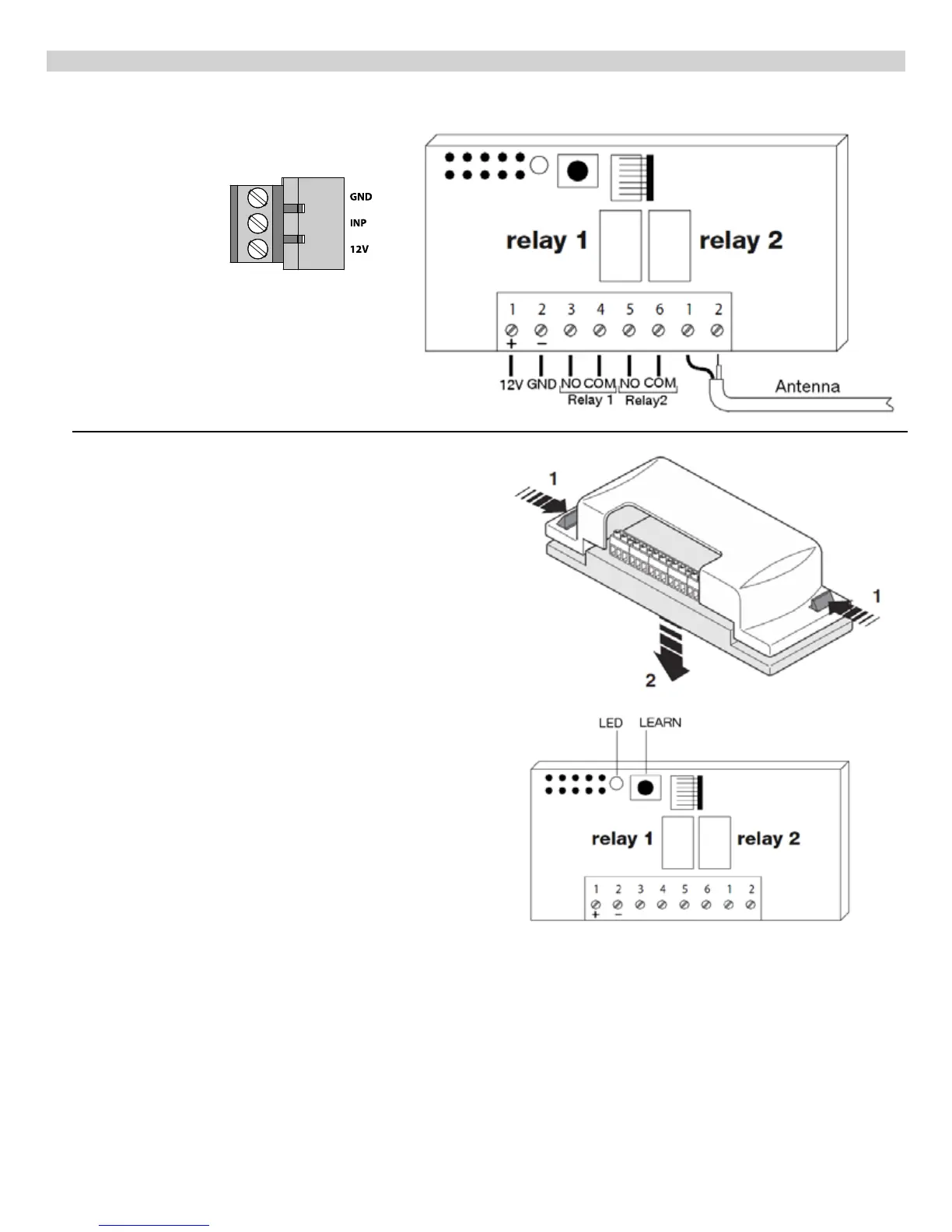
Remove plastic cover of receiver.
Programming transmitters
Press and release the Yellow Learn Button on the receiver inside
the control box
.
The red LED next to the learn button will turn on
and stay on for 5 seconds.
While the red LED of the receiver is on, press and hold either
button on your 2 button transmitter
until the LED on the receiver
turns off. When the red LED on the receiver turns off, release the
transmitter button and immediately press and release the same
transmitter button again. The red LED on the receiver will ash
3 times indicating the transmitter is programmed. Repeat these
steps for programming additional transmitters.
By default, after programming the transmitter(s), button 1 will
control relay 1 and button 2 will control relay 2.
Deleting Transmitters
Press and hold the yellow learn button for 3 seconds. When the
LED turns off release the yellow button. Press and hold either
transmitter button (of the transmitter to be deleted) until the LED
turns off, release the transmitters button and immediately press
the same button again.
The LED ashes 1 time to conrm the transmitter has been
deleted.
Deleting ALL transmitters from memory
Press and hold the yellow learn button of the receiver, the LED
will turn on and after 3 seconds turn off, then start to ash.
Release the yellow button on exactly the 3 ash. As soon as the
LED turns back on press the yellow learn button and release as
soon as the LED turns back off.
17.1 - Wiring Instructions for Nice receivers
Connect terminals 1-4 of the receiver to the
635/636 circuit board.
Terminal 1 - 12V
Terminal 2 - GND
Terminal 3 - INP
Terminal 4 - GND
To Control another gate or device within
close proximity connect wires from activation
terminals of second operator or device to
terminals 5 and 6 of this receiver.


 To Next Page