17
Intercom Description
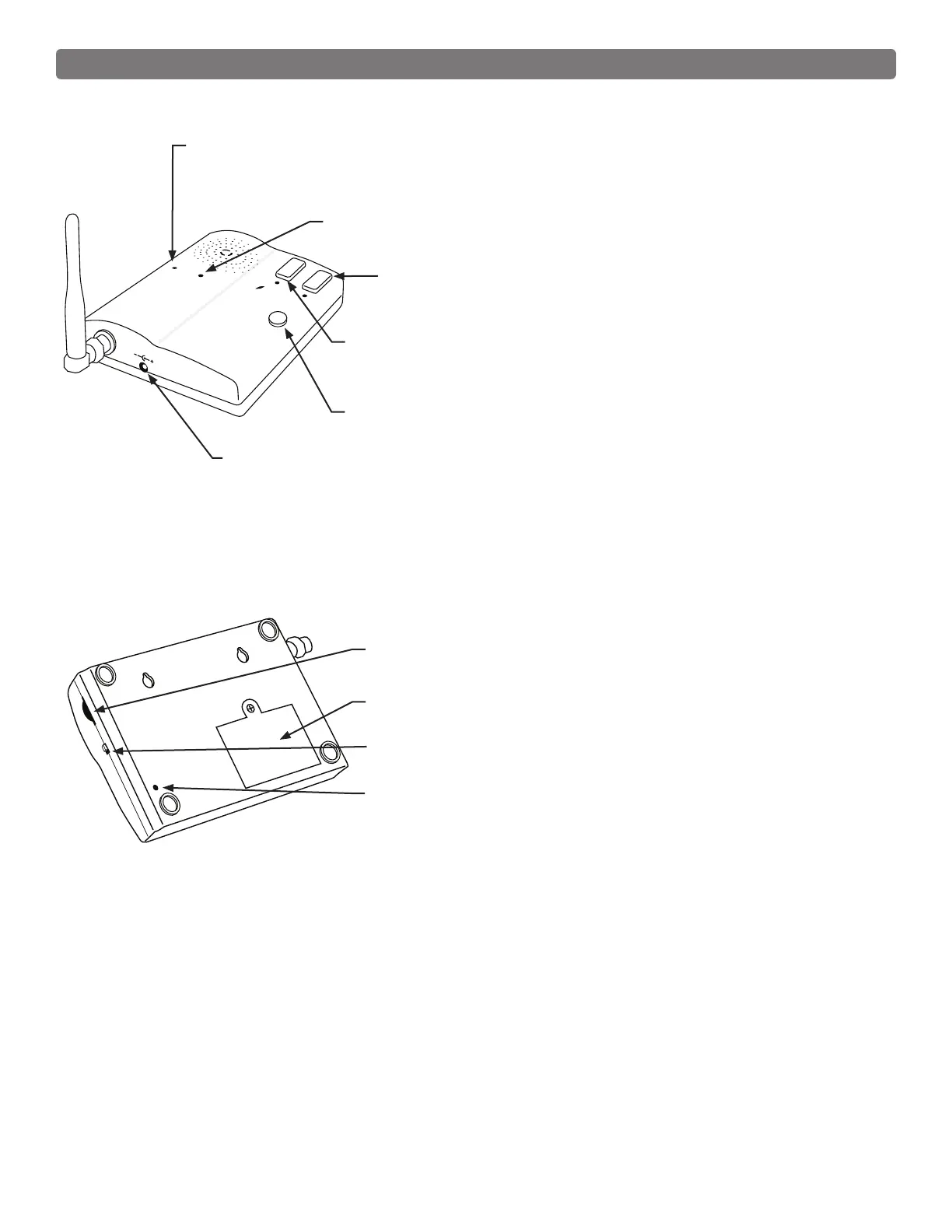
GRANT ACCESS Button: When the GRANT PERMISSION button
must be pressed, then the person at the keypad presses any key to
open the gate.
Intercom - Face
PUSH TO ANSWER/TALK Button: Used to answer CALL from
keypad. HOLD to talk - RELEASE to listen.
POWER
Keypad
Batt Low
Grant Permission
Push To Answer/Talk
End Call
DC 9V
POWER Light:
LED is GREEN when charging on AC power source and RED during
battery power mode. Blinking RED indicates low battery on Base unit.
KEYPAD BATTERY INDICATOR Light: LED turns ON when keypad
battery is low.
9 Vdc Transformer Plug:
Transformer plugs here to charge the base unit battery.
ID SET
VOLUME
POWER
OFF
ON
Intercom - Bottom
ON/OFF Switch: Turn OFF to conserver power when battery
operated.
VOLUME Control: Controls volume level of speaker.
ID SET button: This button is used only when there is another pair
of wireless intercom units nearby causing interference.
END CALL Button: Allows user to terminate the call.
BATTERY ACCESS Cover: Rechargeable 3.6 Volt Ni-MH battery
included.



 To Next Page