3
HDMI HDMI
USB
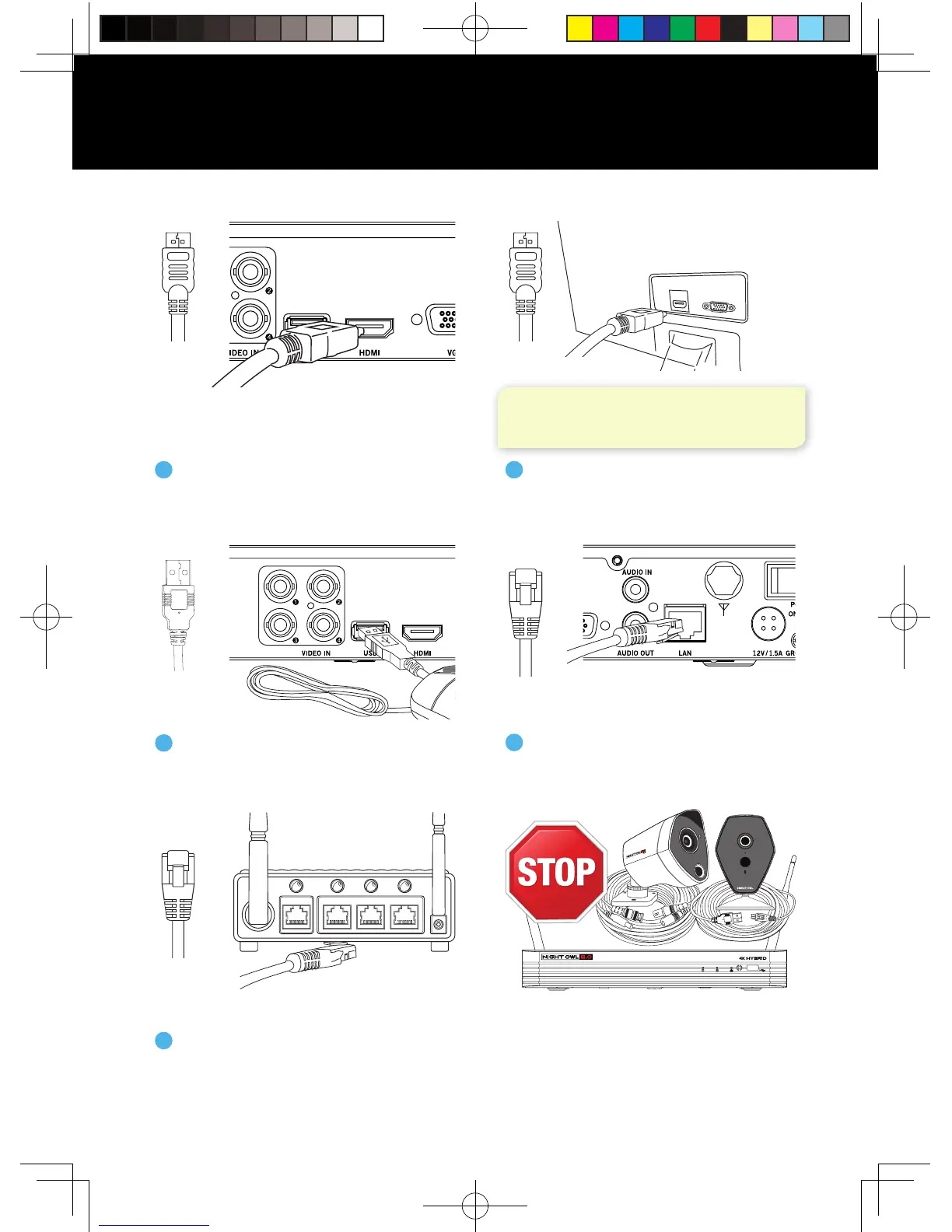
Connecting Your System
NOTE: Monitor is required for initial setup. To
view cameras, TV/Monitor must be tuned to
the same Input the HDMI is plugged into.
(Router Not
Included)
ETHERNET
Plug the other end of the
Ethernet cable into a numbered
port on the back of the router.
5
STOP: BEFORE installing, test
each camera locally to confirm they
function properly.
DISCLAIMER: Camera/cable quantities may vary.
ETHERNET
Plug included HDMI cable into
the HDMI port on the back of
the DVR.
1
Plug the other end of the HDMI
cable into the back of the TV
or Monitor.
2
Plug the USB mouse into the USB
port on the back of the DVR.
3
Plug the included Ethernet cable
into the LAN port on the back of
the DVR.
4
QSG-H2THD.indd 4 2018/6/22 11:00



 To Next Page