E-10
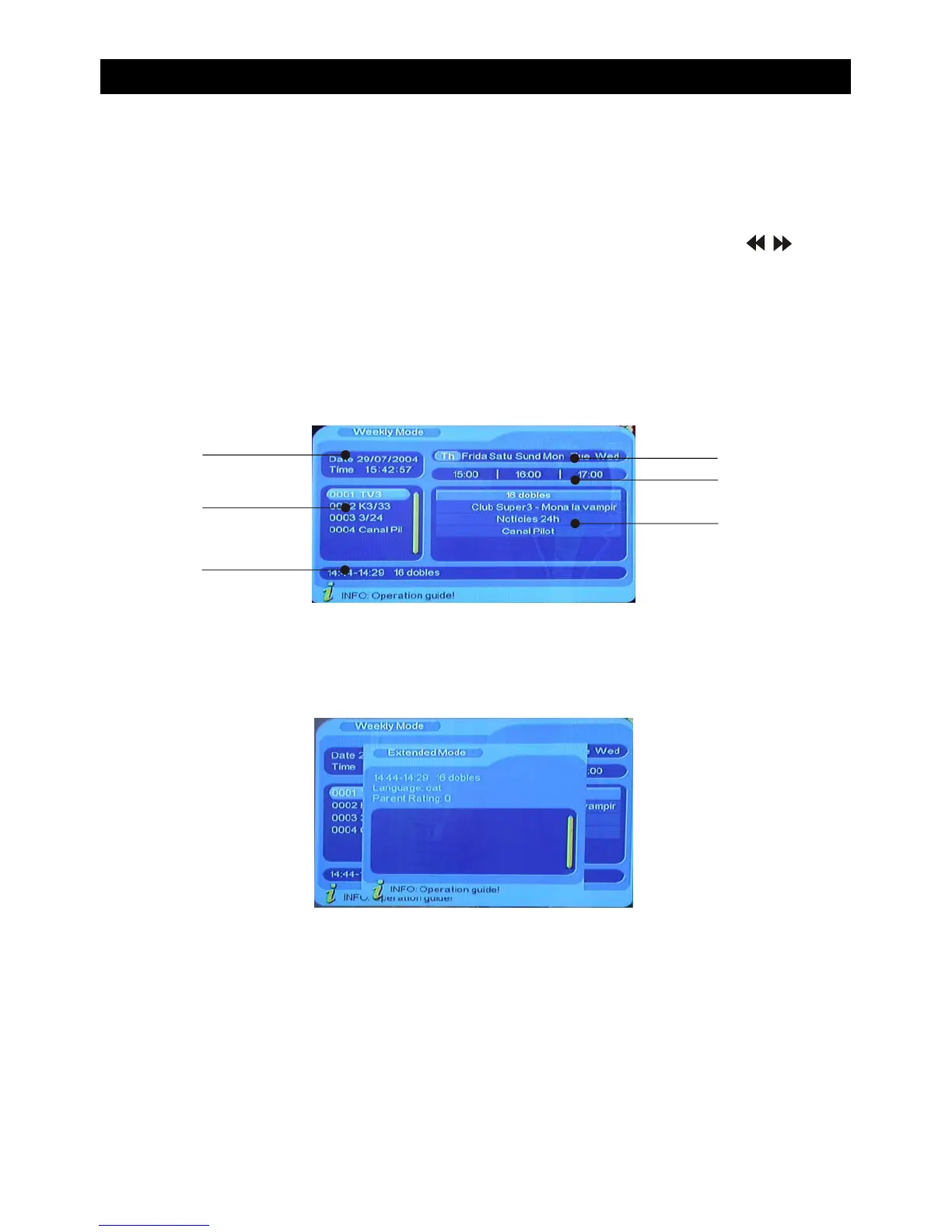
EPG Explained.
F
A
B
C
D
E
A) Current time and date.
B) Program list. Press “CH+/CH-” to switch between programs.
C) Information of EPG selection.
E) Daily Planner. Displays the time range in hours in which the program will be displayed.
Press “VOL+/VOL-” to select a time range.
F) Information of programs. Shows which programs are showing on the channels displayed
in “A”. This also corresponds to the time range displayed in “E”.
•When the cursor is above the selected channel/program in“B / F” press the yellow button to
display detailed information of that particular program.
• When the cursor is above the selected channel/program in“B / F” Press the blue button to
enter the timer/reminder mode. This will sound an alert informing you that your program is
about to start.
• Press “EXIT” to exit from the EPG
D) Weekly Planner. Displays the time range in days of programs shown. Press “ / ” to
select a day.
BASIC FUNCTIONS


 To Next Page