E-17
E) Delete All
Under Channel manger select “Delete All” using “CH+/CH-” buttons. In the Delete all menu
screen there are two options: To select either of these two options use the “CH+/CH-”
buttons.
The password for deleting channels is “0000".
• All TV Channels
• All Radio Channels
Configuration
This option gives you the choice to customise the display.
To enter the configuration follow this path:
MENU->Digital TV-> Configuration
You will be presented with six options.
A) OSD
B) TV
C) System Setup
D) Time
E) Wakeup Timer
F) Parental Lock
A) OSD
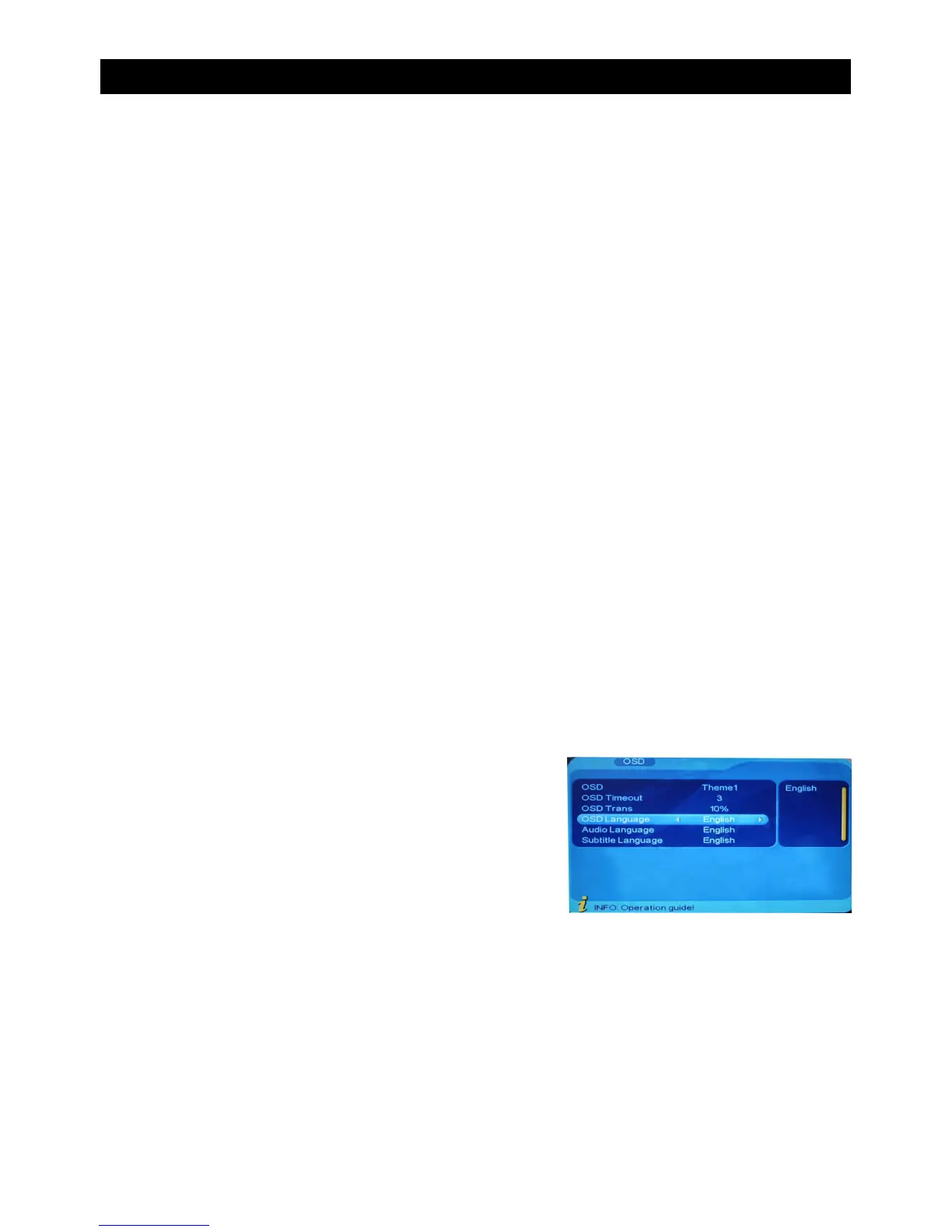
This option allows you to set up the “On Screen Display” according to your own preferences.
To enter the configuration follow this path:
MENU->Digital TV-> Configuration-> OSD
In this menu there are six options which can be altered.These can be selected using the
“CH+/CH-” buttons. To alter the selection use the “VOL+/VOL-” Buttons. Pressing “EXIT”
will exit this menu.
• OSD (Sets the theme/colour of the OSD)
• OSD Timeout (Sets the time it takes for the OSD to disappear when in full screen mode)
• OSD Trans (Sets the transparency of the OSD)
• OSD Language (Sets the language of the OSD depending on the area you are in)
• 1st Audio Language (Sets the 1st choice supported audio language)
• 2nd Audio Language (Sets the 2nd choice supported audio language)
USING THE ON SCREEN MENU


 To Next Page