E-15
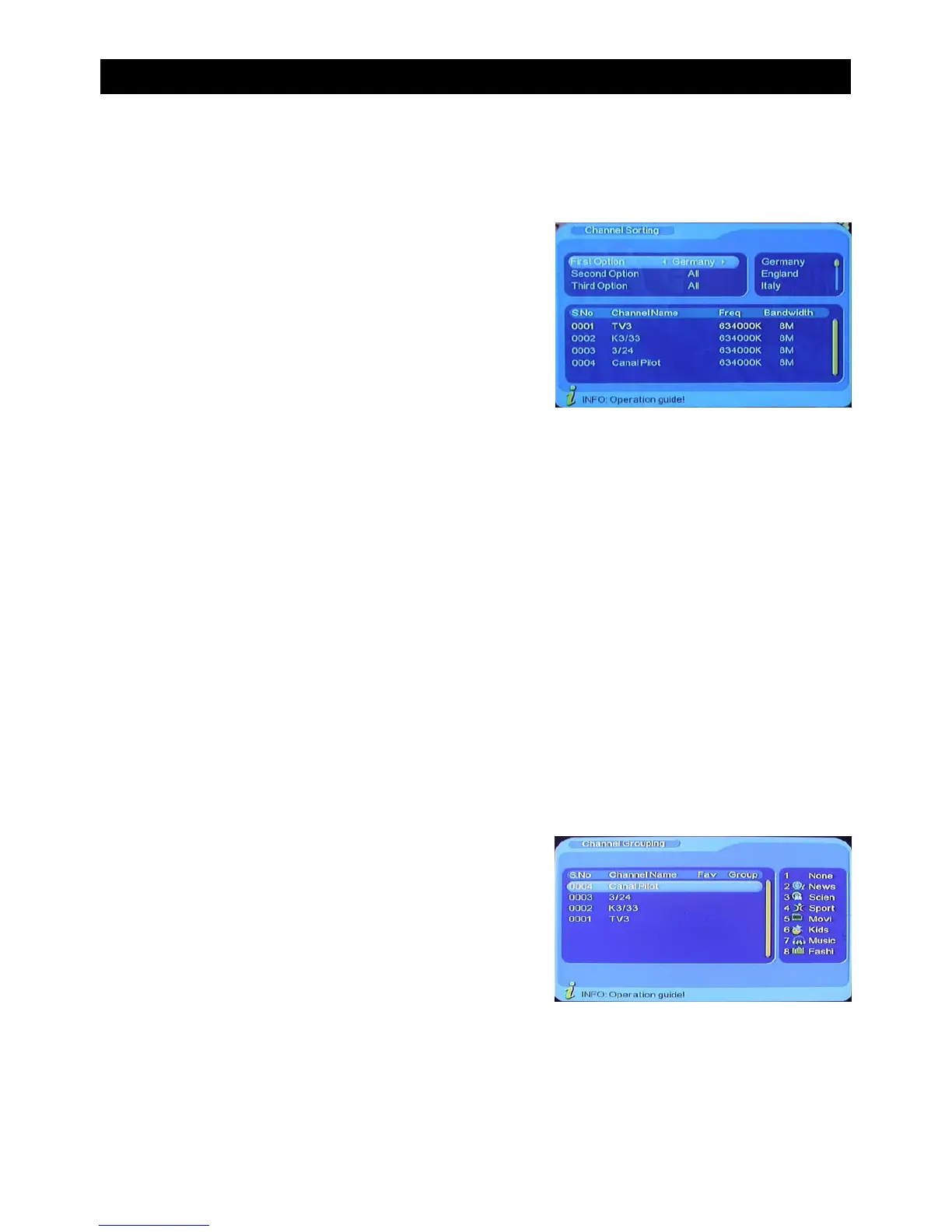
B) Channel Sorting
To enter the channel sorting menu follow this path:
MENU->Digital TV-> Channel Manager->Channel Sorting
Channels can be sorted using three options:
1. Choose the programs to be sorted via the selection area or country
2. Choose the programs to be sorted by category: FTA (Free to air), Scramble(encrypted),
all freehand encrypted channels.3. Choose the program to be sorted in alphabetical
order (A-Z or Z-A)
• Press “CH+/CH-” to choose option
• Press “VOL-/VOL+” to choose sorting parameters
• Press “ENTER” to confirm
• Press “EXIT” to Exit
C) Channel Grouping
To enter the channel grouping menu follow this path:
MENU->Digital TV-> Channel Manager->Channel Grouping
Channels can be grouped according to the following categories:
• None (1)
• News (2)
• Science (3)
• Sport (4)
• Movies (5)
• Kids (6)
• Music (7)
• Fashion (8)
• Press “CH-/CH+” to choose the line where the channel will be grouped in.
• Press Number key 1-8 to set the different channel grouping option. See list above for
corresponding numbers.
• Press “EXIT” to exit this menu.
USING THE ON SCREEN MENU


 To Next Page