4
Shooting
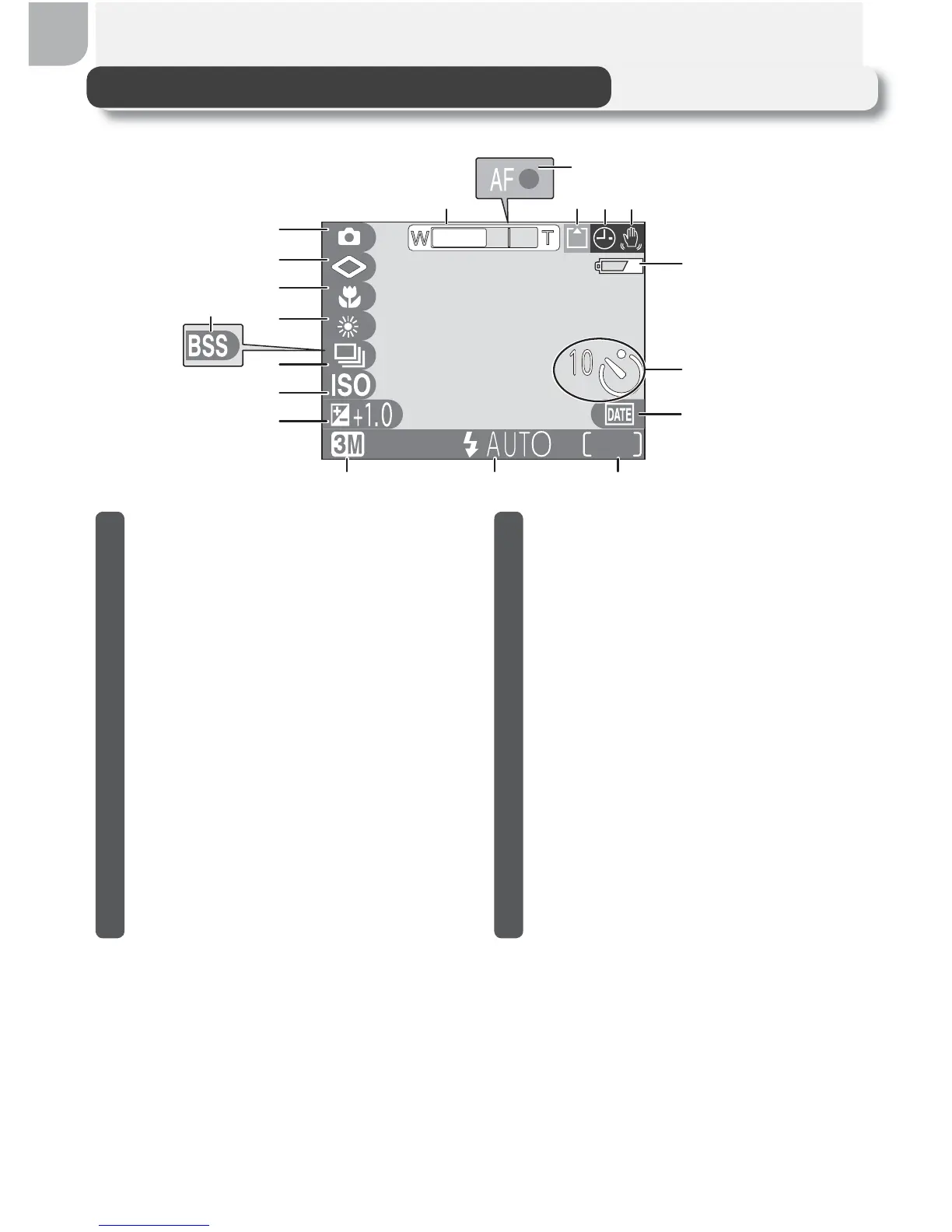
The Monitor
19
7
13
12
14
16
17
19
18
13
5
6
91011
4
8
15
2
1 Zoom indicator
1
......................18
2 Focus indicator........................20
3 Recording indicator .................21
4 “Date not set” icon
2
...............15
5 Camera shake icon
3
................25
6 Battery level indicator
4
.............12
7 Self-timer indicator..................26
8 Date imprint indicator .............63
9 Number of exposures remaining/
length of movie...........16, 17, 51
10 Flash mode .............................24
11 Image quality/size indicator .....58
12 Exposure compensation ..........62
13 Sensitivity gain indicator
5
.........25
14 Continuous shooting mode.....64
15 Best Shot Selector (BSS)...........65
16 White balance.........................60
17 Macro close-up mode .............27
18 Image sharpening ...................66
19 Shooting mode ...................6, 16
1 Displayed when zoom buttons are pressed.
2 Appears when camera clock has not been set.
3 Appears at slow shutter speeds to warn that pic-
tures may be blurred.
4 Appears when batteries are running low.
5 Indicates that camera has raised sensitivity auto-
matically.



 To Next Page
 Loading...










