The Mode Dial
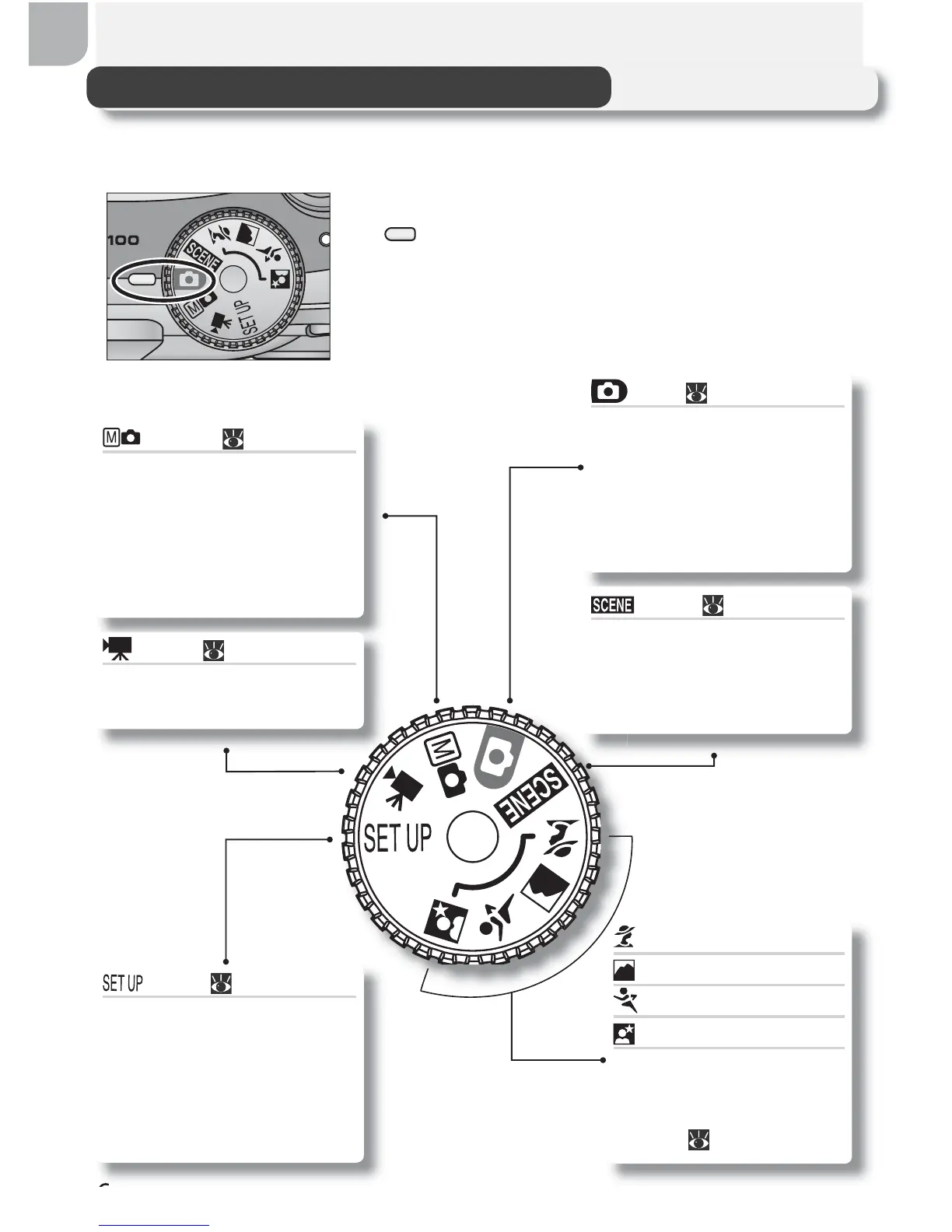
Using the mode dial, you can select from eight shooting modes and setup
mode. Choose a shooting mode according to shooting conditions.
To select a mode, align the mode icon with the
“ ” mark next to the mode dial.
Setup ( 77)
Choose this mode to dis-
play the setup menu, where
you can perform such tasks
as setting the camera clock
and adjusting monitor
brightness.
Manual ( 17, 56)
In addition to the shoot-
ing-menu options available
in auto mode, you have
access to such menu items
as white balance and image
sharpening.
Portrait Assist
Landscape Assist
Sports Assist
Night Portrait Assist
Use framing assist to help
compose pictures suited
to a particular type of
subject ( 28–33).
Auto ( 16)
A simple “point-and-shoot”
mode in which the majority
of camera settings are con-
trolled by the camera. Rec-
ommended for fi rst-time us-
ers of digital cameras.
Scene ( 28, 34–37)
Choose from ten “scenes”
suited to different subjects
or shooting conditions and
let the camera do the rest.
Movie ( 51–52)
Make silent movies up to
40 s in length.



 To Next Page
 Loading...










