10
Preparation for Shooting
Preparation for Shooting
Inserting Batteries
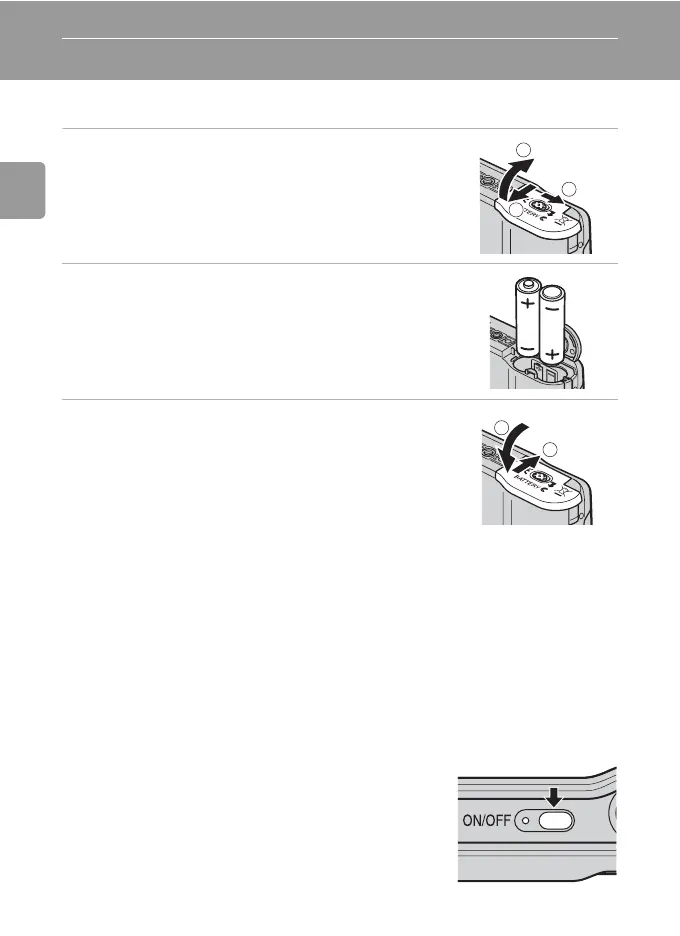
Insert the Batteries
1 Open the battery-chamber cover.
• Hold the camera upside down to prevent the bat-
teries from falling out.
2 Insert the batteries.
• Insert the batteries correctly as shown at right.
3 Close the battery-chamber cover.
Supported Batteries
This camera uses the following size AA batteries.
• Two FR6/L91 lithium batteries (batteries supplied)
• Two LR6 alkaline batteries
• Two Nikon EN-MH1 rechargeable nickel-metal hydride batteries (available
separately)
• Two ZR6 oxyride batteries
Turning On and Off the Camera
To turn on the camera, press the power switch. The
power-on lamp (green) will light for a moment and
the monitor will turn on.
To turn off the camera, press the power switch
again.
1
2
3
1
2



 To Next Page
 Loading...










