48
More on Photography
Select from the following options according to your shooting intent.
* All figures are approximate. Print sizes assume a printer resolution of approximately 300dpi. The
size of images when printed depends on the printer resolution: the higher the resolution, the
smaller the final print size.
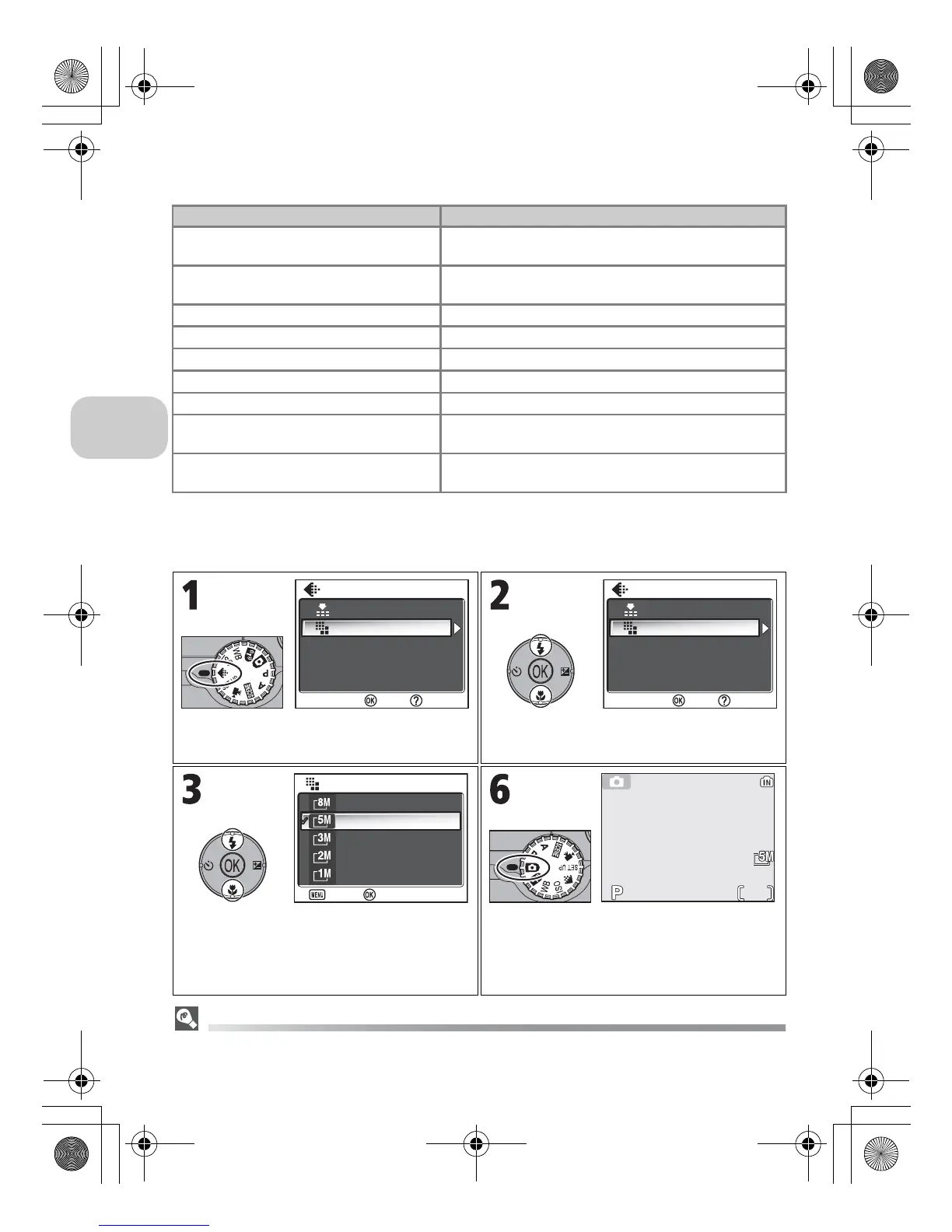
To choose image quality or size:
The Shooting Menu
Image quality and size can also be set in the Shooting menu (c86).
Image size (pixels) Print size (cm)*
c 3264 × 2448
(default setting for P1)
28 × 21 (11" × 8")
d 2592 × 1944
(default setting for P2)
22 × 16 (8.6"× 6.5")
e 2048 × 1536 17 × 13 (6.7"× 5.1")
f 1600 × 1200 14 × 10 (5.3"× 4")
g 1280 × 960 11 × 8 (4" × 3")
h 1024 × 768 9 × 7 (3.4"× 2.6")
i 640 × 480 5 × 4 (2.1"× 1.6")
j 3264 × 2176
(for P1)
28 × 18 (11" × 7")
j 2592 × 1728
(for P2)
28 × 15 (11" × 5.8")
IMAGE MODE menu is displayed. Highlight Image quality or Image size
and press d.
Highlight option and press d. Rotate mode dial to X, b, P, A or
Y (when Shoot & Transfer is
selected.). Current image quality and size
displayed in monitor.
Image quality
Image size















 To Previous Page