2 Introduction
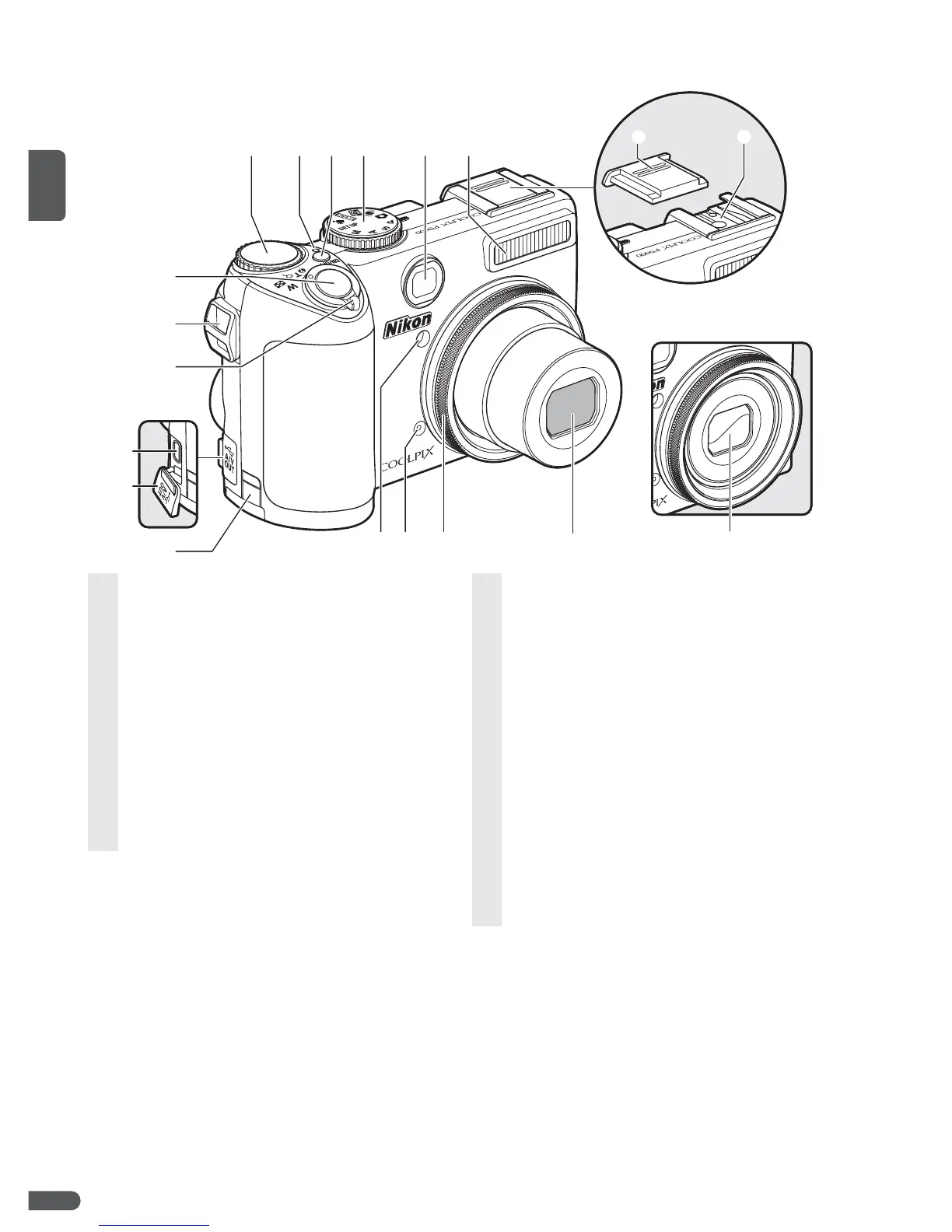
Parts of the Camera
e
w
q
t
r
y
!0
o
!1
!8
!5
!6
!7
!9
!4
!2
!3
u
i
Lens in storage position
1 Command dial....23, 29, 43, 48, 50, 52, 89
2 Power-on lamp ................................................. 16
3 Power switch...................................................... 12
4 Mode dial.................................................................6
5 Viewfinder ............................................................18
6 Built-in flash......................................................... 24
7 Accessory shoe cover ...................................93
8 Accessory shoe
(for optional flash unit)................................. 93
9 Shutter-release button........................20–21
10 Eyelet for camera strap (×2).........................3
11 Zoom control.....................................................19
M (thumbnail playback) ............................43
O (playback zoom)..........................................43
L (help)....................................................................7
12 Cable connector............................... 55, 58, 61
13 Connector cover .............................. 55, 58, 61
14 Power connector cover for
optional AC adapter kit................................90
15 Self-timer lamp.......................................... 26, 94
AF-assist illuminator............................... 25, 94
16 Microphone ........................................ 46, 47, 51
17 Lens ring................................................................92
18 Lens............................................................... 96, 108
19 Lens cover ............................................................94



 To Next Page
 Loading...







