- D ・ -
logo�Q0310�forGraphic
070509�Gdesign�ito
VBA20001-R.3720.A
・
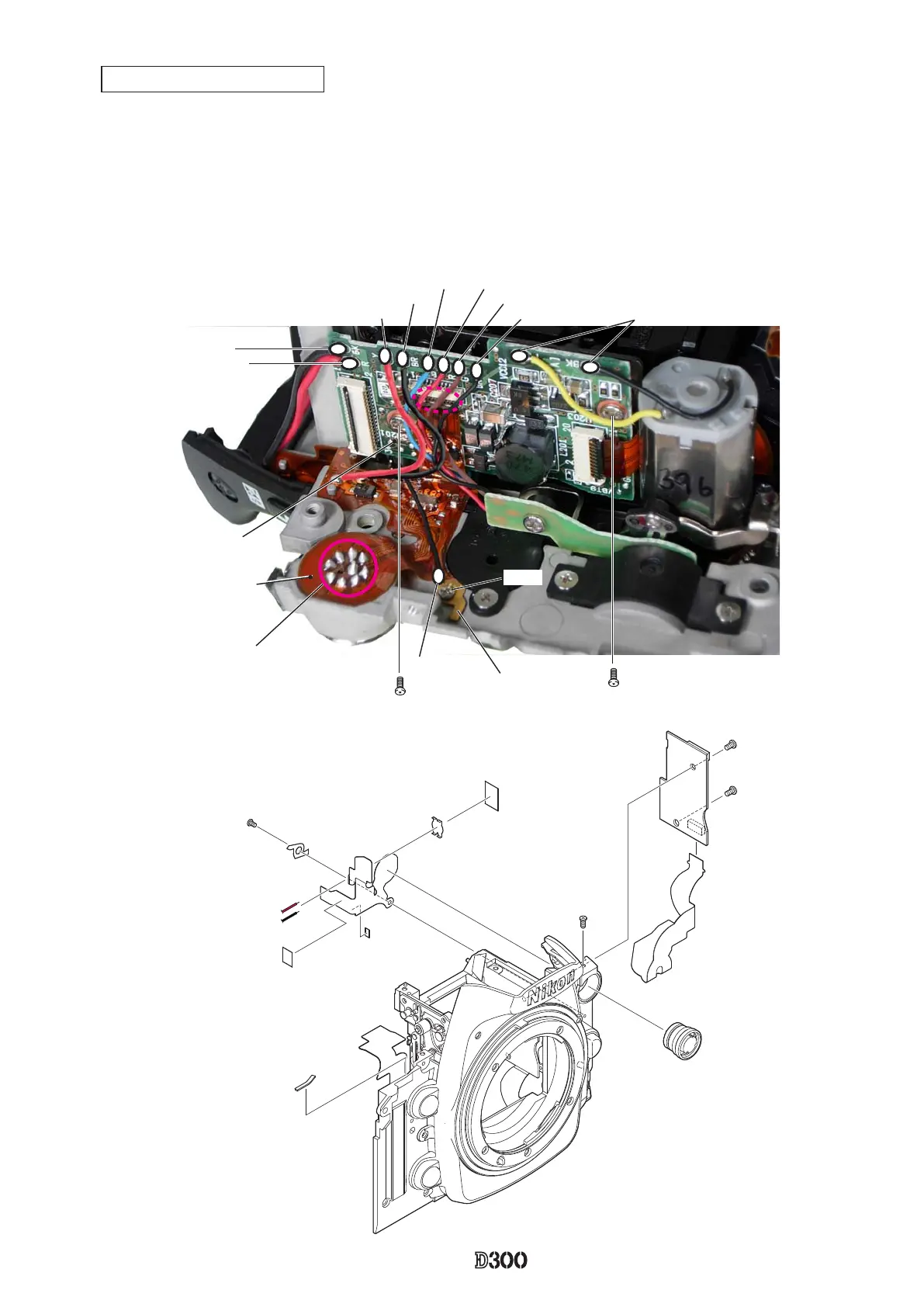
Remove the ten solders of the wires that are connected to the PD base plate (#1002).
・
Disconnect the FPC (#1010) from the connector.
・
Take out the screw (#1522), and remove the PD base plate.
・
Remove the solder of the lens release SW lug plate (#680) and also remove nine solders of the 10-pin terminal
(#41) (which is assembled from the other side and soldered).
・
Take out the screw (#1503), and remove [#680] and the FPC (#1010).
・
Take out the screw (#65), and remove [#41].screw (#65), and remove [#41].[#41].#41].
PD base plate/10-pin terminal
Yellow
Brown
Blue
Red
Green
Black
Red
Black
#1119:Black
10-pin terminal (#41)(9 solders)
lug plate (#680)
AF motor wire
FPC: #1010
PD base plate
(#1002)
#1522
#1522
#1503
#991
#39
#1010
#1110
#1111
#957
#905
#1522×2
#1002
#1042
#65
#41
#968
#680
#1503



 To Next Page
 Loading...











