Nikon D5100 Experience
40
which will make the background blurry, call attention to your subject, and generally result
in a more dramatic or interesting photo.
Use A mode most of the time, to control the range of your dof and the amount of background
blur.
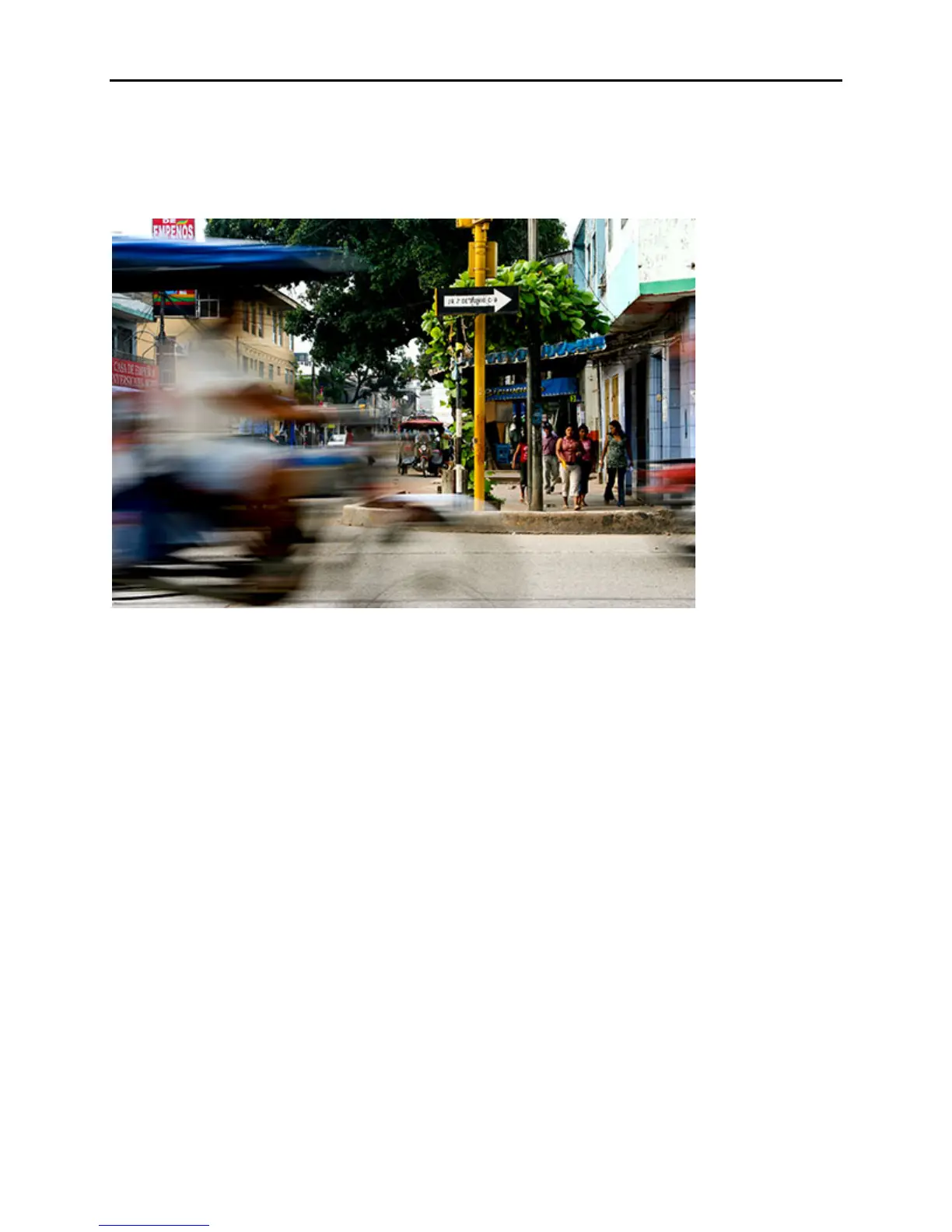
Figure 27 – Mototaxi, Pulcallpa, Peru. Use of a slow shutter speed to express motion through
blur. Shutter speed 1/20, Aperture f/14, ISO 100
Shutter-Priority Auto Mode - S: To control the shutter speed you need to use Shutter-Priority
Auto Mode (S). Shutter speeds are identified by time in seconds or most often fractions of a
second. A slow shutter speed is something like 1/2 or 1/30, while a fast shutter speed is 1/500,
1/1000, or 1/2000. Shutter speeds are shown on the Information Display as the fraction, such as
1/30 or 1/500, and in the viewfinder as just the denominator, such as 30 or 500. In order to take
a photo that does not have blur caused by camera or subject movement when hand-holding, the
camera needs to be set at an appropriate shutter speed. Generally for still subjects this is 1/60 or
faster, like 1/125 or 1/250. A good rule of thumb is to use a shutter speed 1/60 or faster that is at
least as fast as the reciprocal of your lens focal length. So if you are using a 200mm lens, your
shutter speed needs to be 1/200 or faster – for still subjects. You can cheat a little if your lens
has VR (vibration reduction or image stabilization) and use a slightly slower shutter speed than
the situation calls for. (Note that VR will stabilize and help to prevent blur for the still aspects of
the image, caused by camera movement, but does not stabilize or prevent blur of a moving
subject. A fast shutter speed will prevent blur of a moving subject.) For moving subjects you
need to increase the shutter speed, maybe 1/500 or 1/1000 or faster but this varies by subject
speed and distance from the camera. Use a slow shutter speed such as 1/30 to intentionally
create blur – either pan with the subject or hold the camera very still or on a tripod as the subject
moves across the frame (see Figure 27).
Use S mode when shutter speed is critical and takes priority over dof, such as photographing fast
action you wish to freeze or when you want to purposely create blur with a slow shutter speed, or



 To Next Page