Nikon D5100 Experience
66
VIDEO – AN INTRODUCTION
I said this guide was intended for still photographers only, but I know you want to start playing
with the HD video capability of your D5100, so I will provide some starting points.
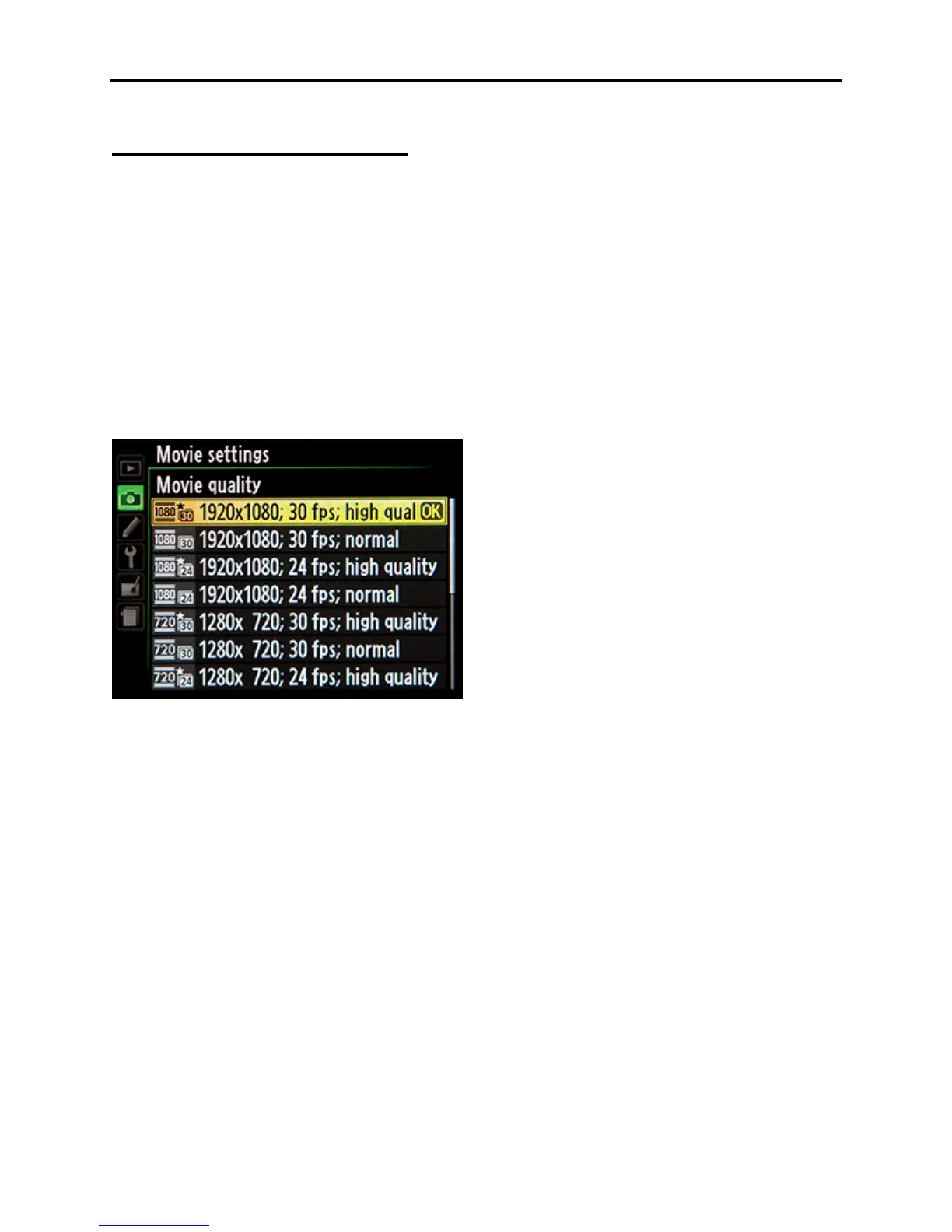
Movie Quality
Choose Full HD (1920x1080), HD (1280x720), or standard-definition (640x424).
Frame Rate
For NTSC (such as in North America), 24 fps will give the “cinema” or “movie” look to your
videos and 30 fps will give you that “video” look to your videos.
For PAL (such as in Europe and Australia) 24 fps will give the “cinema” or “movie” look to your
videos and 25 fps will give you that “video” look to your videos.
Figure 44 – Movie Settings menu – movie quality and frame rate options
Shutter Speed
The shutter speed should be the reciprocal of twice the frame rate:
Frame rate 24 fps or 25 fps use Shutter Speed 1/50
Frame rate 30 fps use Shutter Speed 1/60
ISO
Set the ISO to a full stop: 100, 200, 400, 800, 1000, 1600, etc
Picture Control
If you do not have advanced video editing capabilities, it may be important that you select or
modify a Picture Control setting to create the final look you want. You may want to ensure that
Active D-Lighting is turned off so that the camera isn’t adjusting your exposures.
White Balance
While Auto White Balance may work, it is best to set WB to match the actual lighting of the
scene, Sunlight, Incandescent, etc.



 To Next Page