95
Reference—Non-CPU Lenses
Specifying Maximum Aperture
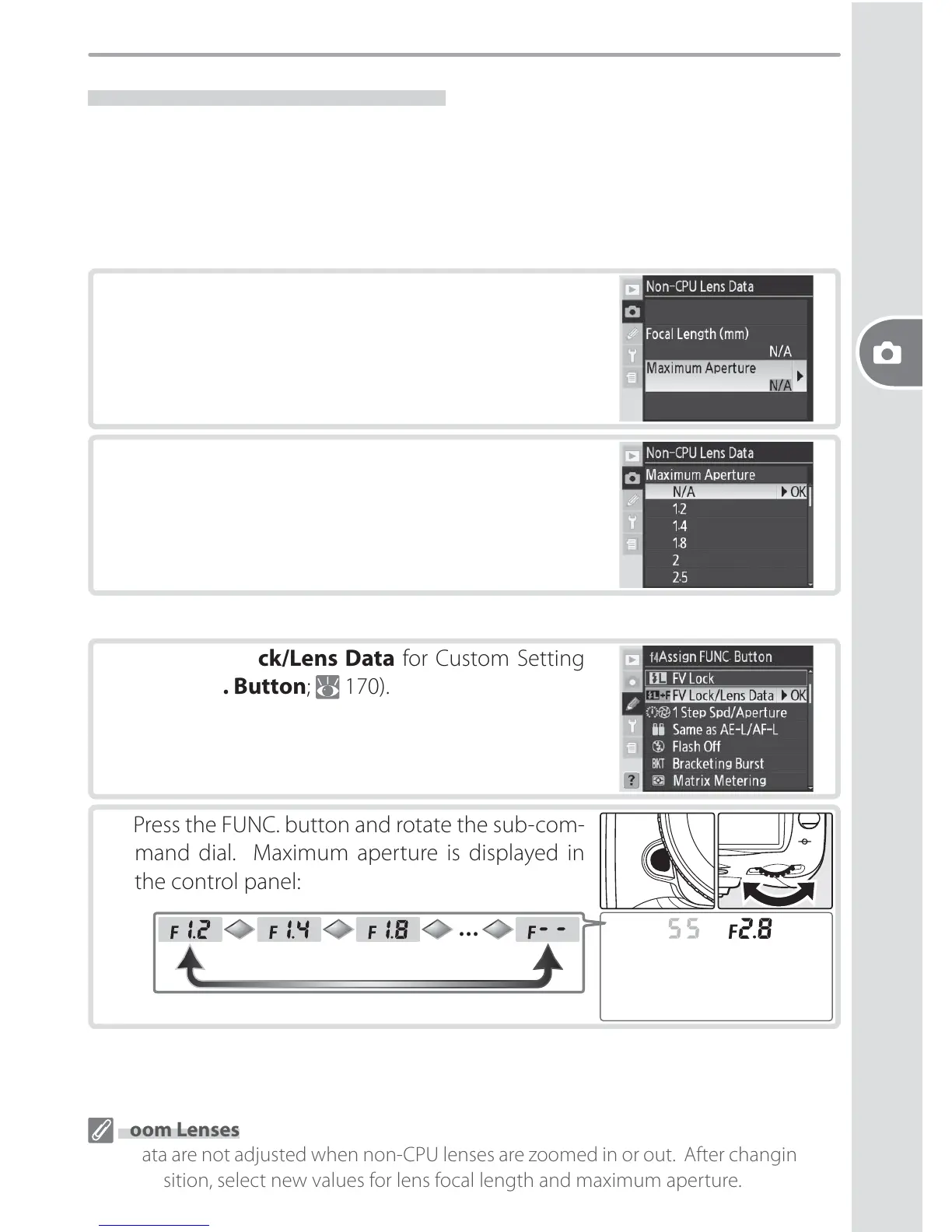
Lens maximum aperture can be specifi ed using the Non-CPU Lens Data option
in the shooting menu or by pressing the FUNC. button and rotating the sub-
command dial. The following f/-numbers are available:
• 1.2, 1.4, 1.8, 2, 2.5, 2.8, 3.3, 3.5, 4, 4.5, 5, 5.6, 6.3, 7.1, 8, 9.5, 11, 13, 15, 16, 19, 22
The Non-CPU Lens Data Menu
1
Highlight Maximum Aperture in the Non-
CPU Lens Data menu and press the multi se-
lector to the right.
2
Select the f/-number corresponding to the max-
imum lens aperture and press the multi selector
to the right.
Zoom Lenses
Lens data are not adjusted when non-CPU lenses are zoomed in or out. After changing the
zoom position, select new values for lens focal length and maximum aperture.
The FUNC. Button
1
Select FV Lock/Lens Data for Custom Setting
f4 (FUNC. Button; 170).
2
Press the FUNC. button and rotate the sub-com-
mand dial. Maximum aperture is displayed in
the control panel:
…



 To Next Page
 Loading...









