EasyManua.ls Logo

Nikon N75 - Troubleshooting

Nikon N75
132 pages
Print Icon
To Next Page IconTo Next Page
To Previous Page IconTo Previous Page
Loading...
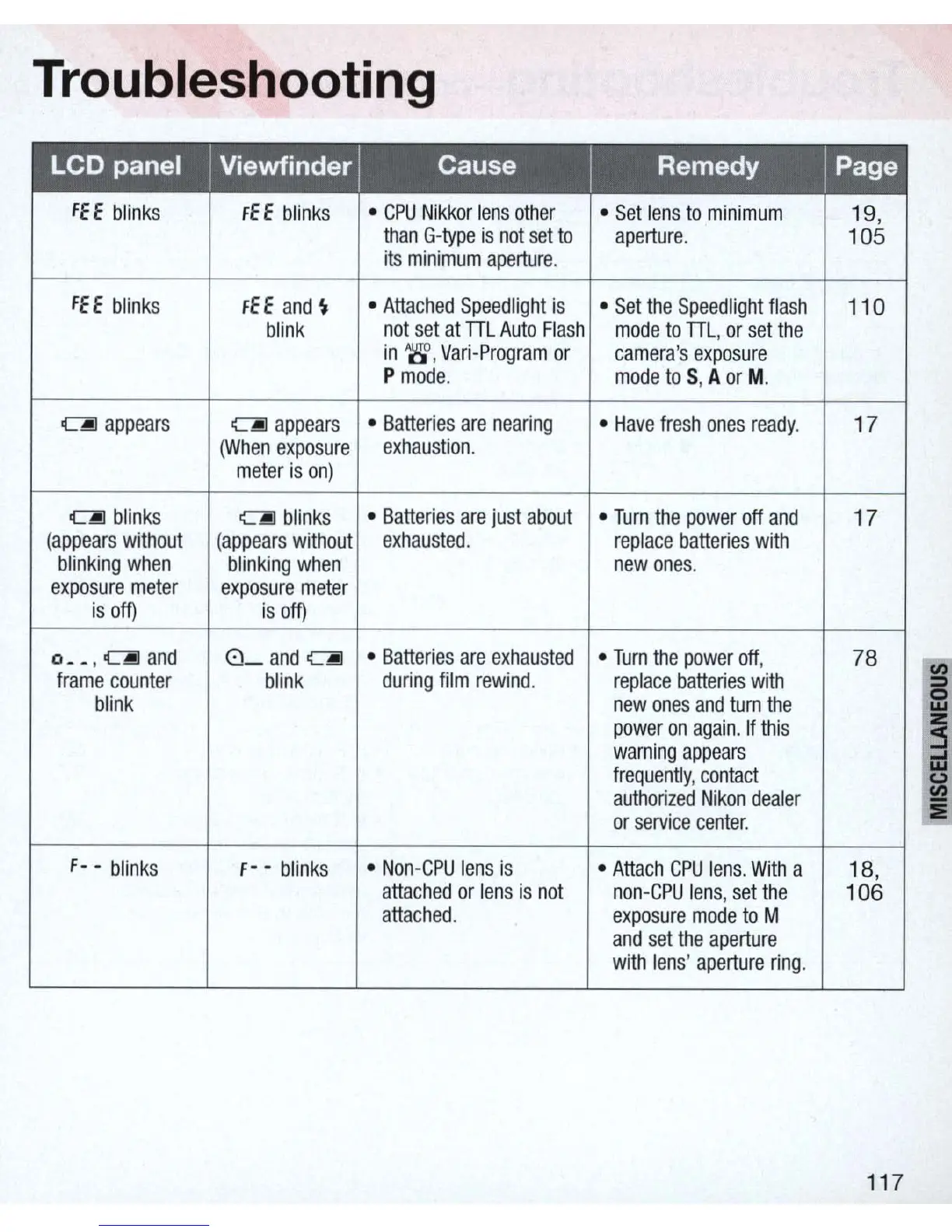
Troubleshooting
fEE
blinks
fEE
blinks
CPU
Nikkor
lens
other
Set
lens
to
minimum
19
,
than
G-type
is
not
set
to
aperture
.
105
its
minimum
aperture
.
fEE
blinks
fEE
and
~
Attached
Speed
light
is
Set
the
Speed
light
flash
110
blink
not
set
at
TIL
Auto
Flash
mode
to
TIL,
or
set
the
in
'8',
Vari-Program
or
camera
's
exposure
P
mode
.
mode
to
S, A
or
M.
~
appears
CAiI
appears
Batteries
are
nearing
Have
fresh
ones
ready
.
17
(When
exposure
exhaustion
.
meter
is
on)
~
blink
s
~
blinks
Batterie
s
are
just
about
Turn
the
power
off
and
17
(
appears
without
(appears
without
exhausted
.
replace
batteries
with
blinking
when
blinking
when
new
ones
.
exposure
meter
expo
s
ure
meter
is
011)
is
011)
o
__
,
~and
8_
and
CAiI
Batteries
are
exhausted
Turn
the
power
off
,
78
~
frame
counter
blink
during
film
rewind
.
replace
batteries
with
blink
new
ones
and
turn
the
0
w
power
on
again.
If
this
i
warni
ng
appears
frequently
,
contact
authorized
Nikon
dealer
or
service
center
.
:Ii
f - -
blinks
f-
-
blinks
Non
-
CPU
lens
is
Attach
CPU
lens
.
With
a
18,
attached
or
lens
is
not
non-CPU
lens
,
set
the
106
attached.
exposure
mode
to
M
and
set
the
aperture
with
lens
'
aperture
ring
.
117

Table of Contents

Related product manuals