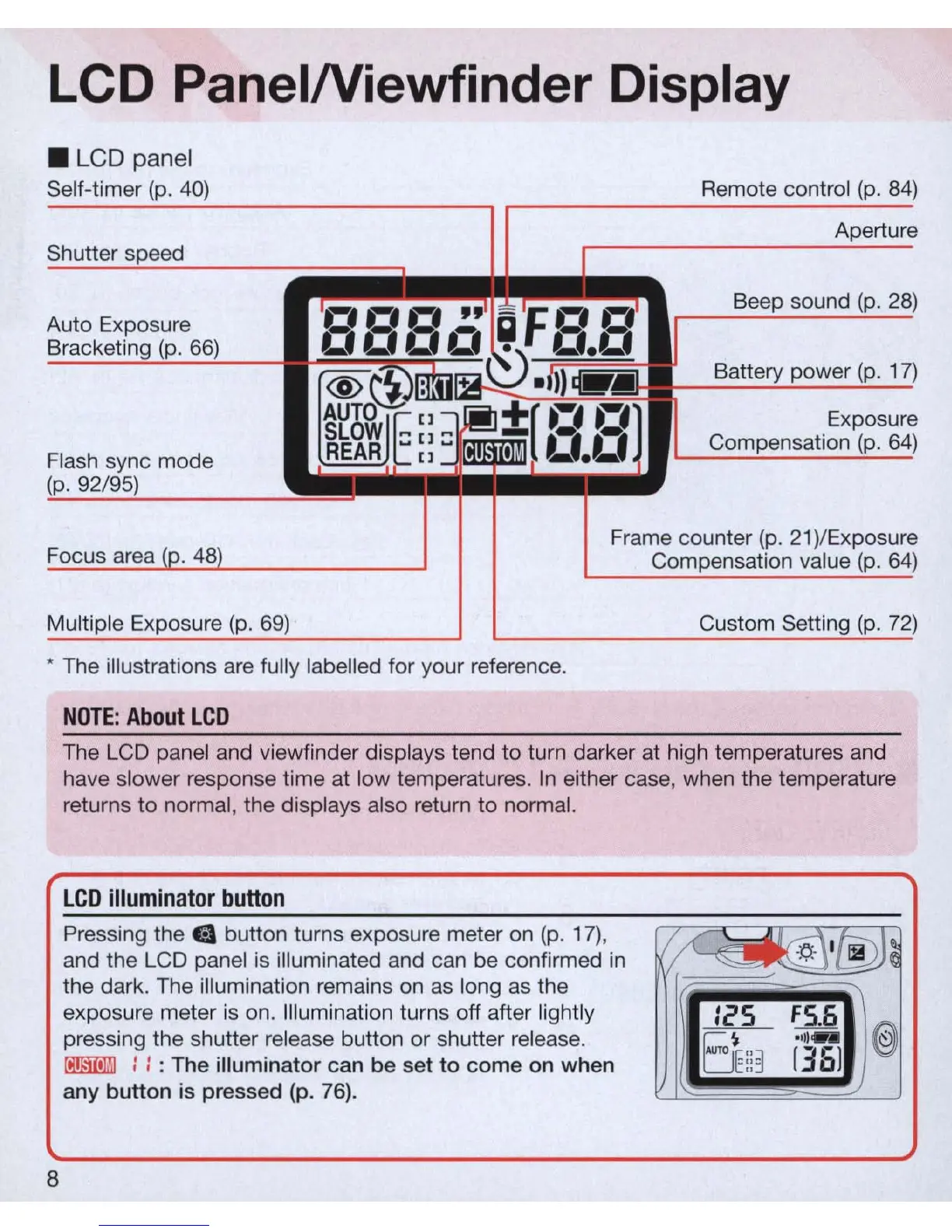
LCD PanelNiewfinder Display
• LCD panel
Self-timer
(p
.
40)
Shutter spe
ed
Auto Exposure
Bracketing
(p
.
66)
Flash sync mode
(p
. 92/
95)
~
Remote control
(p
.
84)
Apertur
e
r.
~.~.
,~
'
~'-
Fr.
r.
Beep sound
(p.
28)
ooe.o
~
0.0
@~:
+.
~.
m
t{-.
Battery power
(p
.
17)
g
~[]~
~+[
~~.
r.
Exposur
SLOW
::
I]::
~iiill'
I'
Compensation
(p
.
64)
REAR
I]
I
_._
e
Focus area
(p.
48
)
Frame counter
(p.
2
1)
/Exposur
e
Compensation value
(p
.
64)
Multiple Exposure
(p
.
69)
Custom Setting
(p
.
72)
* The illustrations
are
fully labelled for your reference.
8
NOT
E:
Abou
t
LCD
The LCD panel and viewfinder displays tend
to
turn darker at high temperatures and
have slower response time at low temperatures.
In
either case, when the temperature
returns
to
normal, the displays also return to normal.
LCD
i
llumina
t
or
button
Pressing the e button turns exposure meter
on
(p
.
17)
,
I/
~
I
®J~
and the LCD panel is illuminated and can be confirmed
in
the dark. The illumination remains
on
as
long
as
the
~
exposure meter
is
on. Illumination turns off after lightly
Ie'
S
56
@
pressing the shutter release button or shutter release.
El:3
-
11)"-
oo.mmJ
::
: The illuminator can be set
to
come on when
[
36
]
an
y button is pressed (p.
76).



 To Next Page