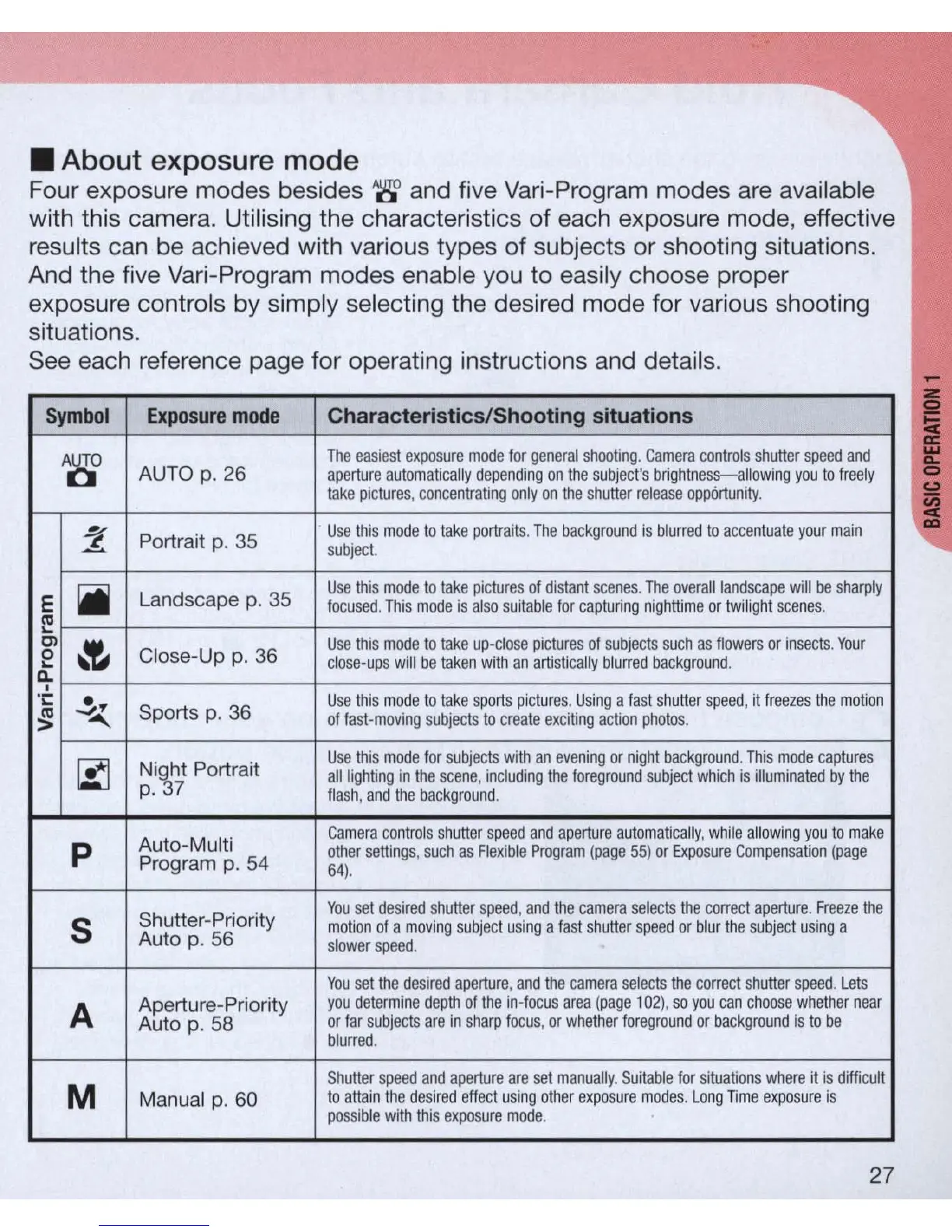
• About exposure mode
Four exposure modes besides '8' and five
Vari
-Program modes
are
available
with this camera. Utilising the characteristics of each exposure mode, effective
results c
an
be achieved with various types of subjects or shooting situations.
And the five Vari-Program modes enable you
to
e
as
i
ly
choose proper
exposure controls by simply selecting the desired mode for various shooting
situations.
See each reference page for operating instructions and details.
Symbol
Exposure
mode
Characte
ri
stics/Shooting situations
A~
The
easiest
exposu
re
mode
for
general
shooting
.
Camera
controls
shutter
speed
and
AUTO
p.
26
aperture
automatically
depending
on
the
subject
's
brig
h
tness-allowing
you
to
freely
take
pictures
,
concentra
ti
ng
only
on
the
shutter
release
opportunity.
~
Po
rt
rai
t p.
35
Use
this
mode
to
take
portraits
. T
he
background
is
bl
urred
to
accentuate
your
main
:!..
subject.
E
iii
Landscape
p.
35
Use
this
mode
to
take
pictures
of
distant
scenes
.
The
overa
ll
landscape
w
ill
be
sharply
ca
focused
.
This
mode
is
also
suitable
for
captu
r
ing
nighttime
or
twilight
scenes.
"-
Cl
~
Use
this
mode
to
take
up·c
l
ose
pictures
of
subjects
such
as
fl
owers
or
insects
.
Your
0
Close-Up
p.
36
"-
close·ups
will
be
taken
with
an
artis
ti
cally
bl
urred
backgro
u
nd
.
D;-
.;:
~
Spo
rt
s
p.
36
Use
this
mode
to
t
ake
sports
pictu
r
es
. U
sing
a f
ast
sh
utter
speed
, it
freezes
the
mo
t
ion
~
of
fast·moving
subjects
to
create
exciting
action
photos
.
~
N
i
~
ht
Portr
ai
t
Use
this
mode
for
subjects
with
an
evening
or
night
background
.
This
mode
captures
all
lighting
in
the
scene
,
including
the
foreground
subject
which
is
illuminated
by
the
p. 7
fl
ash
, and t
he
backg
r
oun
d.
Aut
o-
Multi
Camera
co
n
trols
sh
utte
r sp
eed
and
apert
ur
e au
tomat
i
cally
, wh
ile
a
ll
ow
in
g
you
to
make
p
other
settings
,
such
as
Flexible
Program
(page
55)
or
Exposure
Compensa
ti
on
(page
Program p.
54
64)
.
Shutter-Priority
You
set
desired
shutter
speed
, and
the
camera
se
l
ects
the
correct
aperture.
F
reeze
the
5
mo
ti
on of a
moving
subject
using
a
fast
s
hu
tter
speed
or
blur
the
subject
using
a
Auto p.
56
slower
speed
.
You
set
the
desired
aperture
,
and
the
camera
selects
the
correct
shutter
speed
.
Lets
A
Ap
e
rtu
re-
Pri
ority
you
determine
depth
of
the
in·focus
area
(page
1
02),
so
yo
u
can
choose
whet
h
er
nea
r
Auto p. 58
or
far
subjects
are
in
sha
rp
focus
,
or
whether
foreground
or
background
is
to
be
bl
urred
.
M
Shutte
r
speed
and
apert
u
re
are
set
manually
.
Suitable
fo
r
si
t
uations
whe
re it
is
difficult
Ma
nu
al p. 60
to
atta
in
the
desired
effect
usi
ng
ot
her
expos
ur
e
modes
. L
ong
TI
me
ex
p
os
ur
e is
possib
le
with
this
expcsure
mode
.
27



 To Next Page