Mount Lens
Turn
the power switch off and mount the lens to the camera body .
. . . . . . . . . . . . . . . . . . . . . . . . . . . .
..
. .
..
.
..
. . . . . . .
..
. . . . .
..
1
Check the lens type.
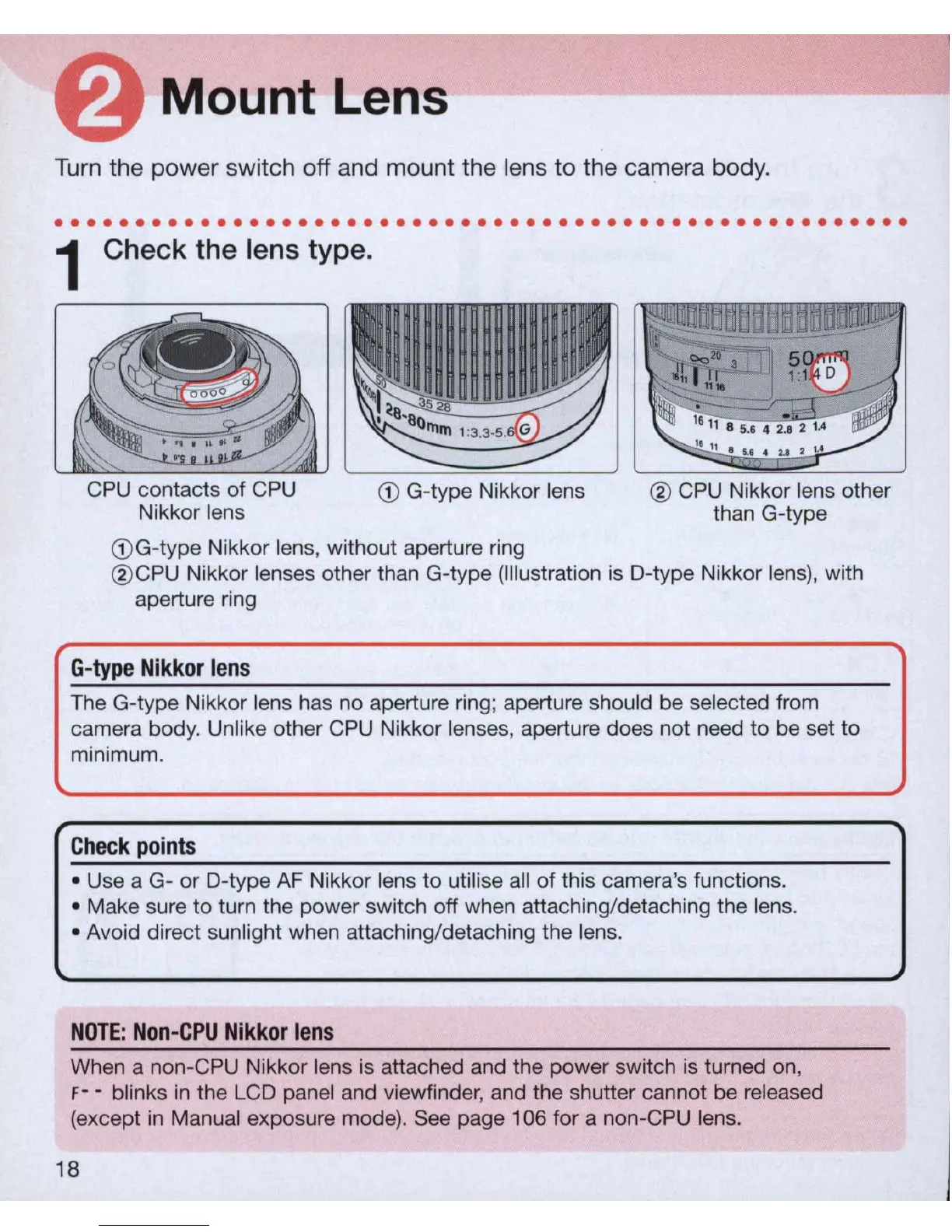
CPU contacts of
CPU
Nikkor lens
G)
G-type Nikkor lens
G)
G-type Nikkor lens, without aperture ring
® CPU Nikkor lens other
than G-type
®
CPU
Nikkor lenses other than G-type (Illustration is D-type Nikkor lens), with
aperture ring
G-type
Nikkor
lens
The G-type Nikkor lens has no aperture ring; aperture should be selected from
camera body. Unlike other CPU Nikkor lenses, aperture does not need to be set to
minimum.
Check
points
• Use a G- or D-type
AF
Nikkor lens to utilise all of this camera's functions.
• Make sure
to
turn the power switch off when attaching/detaching the lens.
• Avoid direct sunlight when attaching/detaching the lens.
NOTE
:
Non-CPU
Nikkor
lens
When a non-CPU Nikkor lens is attached and the power switch
is
turned on,
F- - blinks
in
the
LC
D panel and viewfinder, and the shutter cannot be released
(except
in
Manual exposure mode).
See
page 106 for a non-C
PU
lens.
18



 To Next Page