EasyManua.ls Logo

Nikon N75 - Page 119

Nikon N75
132 pages
Print Icon
To Next Page IconTo Next Page
To Previous Page IconTo Previous Page
Loading...
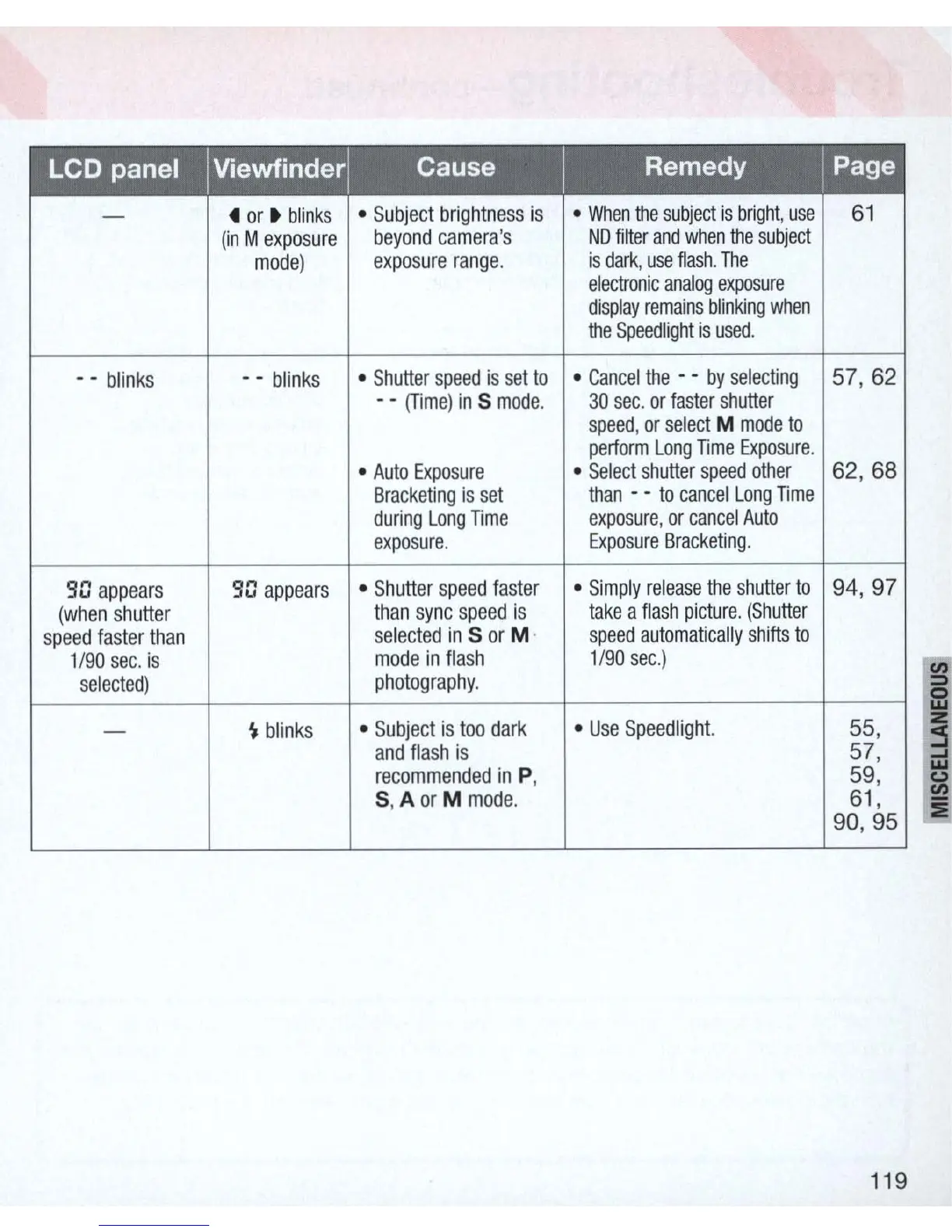
LCD panel
I Viewfinderl
Cause
I
Remedy
I Page
-
4
or
blinks
Subject
brightness
is
When
the
subjec
t
is
bright
,
use
61
(in
M
exposure
beyond
camera's
NO
filter
and
when
the
subject
mode)
exposure
range.
is
dar!<
,
use
ftash
.
The
electronic
analog
exposure
display
remains
blinking
when
the
Speedlight
is
used
.
- -
blinks
- -
blinks
Shutter
spee
d is
se
t
to
Cancel
the
- -
by
selecting
57,
62
- -
(Time)
in
5
mode
.
30
sec
.
or
faster
shutter
speed
,
or
select
M
mode
to
perform
Long
TIme
Exposure
.
Auto
Exposure
Select
shutte
r
speed
other
62
,
68
Bracketing
is
s
et
than
- -
to
cance
l
Long
TIme
during
Long
TIme
ex
po
su
re
,
or
cancel
Auto
exposure
. Ex
posure
Bracketing
.
90
appears
90
appears
Shutter
speed
fa
s
ter
Simply
re
l
ease
the
shutter
to
94,
97
(when
shutter
than
sync
speed
is
take
a
flash
picture
.
(Shutter
speed
fa
ster
than
selected
in
5
or
M· s
peed
automatically
shifts
to
1/
90
sec.
is
mode
in
fla
sh 1/
90
sec
.)
selec
ted)
photogr
ap
hy
.
-
~
blinks
Subject
is
too
dark
U
se
Speedlighl.
55,
and
flash
is
57,
recommended
in
P,
59,
5, A
or
M
mode
.
61,
90
,
95
119

Table of Contents

Related product manuals