3
Con
fi
rm
~
appears
in
the viewfinder, make sure the subject
is
within the flash shooting distance range and shoot.
•
::I~
FS.6
~
• The shutter cannot
be
released unless
~
appears without blinking
in
the
viewfinder.
•
~
in
the
viewfinder blinks approx. 3 sec. after full flash output. This may indicate
underexposure has occurred. Check the focus distance, aperture
or
flash shooting
distance range and
shoot
again.
• When the subject is dark, the AF-Assist Illuminator automatically turns on
to
guide
autofocus. See page 50
for
details.
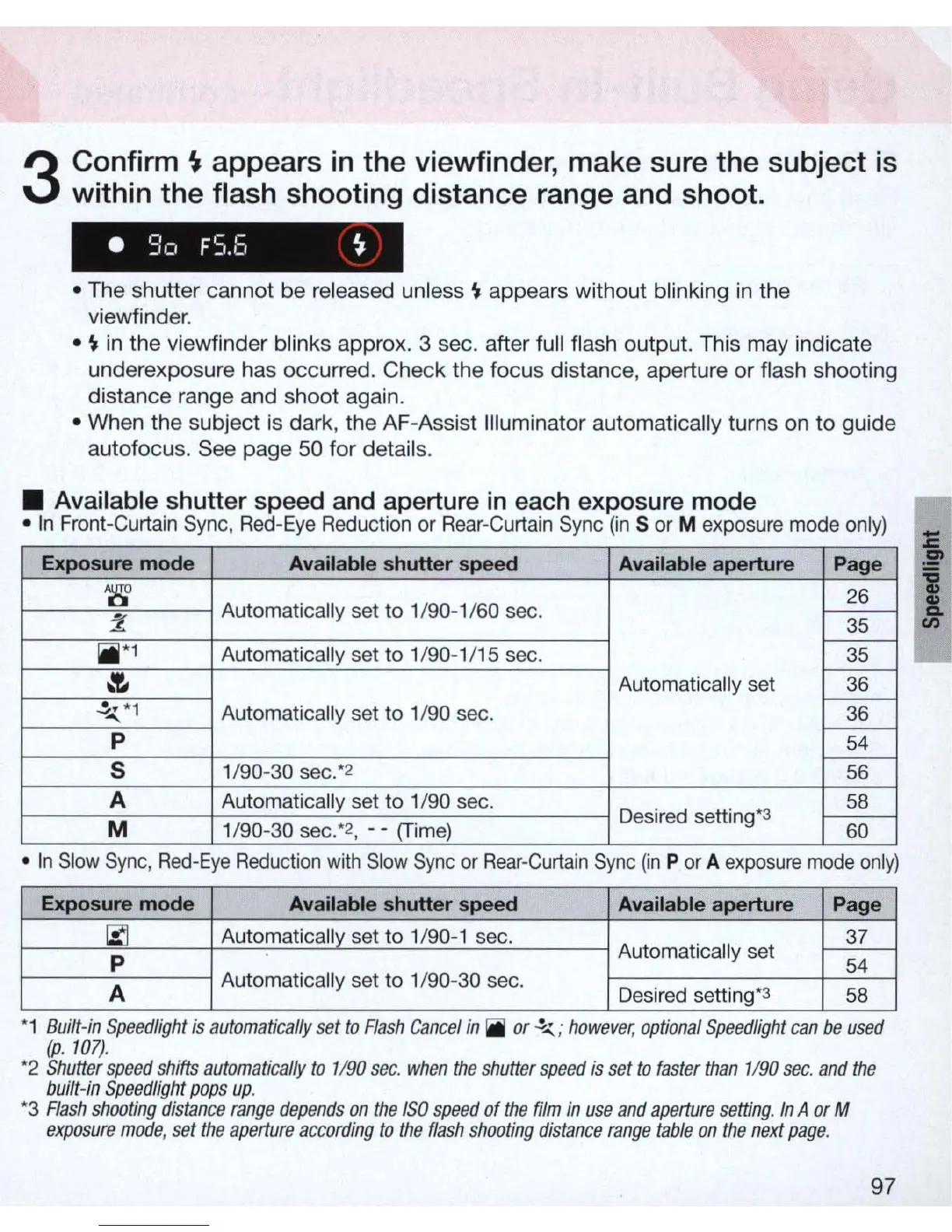
• Available shutter speed and aperture
in
each exposure mode
•
In
Front-Curtain Sync,
Red-Eye
Reduction
or
Rear-Curtain Sync
(in
S
or
M exposure mode
only)
Exposure mode
Available shutter speed Available aperture Page
'8'
Automatically set to 1/90-1 /
60
sec.
26
Z
----s5
1iII*1
Automatically set to 1/90-1/15 sec.
----s5
~
Automatically set
36
~...{.
*
1
Automatically set to 1/
90
sec.
36
p
54
5
1/90-30 sec:
2
56
A Automatically set to 1/90 sec.
58
M 1/
90
-30 sec:
2
, - -
(Time)
Desired setting
*3
60
•
In
Slow
Sync
,
Red-Eye
Reduction
With
Slow
Sync
or
Rear-Curtain
Sync
(In
P
or
A
exposure
mode
only)
Exposure mode Available shutter speed
Available aperture
Page
~
Automatically set to 1/90-1 sec.
Automatically set
~
p
54
A
Automatically set to 1/90-30 sec.
Desired setting
*3
58
*1
Bullt-m
Speedltght
IS
automatically
set
to
Flash
Cancel
in
iI
or.!-..(.
;
however,
optIOnal
Speed!tght
can
be
used
(p
.
l07)
.
*2
Shutter
speed
shifts
automatically
to
1/
90
sec
.
when
the
shutter
speed
is
set
to
faster
than
1/
90
sec
.
and
the
built-in
Speed/ight
paps
up
.
*3
Flash
shoating
distance
range
depends
an
the
ISO
speed
of
the
film
in
use
and
aperture
setting
.
In
A
or
M
exposure
made
,
set
the
aperture
according
to
the
flash
shooting
distance
range
table
an
the
next
page
.
97
i
1



 To Next Page