SETTI
NG
BEFOR
E
SHOOTI
NG~--'-=
==
=-----=.=---..;=--:..:..==-------=-=-==-=---=..;
=
=-=
INSTALLING
BATTERIES
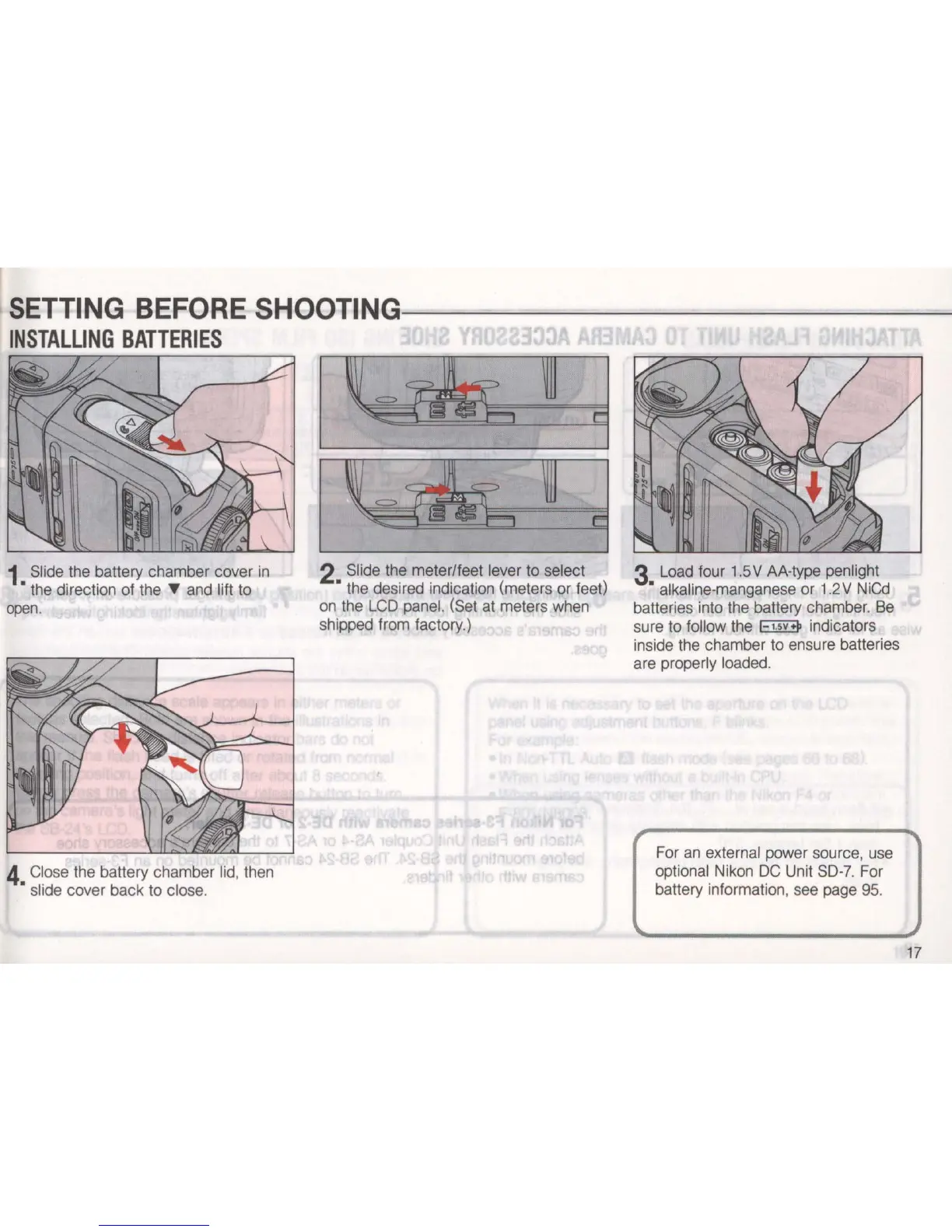
1 Slide the battery chamber cover
in
• the direction of the 'Y and lift to
open.
4 Close the battery chamber lid, then
• slide cover back to close.
2 Slide the meter/feet lever to select
• the desired indication (meters or feet)
on the
LCD
panel. (Set at meters when
shipped from factory.)
3 Load four 1.5V AA-type penlight
• alkaline-manganese or 1.2V NiCd
batteries into the battery chamber.
Be
sure
to
follow the
EllEI>
indicators
inside the chamber to ensure batteries
are properly loaded.
For
an
external power source, use
optional Nikon
DC
Unit
SO-7.
For
battery information, see page 95.
17


 To Next Page