6'iI
CiliD)
ISO
0.60.811.52
3 4 6
91318m
-
2 3 4 5
7101520304060ft
M
:0-
ZOOM _I
-=-
mm
.-
C
F :e.LI
MIl:
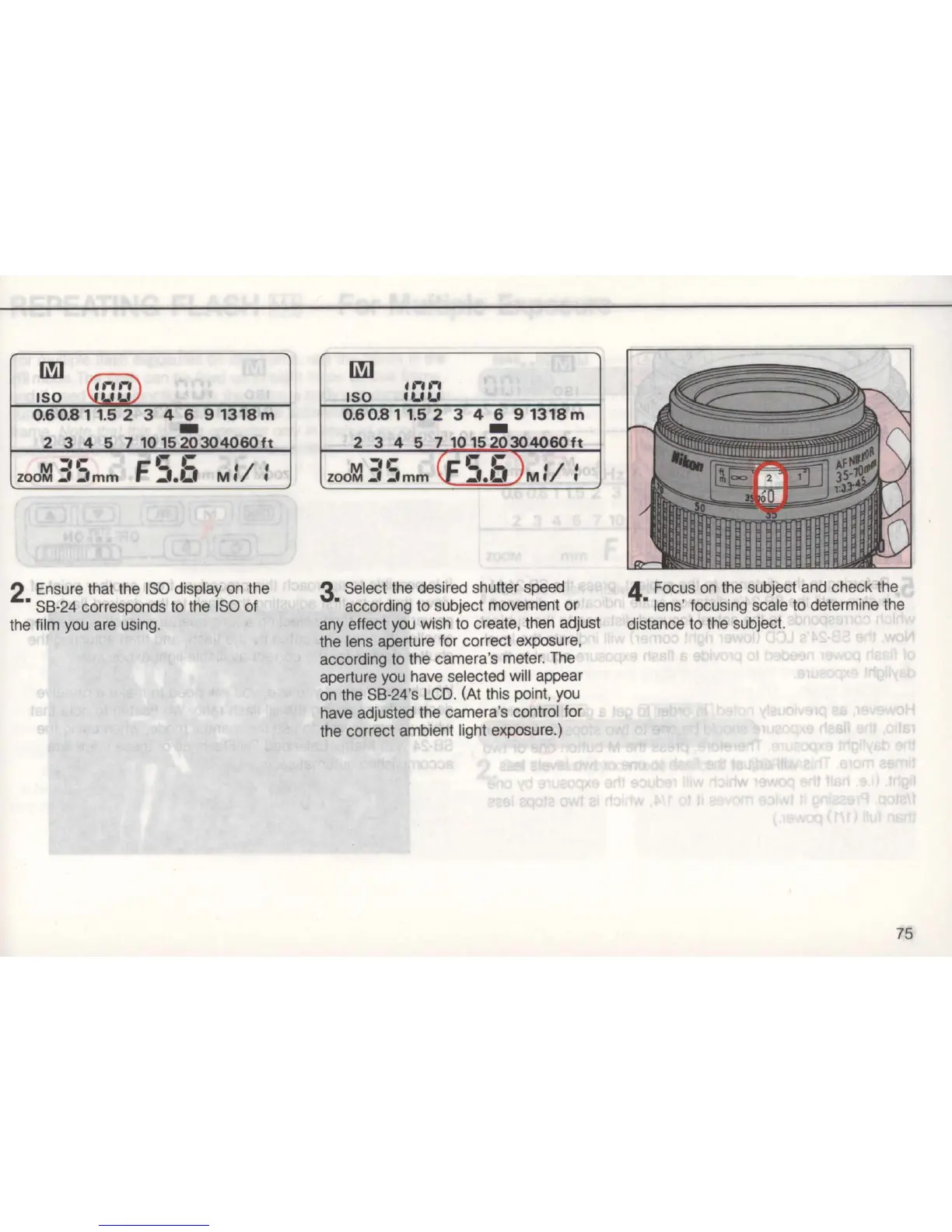
2 Ensure that the
ISO
display on the
• S8-24 corresponds to the
ISO
of
the film you are using.
6'iI
.r'I-'
ISO
IUU
0.6 0.8 1
1.5
2
3 4 6
91318m
-
2
345
7101520304060ft
M
-n:
(F
e 6 )1
'I
I
ZOOM.:t
_Imm
_I.t..
MI.
3 Select the desired shutter speed
• according to subject movement or
any effect you wish to create, then adjust
the lens aperture for correct exposure,
according to the camera's meter. The
aperture you have selected wi
ll
appear
on the
S8
-24's
LCD
. (At this point, you
have adjusted the camera's control for
the correct ambient light exposure.)
4 Focus
on
the subject and check the
• lens' focusi
ng
scale to determine the
distance to the subject.
75



 To Next Page