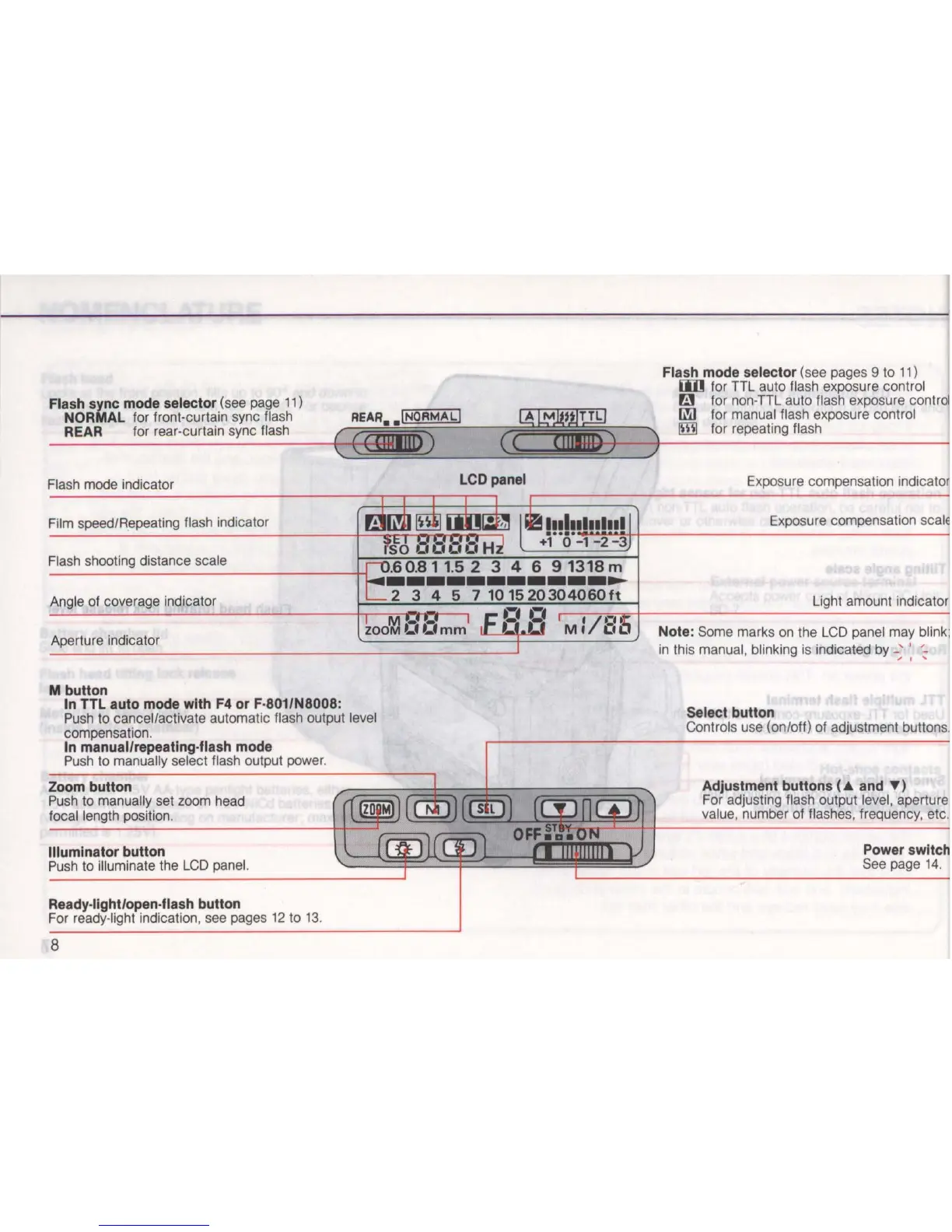
Flash sync mode selector (see page
11)
NORMAL
fo
r front-curtain sync flash
REAR for rear-curtain sync flash
Flash mode indicator
Fi
lm speed/Repeating flash indicator
Flash shooting distance scale
Angle of coverage indicator
Aperture indicator
M button
In
TTL
auto mode with F4 or F-
S01/NSOOS:
Push
to cancel/activate automatic flash output level
compensation.
In manual/repeating-flash mode
Push to manually select flash output power.
Zoom button
Push to manually set zoom head
focal length position.
Illuminator button
Push to illuminate the
LCD
panel.
Ready-light/open-flash button
For ready-light indication, see pages
12
to
13
.
8
LCD panel
Flash mode selector (see pages 9 to 11)
[j]]
for TTL auto flash exposure control
a for non-TTL auto flash exposure control
Ii'iI for manual flash exposure control
IillI for repeating flash
Exposure compensation indicator
Exposure compensation
scalE
Light amount indicator
Note
: Some marks
on
the
LCD
panel may blink;
in
this manual, blinking is indicated by
_;
:
~
Select button
Controls use (on/off) of adjustment buttons.
Adjustment buttons
(&
and T )
For adjusting flash output level, aperture
value, number
of
flashes, frequency, etc.
Power switch
See page
14
.



 To Next Page