B-19
B
Operation
En-03
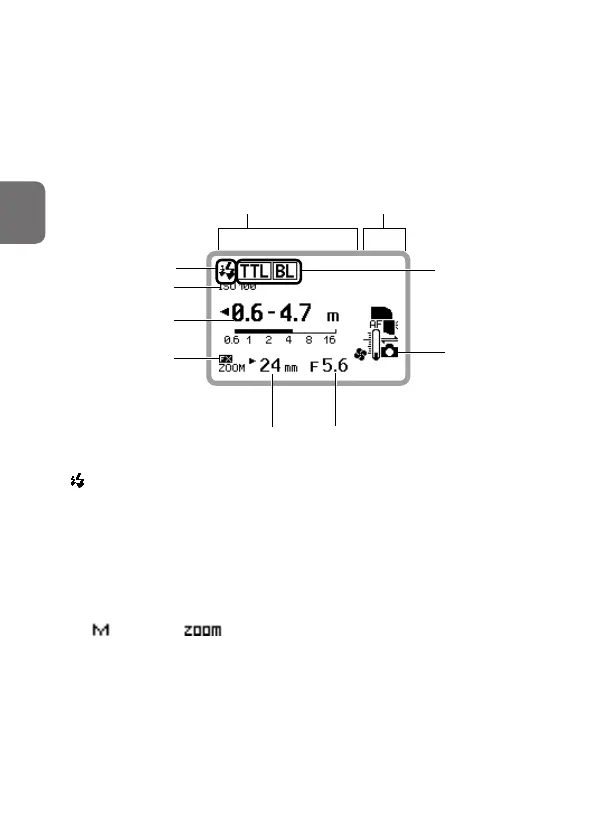
LCD example
• The image below is the SB-5000 LCD with the following settings: flash
mode: i-TTL; image area: FX format; illumination pattern: standard; ISO
sensitivity: 100; zoom head position: 24 mm; aperture f-number: 5.6
• Icons on the LCD may differ depending on the SB-5000 settings and the
camera and lens in use.
Effective flash output
distance range
Flash mode
ISO sensitivity
Monitor pre-flashes
Zoom head position
FX format
SB-5000 status icons
SB-5000 flash information
Connected to a
CLS-compatible
camera
Aperture f-number
• (monitor pre-flashes) appears on the LCD when the SB-5000 is in
communication with a CLS-compatible camera.
• When the SB-5000 is in communication with the camera, ISO sensitivity,
effective flash output distance range, FX format/DX format, zoom
head position and aperture f-number are displayed depending on the
information received from the camera.
• An
above the indicator appears on the LCD when the zoom
head position is set manually.
• Some flash modes are only displayed when the SB-5000 is attached to
the camera.



 To Next Page