65
3
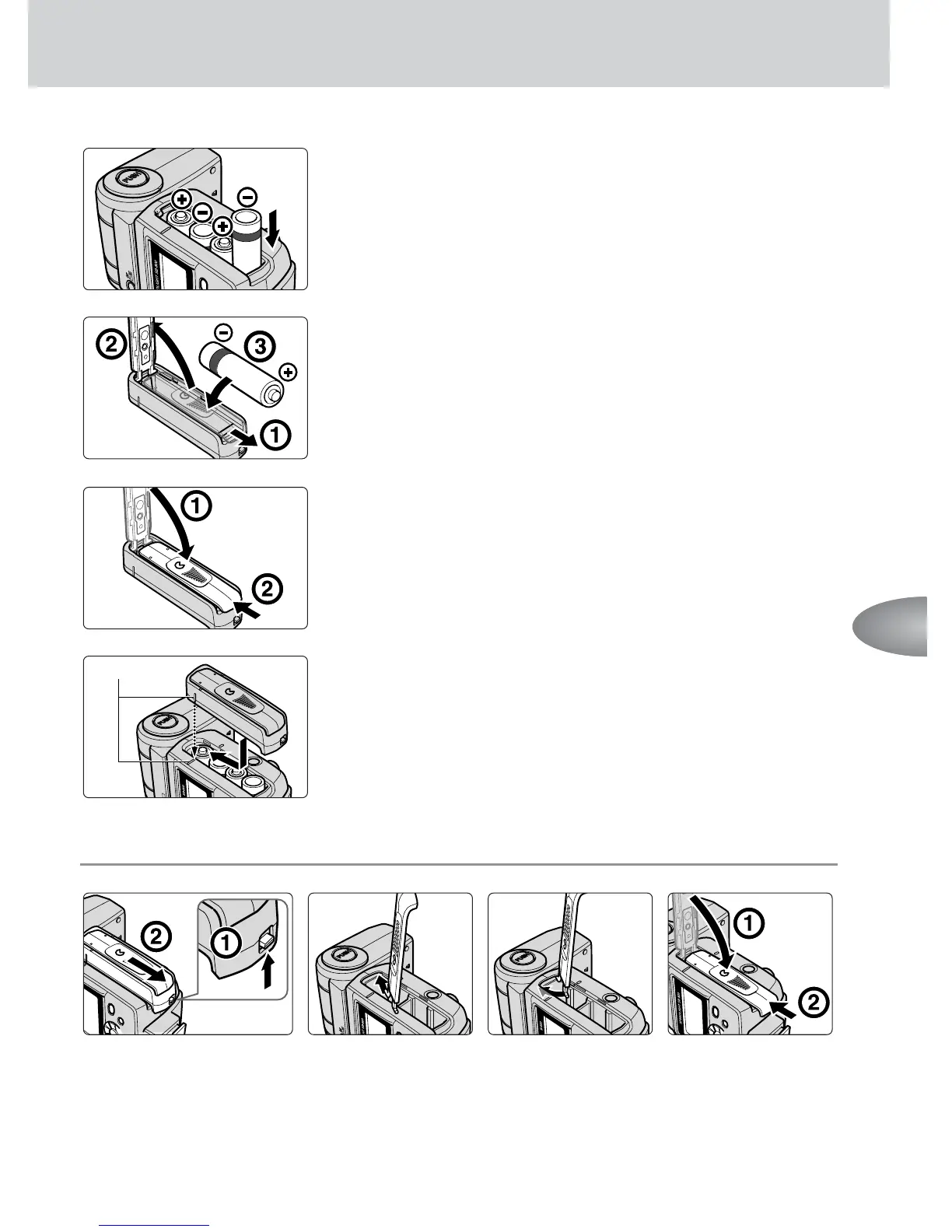
Install the batteries in accordance with the i and
j marks, as shown.
4
Open the SD-800’s battery chamber lid to install
an extra battery, following the i and j marks,
as shown.
5
Close the battery chamber lid by sliding it into
place while pressing down.
6
Align the index mark on the SD-800’s battery
chamber lid with the corresponding index mark on
the SB-800 and attach the battery pack by sliding
it into place.
• Be sure to slide the battery pack until the SD-800’s
lock switch clicks into place.
■
■
■
Detaching the SD-800.
Other functions
Index
1
Push up the
SD-800’s lock
switch, then slide it
to detach.
2
Insert one of
the hinges of
the SB-800’s
battery
chamber lid,
as shown.
3
Insert the
other hinge,
as shown.
4
Close the
battery
chamber lid by
sliding it into
place while
pressing down.



 To Next Page